Analog Devices, Inc. · NASDAQ:ADI
Analog Devices — Technical Presentation (2005)
51 slides from Analog Devices's technical presentation, 2005
Slide 1: Rapid Development of a Blackfin-based Video Application
The World Leader in High Performance Signal Processing Solutions Rapid Development of a Blackfin-based Video Application Presented By: Glen Ouellette
Slide 2: About this Module
About this Module This module discusses the rapid development process of a Blackfin® Video application using readily available and fully supported software and hardware modules. It is recommended that users have some understanding of: ! Basic knowledge of software terminology ! Experience in embedde
Slide 3: Module Outline
Module Outline ! Video-In " Refresher on Device Driver " Video Capture using ADV7183B Video Decoder ! Video-Out " Video Display using ADV7179 Video Encoder ! Video Compression " Overview of MJPEG offering " Encoding Video Data ! USB " Blackfin USB-LAN EZ-Extender " Blackfin-Host data transfer over U
Slide 4: Outline of Video-In Sub-module
Outline of Video-In Sub-module ! A short Device Driver refresher ! Simple Video Capture using ADV7183B Video Decoder 4
Slide 5: Device Driver Refresher
Device Driver Refresher ! Standardized API " User interface is the same across all device drivers ! Independent of driver " Allows buffers to be passed from driver to driver ! Independent of processor " Does not require change when moving from BF561 to BF537 ! Device Drivers are Totally Independent
Slide 6: Device Driver Refresher (continued)
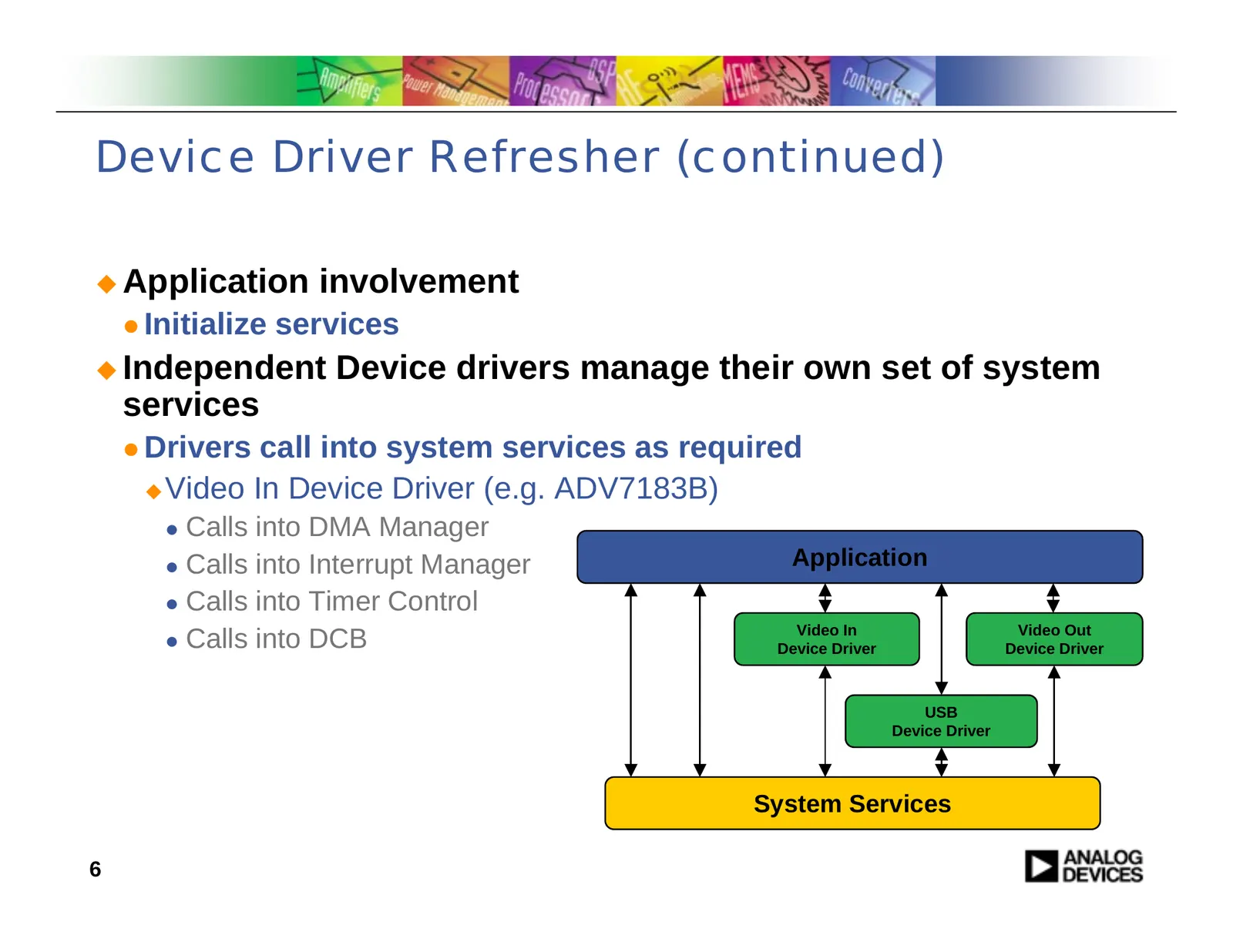
Device Driver Refresher (continued) ! Application involvement " Initialize services ! Independent Device drivers manage their own set of system services " Drivers call into system services as required ! Video In Device Driver (e.g. ADV7183B) " Calls into DMA Manager " Calls into Interrupt Manager Ap
Slide 7: Additional Information on Device Drivers
Additional Information on Device Drivers ! Device Drivers and System Services Manual for Blackfin Processors − http://www.analog.com/processors/manuals ! Device Drivers and System Services Addendum (Sept 2005) − ftp://ftp.analog.com/pub/tools/patches/Blackfin/VDSP++4.0/ 7
Slide 8: Video-In Data Flows
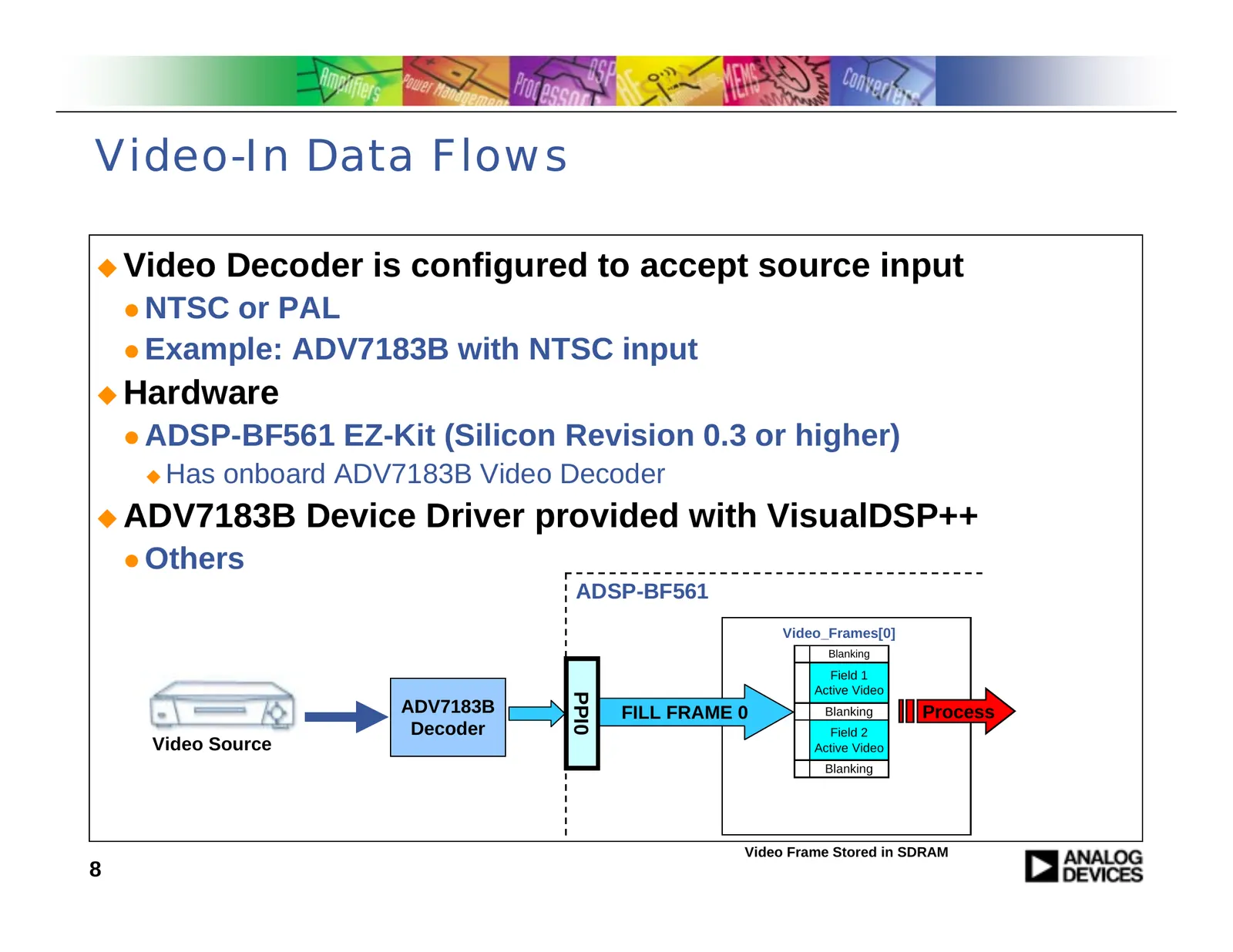
Video-In Data Flows ! Video Decoder is configured to accept source input " NTSC or PAL " Example: ADV7183B with NTSC input ! Hardware " ADSP-BF561 EZ-Kit (Silicon Revision 0.3 or higher) ! Has onboard ADV7183B Video Decoder ! ADV7183B Device Driver provided with VisualDSP++ " Others ADSP-BF561 Video
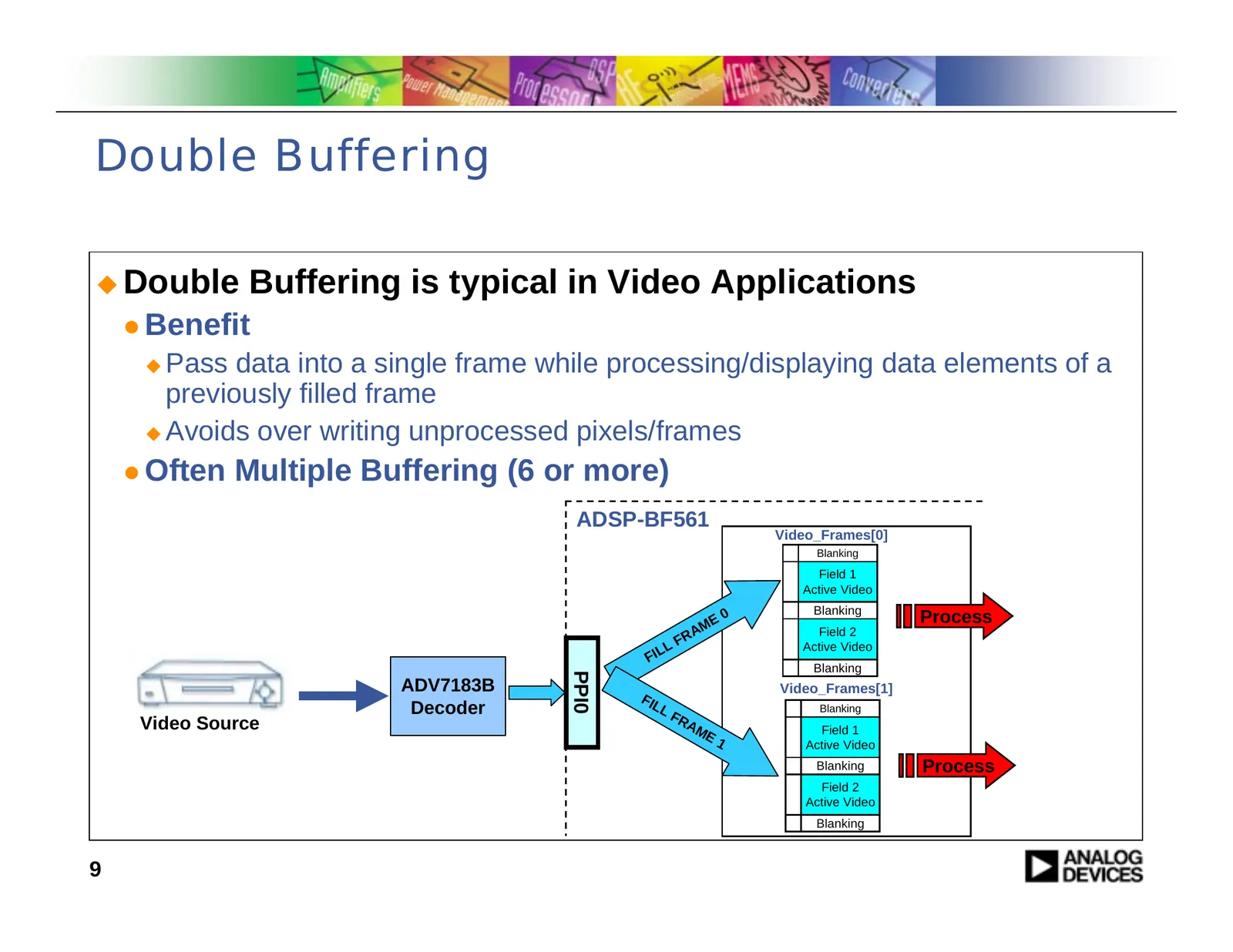
Slide 9: Double Buffering
Double Buffering ! Double Buffering is typical in Video Applications " Benefit ! Pass data into a single frame while processing/displaying data elements of a previously filled frame ! Avoids over writing unprocessed pixels/frames " Often Multiple Buffering (6 or more) ADSP-BF561 Video_Frames[0] Blan
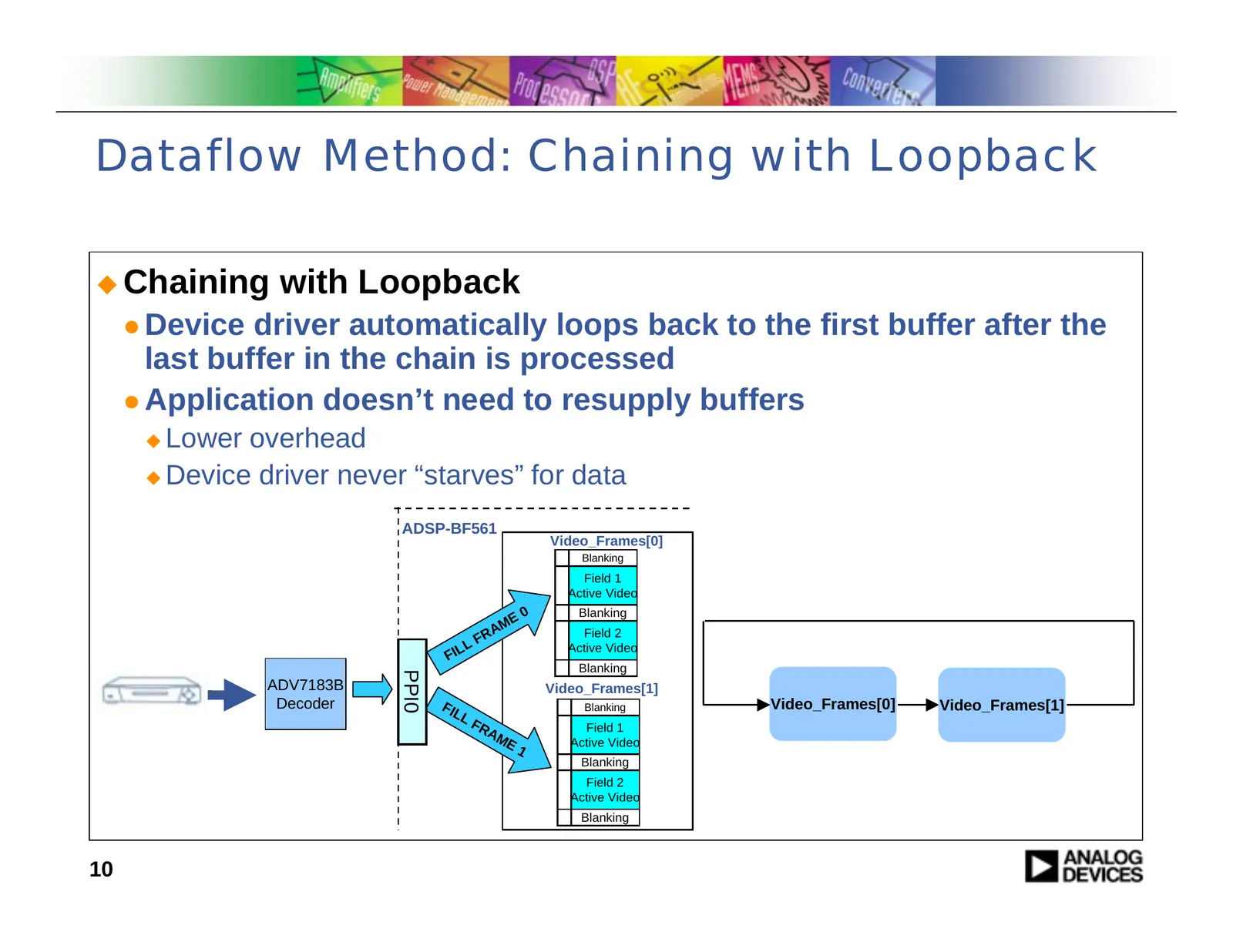
Slide 10: Dataflow Method: Chaining with Loopback
Dataflow Method: Chaining with Loopback ! Chaining with Loopback " Device driver automatically loops back to the first buffer after the last buffer in the chain is processed " Application doesn’t need to resupply buffers ! Lower overhead ! Device driver never “starves” for data ADSP-BF561 Video_Fram
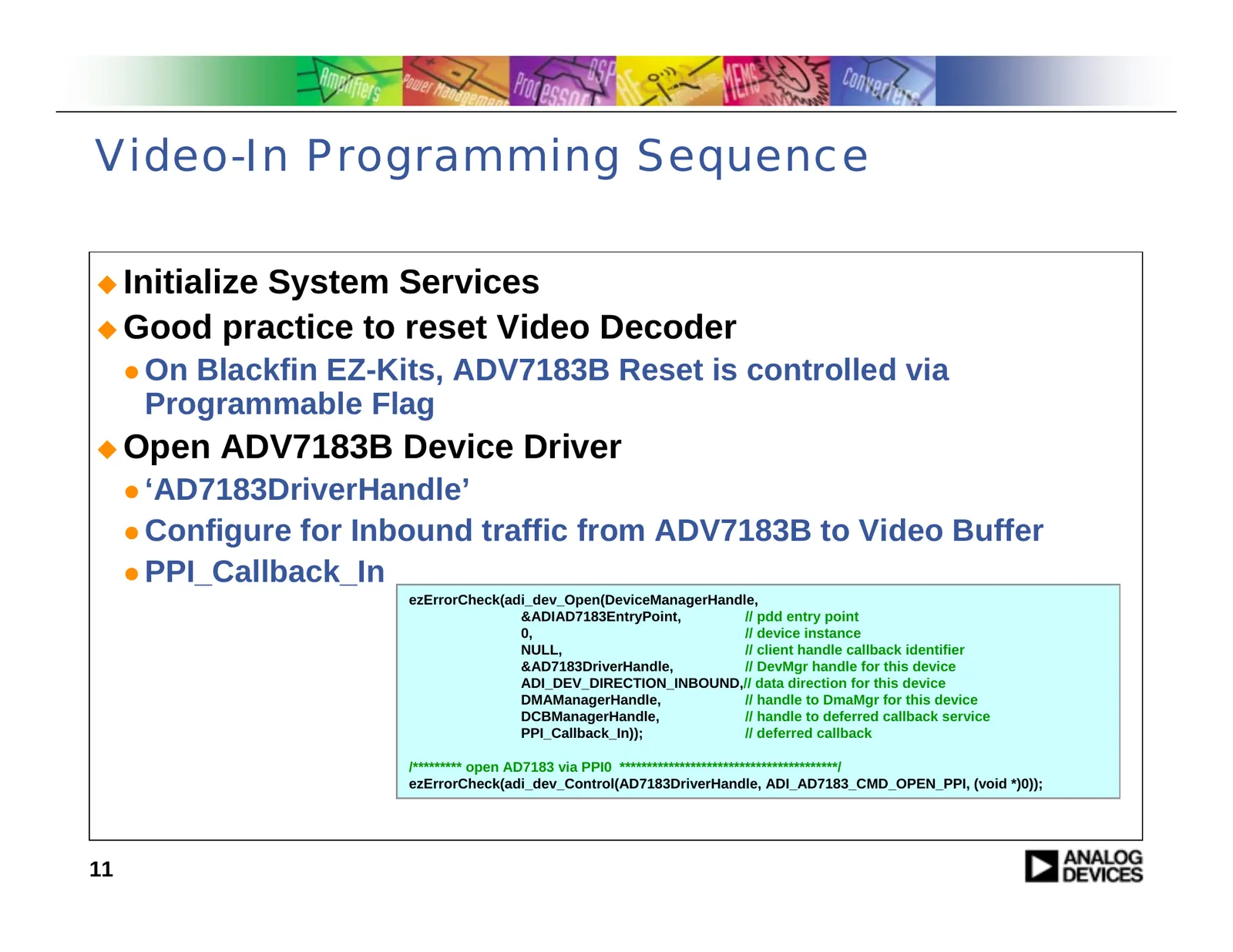
Slide 11: Video-In Programming Sequence
Video-In Programming Sequence ! Initialize System Services ! Good practice to reset Video Decoder " On Blackfin EZ-Kits, ADV7183B Reset is controlled via Programmable Flag ! Open ADV7183B Device Driver " ‘AD7183DriverHandle’ " Configure for Inbound traffic from ADV7183B to Video Buffer " PPI_Callbac
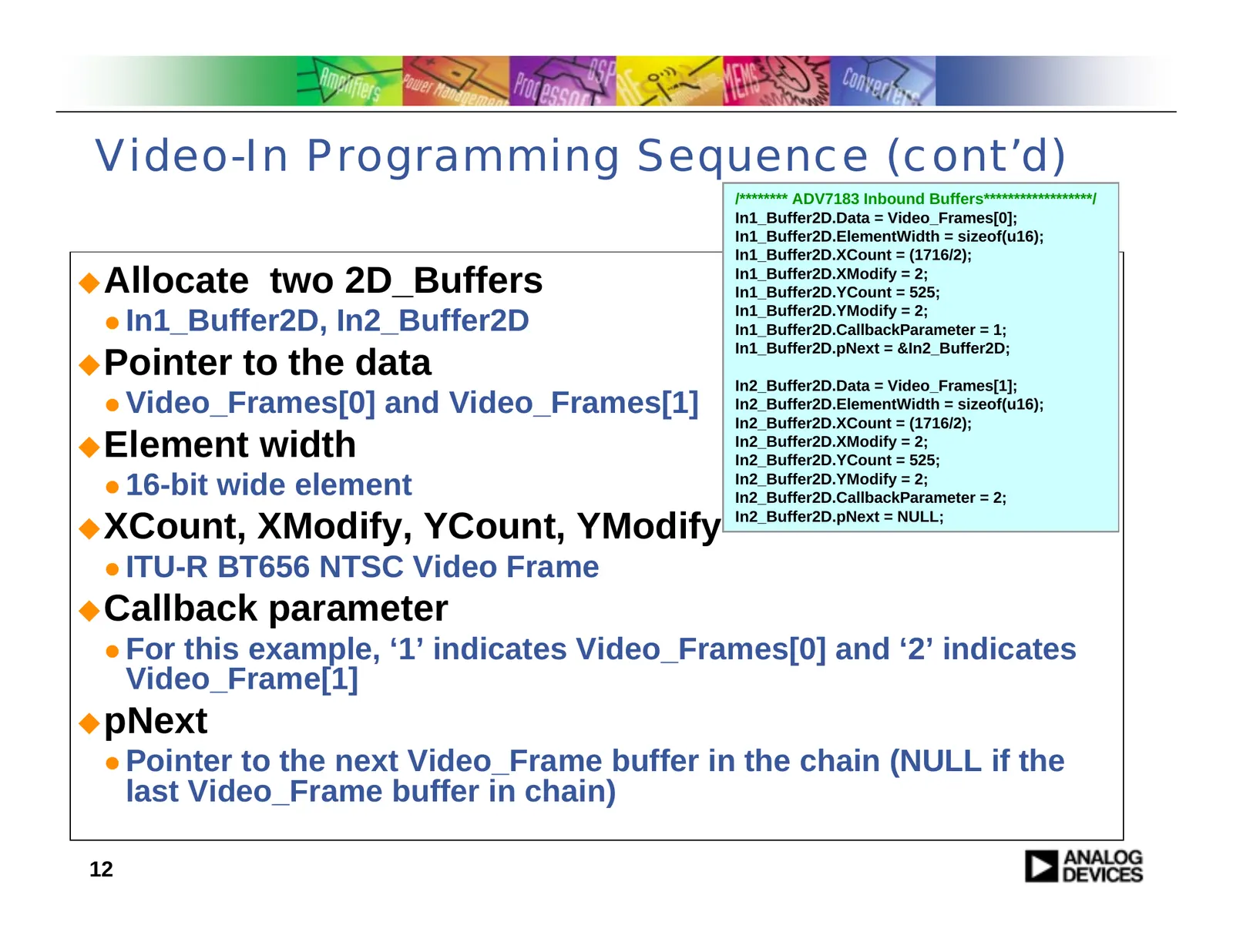
Slide 12: Video-In Programming Sequence (cont’d)
Video-In Programming Sequence (cont’d) /******** ADV7183 Inbound Buffers******************/ In1_Buffer2D.Data = Video_Frames[0]; In1_Buffer2D.ElementWidth = sizeof(u16); In1_Buffer2D.XCount = (1716/2); ! Allocate two 2D_Buffers In1_Buffer2D.XModify = 2; In1_Buffer2D.YCount = 525; In1_Buffer2D.YModif
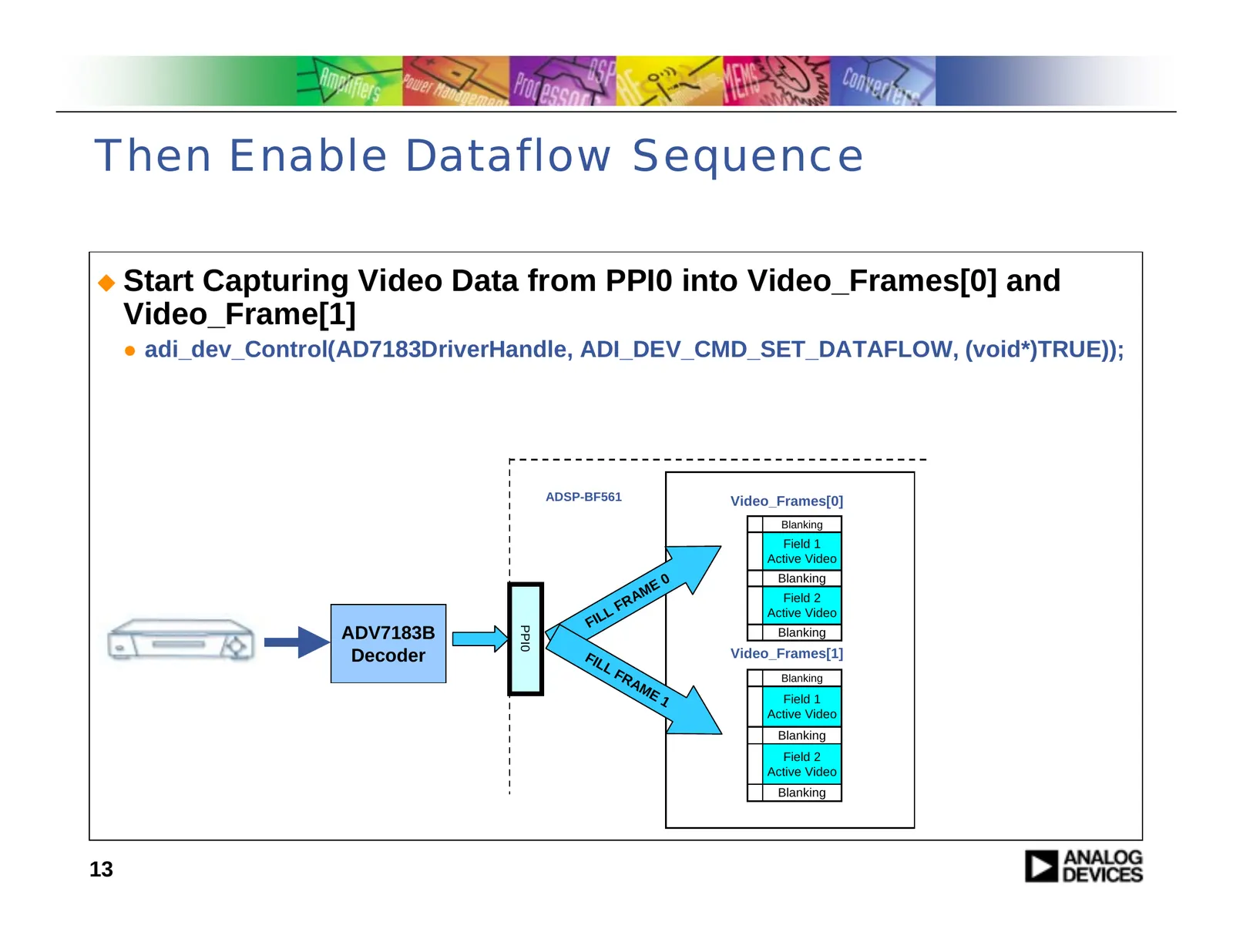
Slide 13: Then Enable Dataflow Sequence
Then Enable Dataflow Sequence ! Start Capturing Video Data from PPI0 into Video_Frames[0] and Video_Frame[1] " adi_dev_Control(AD7183DriverHandle, ADI_DEV_CMD_SET_DATAFLOW, (void*)TRUE)); ADSP-BF561 Video_Frames[0] Blanking Field 1 Active Video 0 Blanking ME F RA Field 2 F ILL Active Video PPI0 ADV7
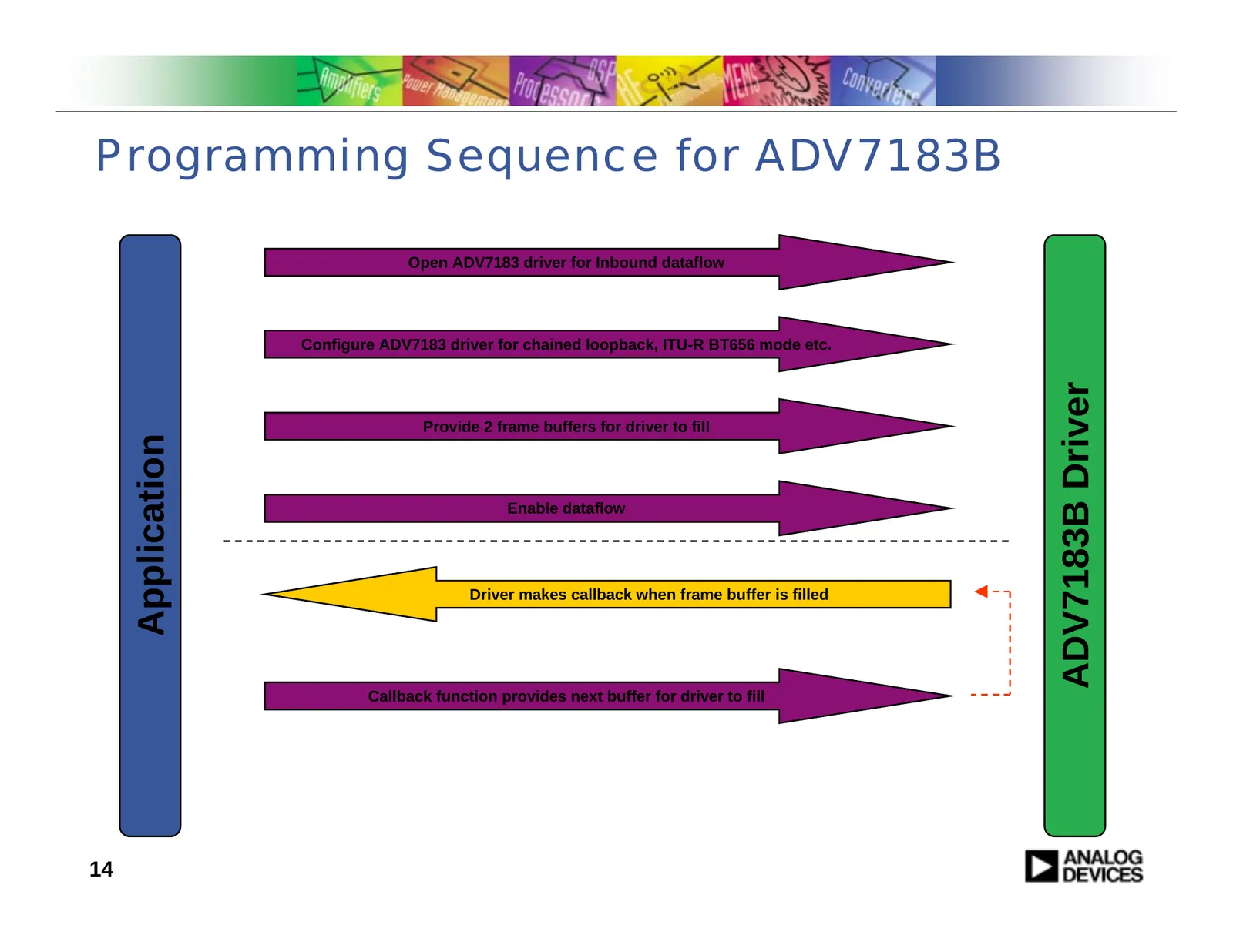
Slide 14: Programming Sequence for ADV7183B
Programming Sequence for ADV7183B Open ADV7183 driver for Inbound dataflow Configure ADV7183 driver for chained loopback, ITU-R BT656 mode etc. ADV7183B Driver Provide 2 frame buffers for driver to fill Application Enable dataflow Driver makes callback when frame buffer is filled Callback function p
Slide 15: Outline for Video-Out Sub-module
Outline for Video-Out Sub-module ! Simple Video Display using ADV7179 Video Encoder 15
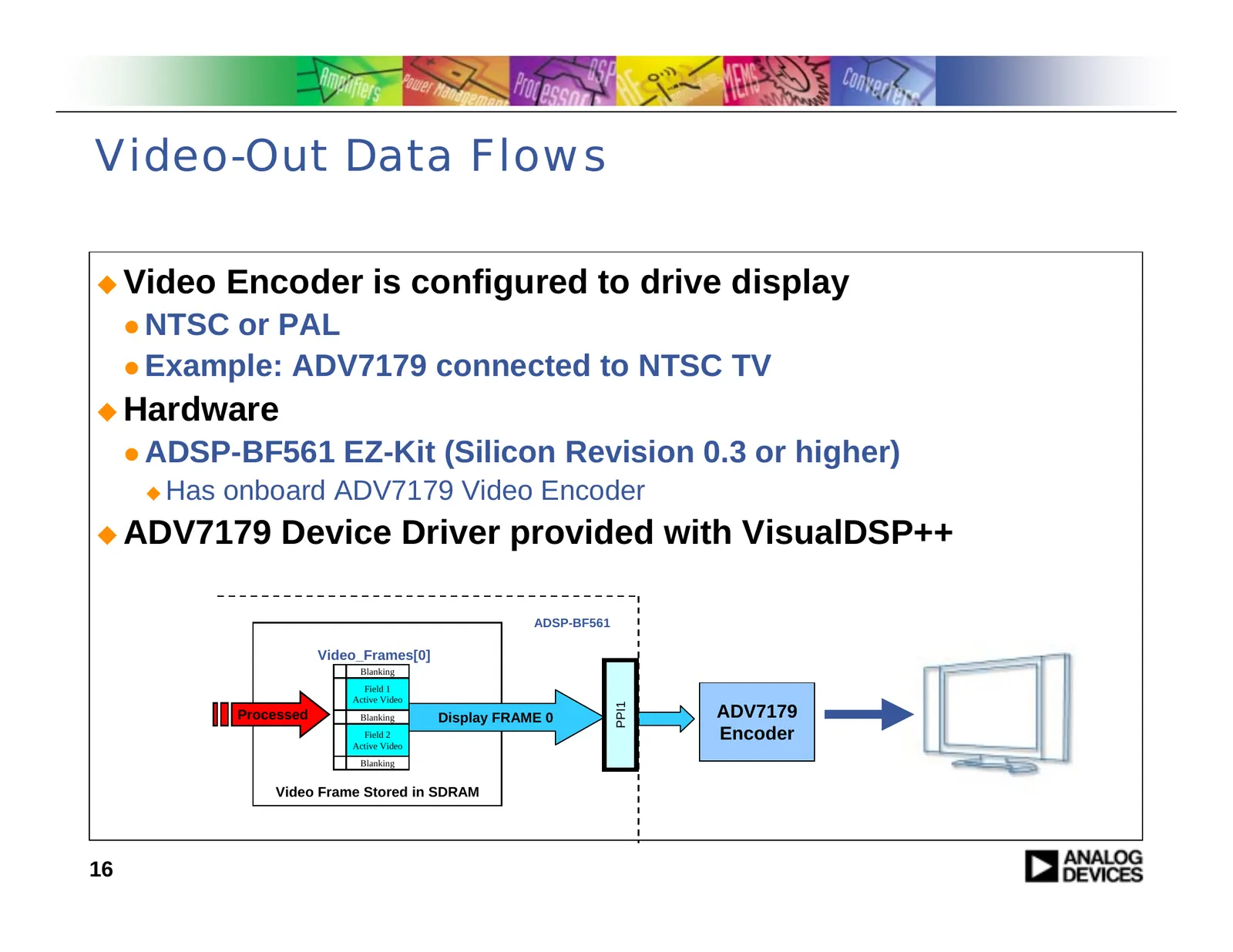
Slide 16: Video-Out Data Flows
Video-Out Data Flows ! Video Encoder is configured to drive display " NTSC or PAL " Example: ADV7179 connected to NTSC TV ! Hardware " ADSP-BF561 EZ-Kit (Silicon Revision 0.3 or higher) ! Has onboard ADV7179 Video Encoder ! ADV7179 Device Driver provided with VisualDSP++ ADSP-BF561 Video_Frames[0] B
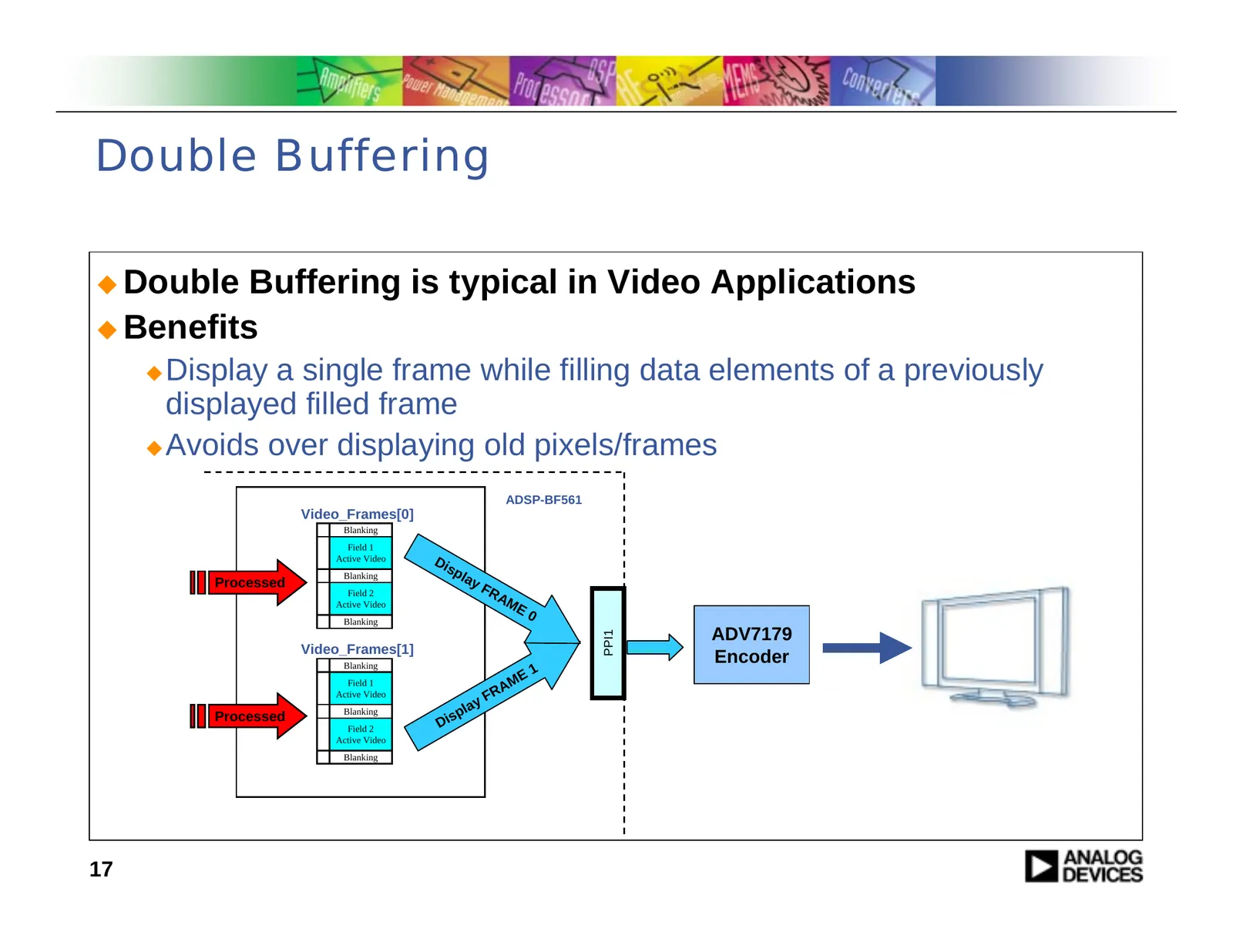
Slide 17: Double Buffering
Double Buffering ! Double Buffering is typical in Video Applications ! Benefits ! Display a single frame while filling data elements of a previously displayed filled frame ! Avoids over displaying old pixels/frames ADSP-BF561 Video_Frames[0] Blanking Field 1 Active Video Di sp Blanking lay Processed
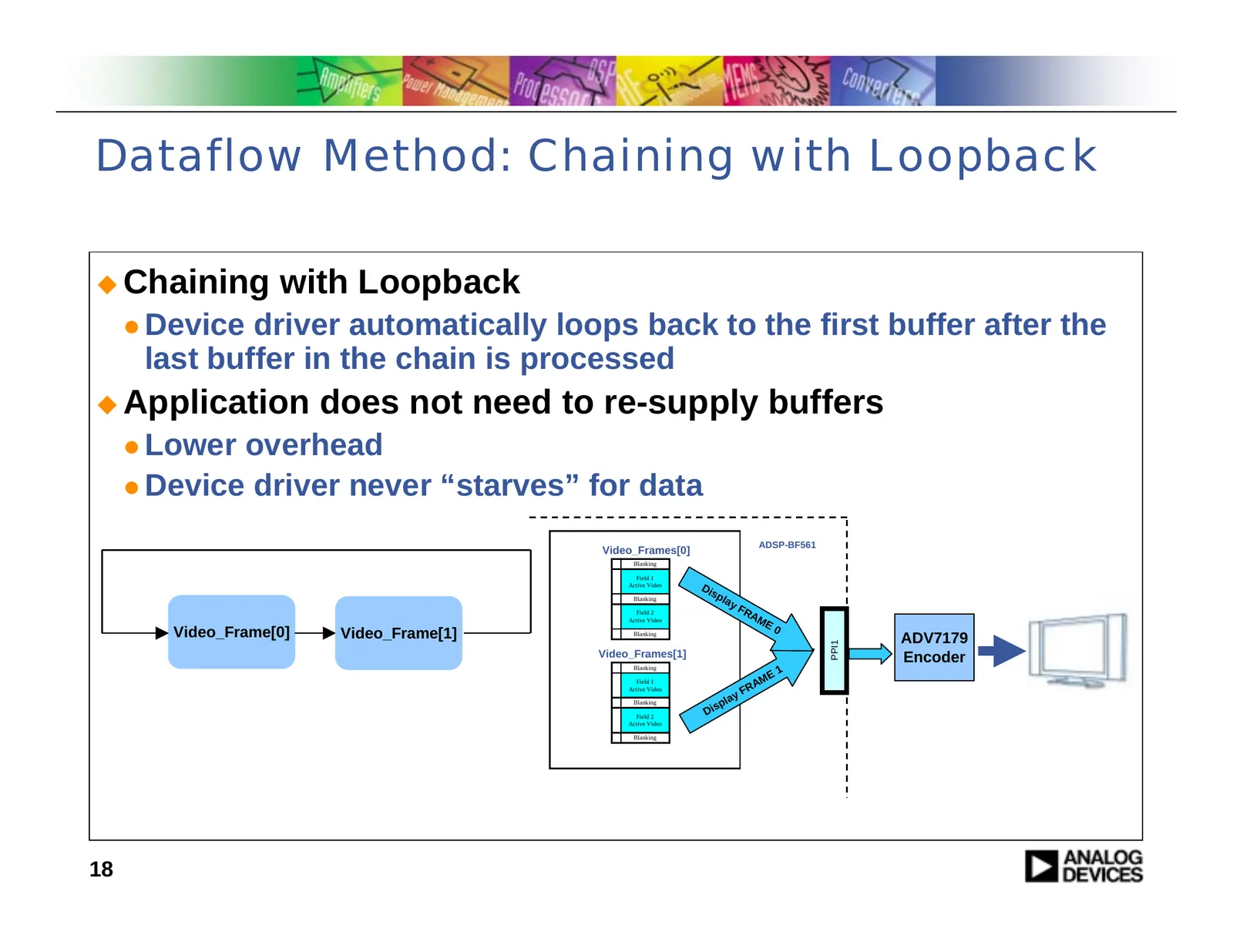
Slide 18: Dataflow Method: Chaining with Loopback
Dataflow Method: Chaining with Loopback ! Chaining with Loopback " Device driver automatically loops back to the first buffer after the last buffer in the chain is processed ! Application does not need to re-supply buffers " Lower overhead " Device driver never “starves” for data ADSP-BF561 Video_Fr
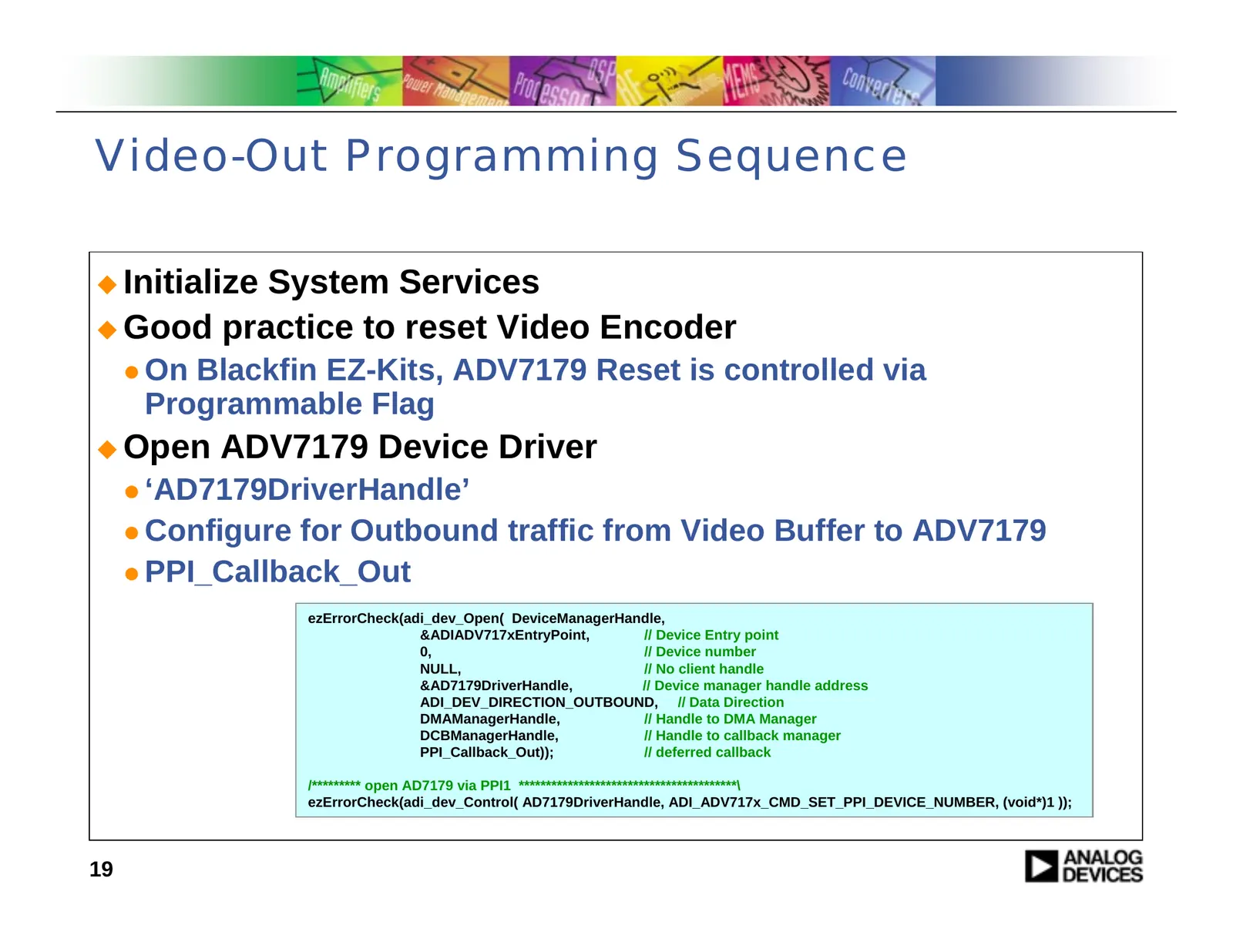
Slide 19: Video-Out Programming Sequence
Video-Out Programming Sequence ! Initialize System Services ! Good practice to reset Video Encoder " On Blackfin EZ-Kits, ADV7179 Reset is controlled via Programmable Flag ! Open ADV7179 Device Driver " ‘AD7179DriverHandle’ " Configure for Outbound traffic from Video Buffer to ADV7179 " PPI_Callback
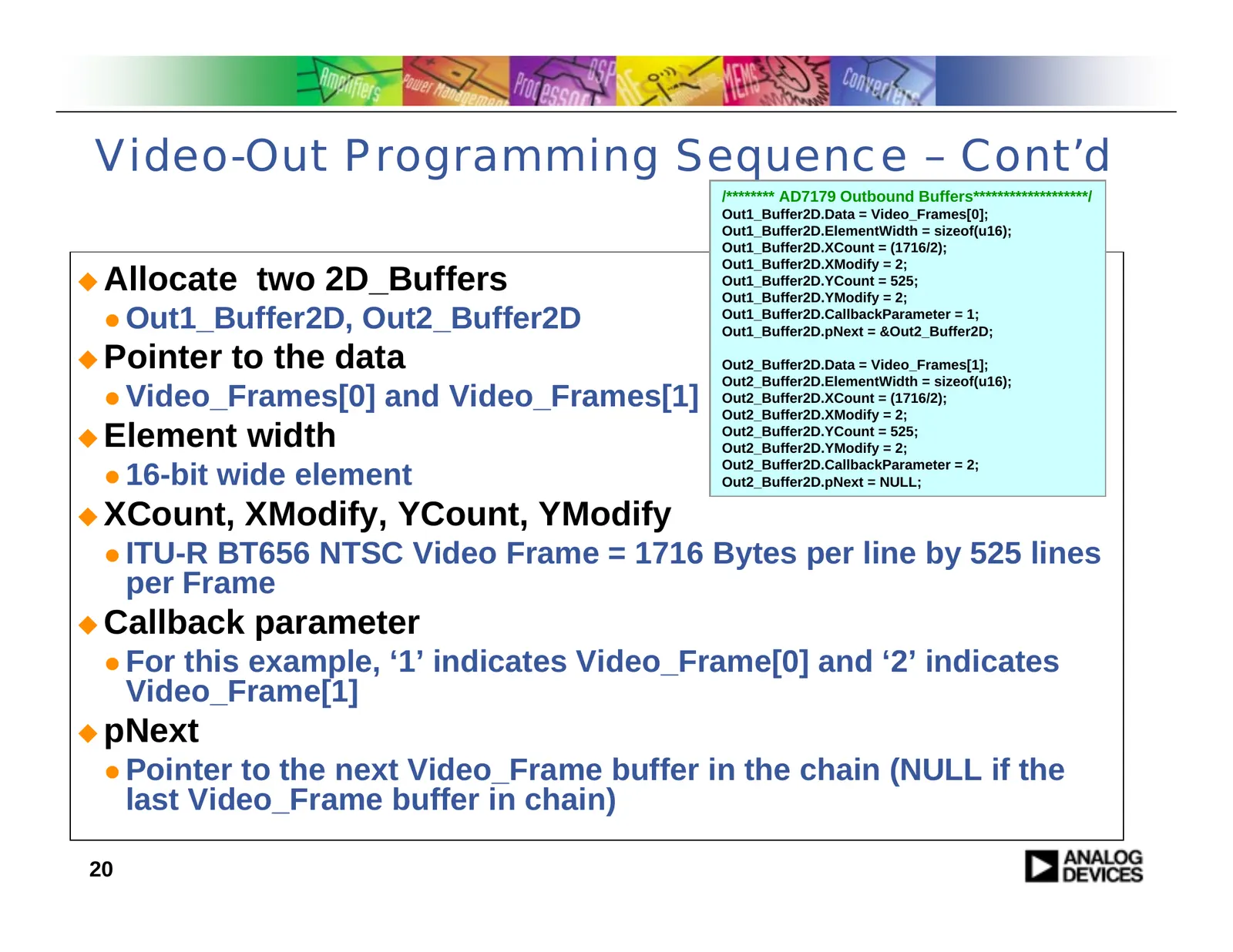
Slide 20: Video-Out Programming Sequence – Cont’d
Video-Out Programming Sequence – Cont’d /******** AD7179 Outbound Buffers*******************/ Out1_Buffer2D.Data = Video_Frames[0]; Out1_Buffer2D.ElementWidth = sizeof(u16); Out1_Buffer2D.XCount = (1716/2); Out1_Buffer2D.XModify = 2; ! Allocate two 2D_Buffers Out1_Buffer2D.YCount = 525; Out1_Buffer2
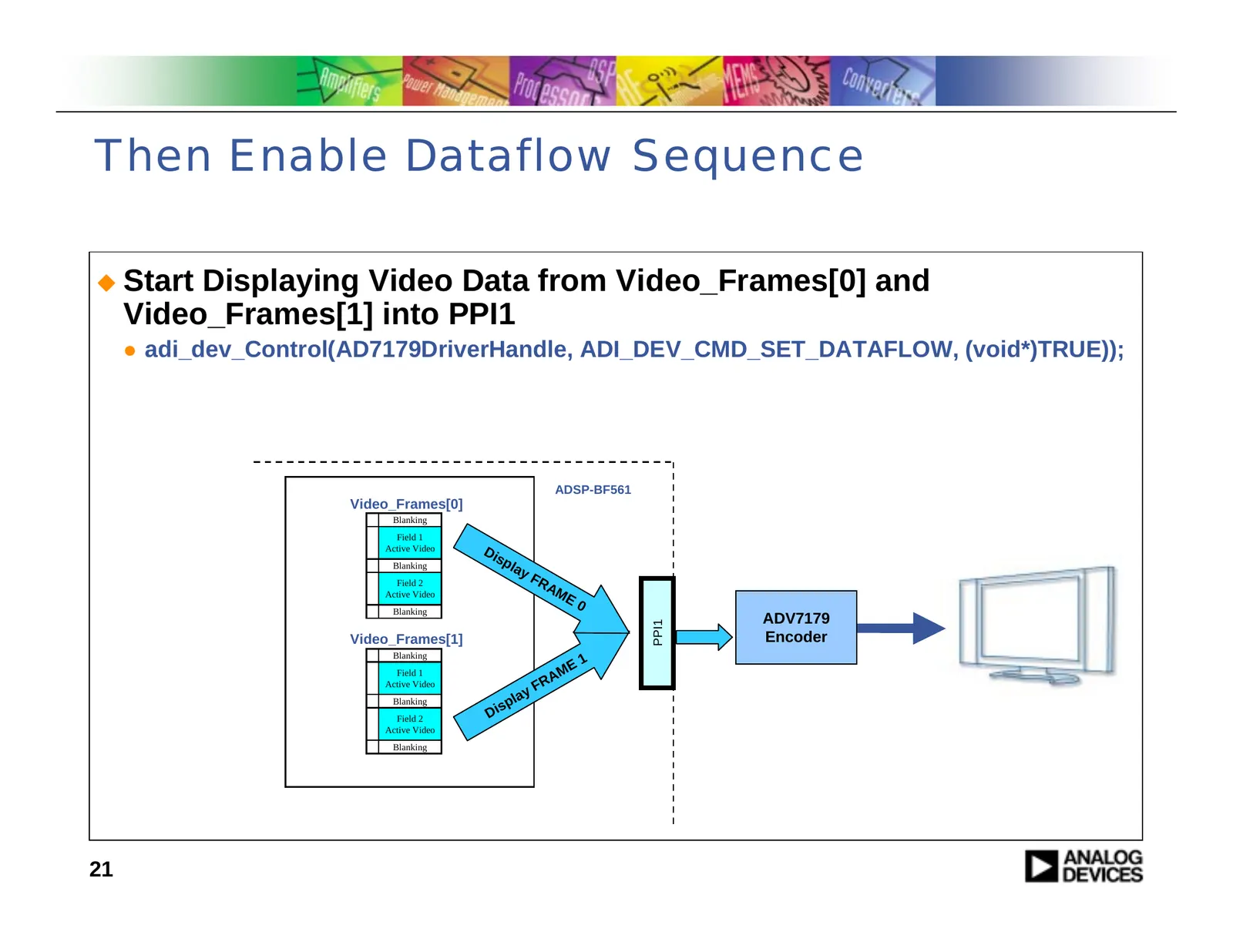
Slide 21: Then Enable Dataflow Sequence
Then Enable Dataflow Sequence ! Start Displaying Video Data from Video_Frames[0] and Video_Frames[1] into PPI1 " adi_dev_Control(AD7179DriverHandle, ADI_DEV_CMD_SET_DATAFLOW, (void*)TRUE)); ADSP-BF561 Video_Frames[0] Blanking Field 1 Active Video Di sp Blanking lay Field 2 FR Active Video AM E 0 Bla
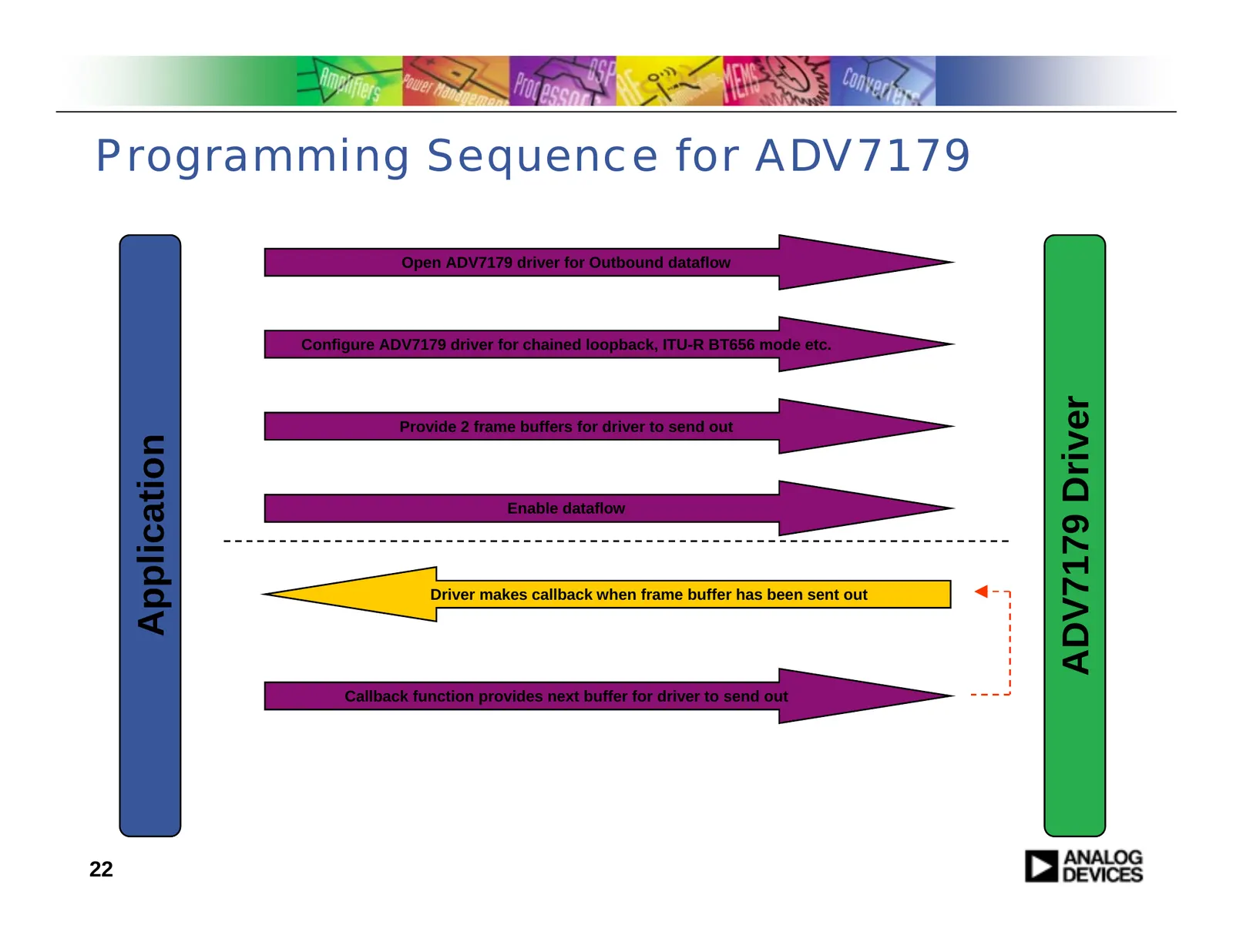
Slide 22: Programming Sequence for ADV7179
Programming Sequence for ADV7179 Open ADV7179 driver for Outbound dataflow Configure ADV7179 driver for chained loopback, ITU-R BT656 mode etc. ADV7179 Driver Provide 2 frame buffers for driver to send out Application Enable dataflow Driver makes callback when frame buffer has been sent out Callback
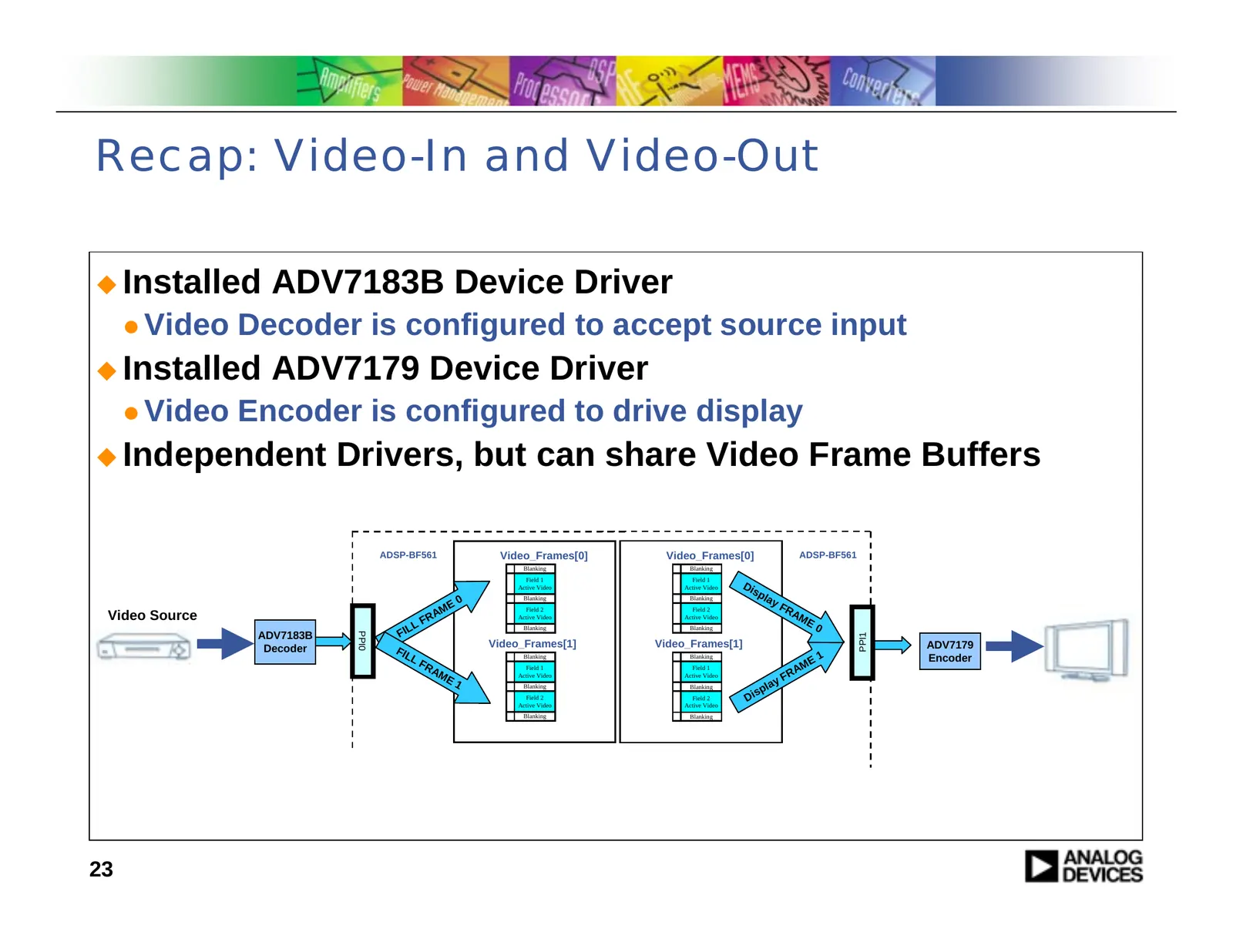
Slide 23: Recap: Video-In and Video-Out
Recap: Video-In and Video-Out ! Installed ADV7183B Device Driver " Video Decoder is configured to accept source input ! Installed ADV7179 Device Driver " Video Encoder is configured to drive display ! Independent Drivers, but can share Video Frame Buffers ADSP-BF561 Video_Frames[0] Video_Frames[0] A
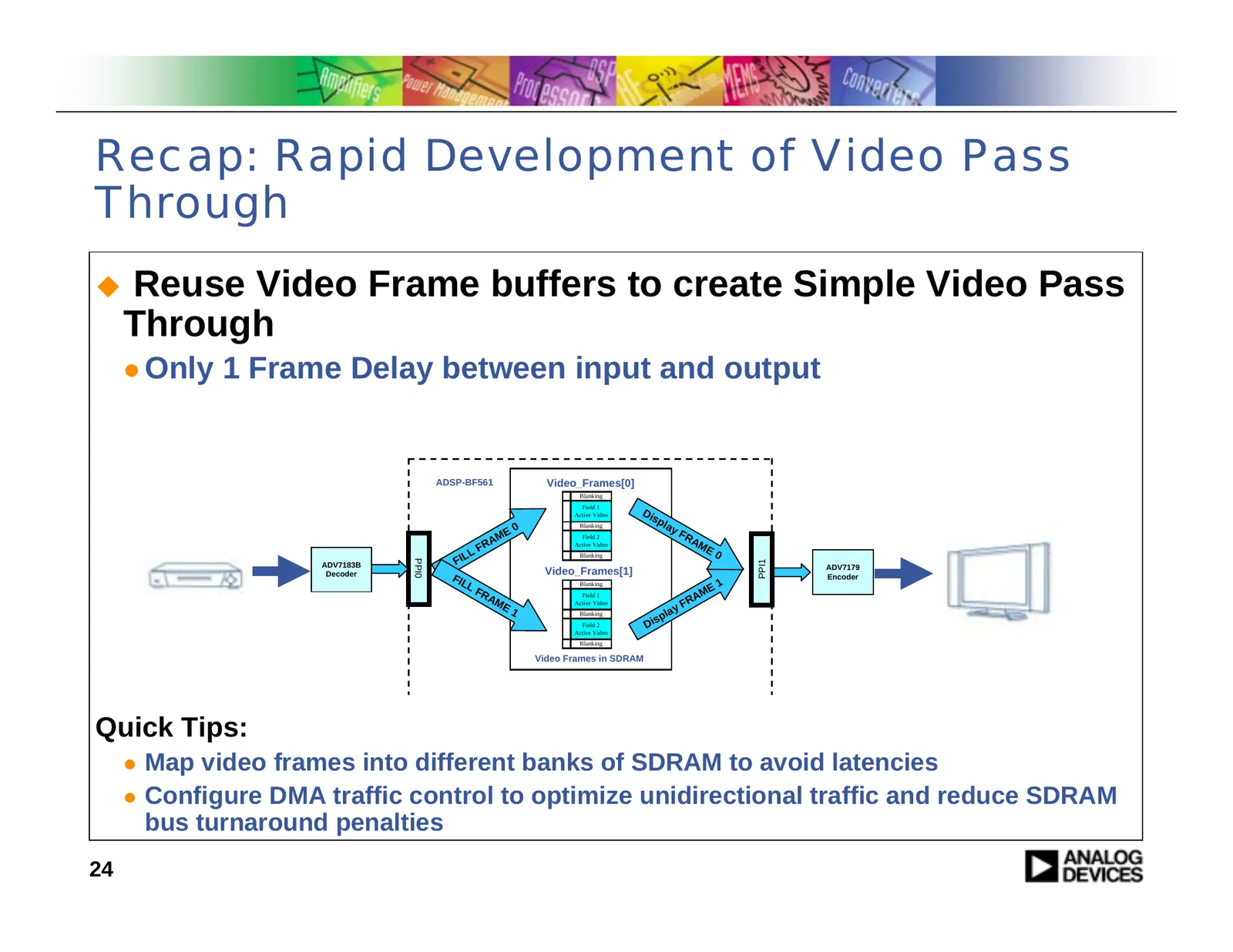
Slide 24: Recap: Rapid Development of Video Pass Through
Recap: Rapid Development of Video Pass Through ! Reuse Video Frame buffers to create Simple Video Pass Through " Only 1 Frame Delay between input and output ADSP-BF561 Video_Frames[0] Blanking Field 1 Active Video Di sp lay E0 Blanking FR AM Field 2 AM FR Active Video E FILL Blanking 0 PPI0 PPI1 ADV
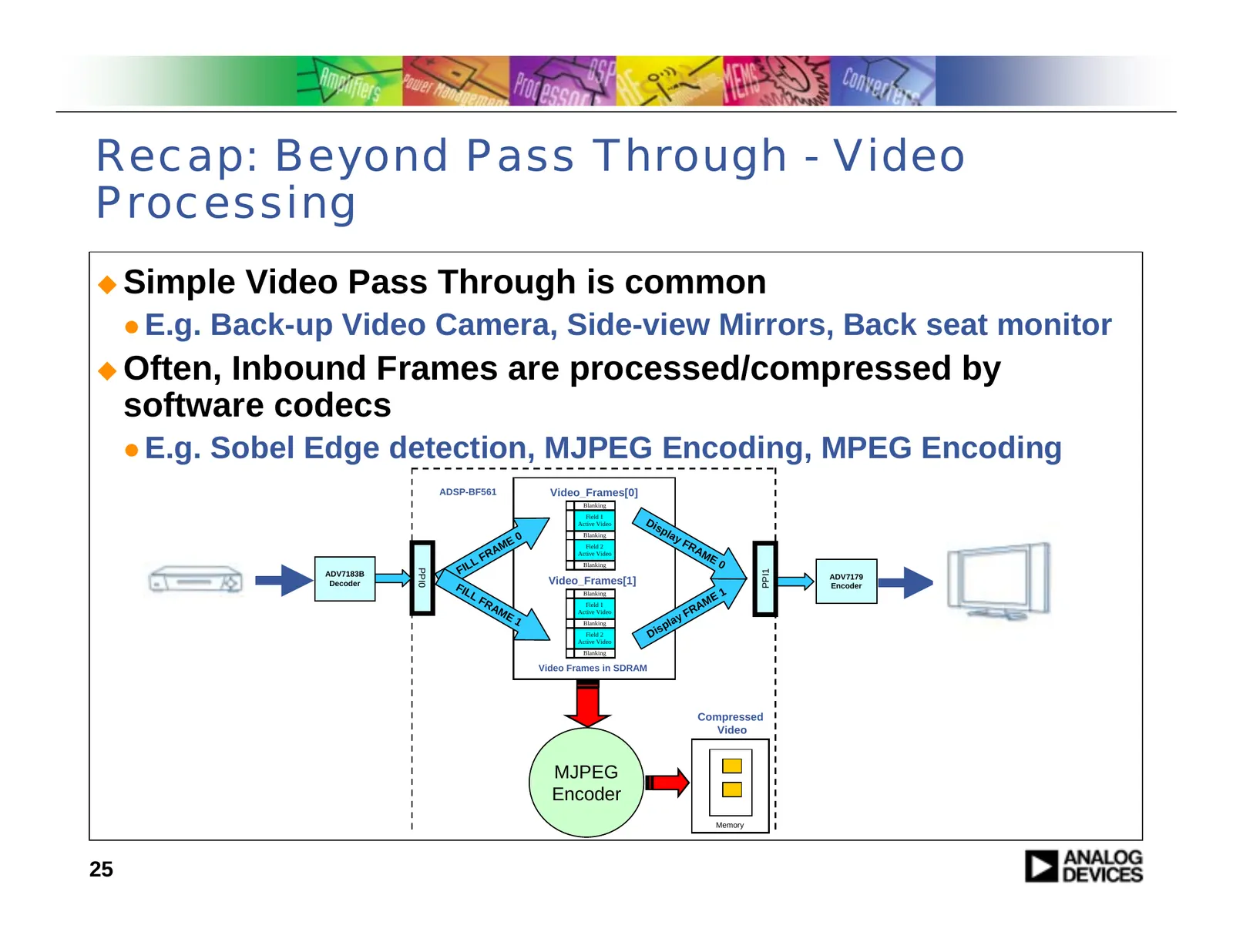
Slide 25: Recap: Beyond Pass Through - Video Processing
Recap: Beyond Pass Through - Video Processing ! Simple Video Pass Through is common " E.g. Back-up Video Camera, Side-view Mirrors, Back seat monitor ! Often, Inbound Frames are processed/compressed by software codecs " E.g. Sobel Edge detection, MJPEG Encoding, MPEG Encoding ADSP-BF561 Video_Frames
Slide 26: Outline for Encoding Video Data Sub-module
Outline for Encoding Video Data Sub- module ! Overview of the MJPEG offering ! Encoding Video Data 26
Slide 27: Overview of the MJPEG offering
Overview of the MJPEG offering ! JPEG/MJPEG SDK includes stand alone Encoder and Decoder Libraries " http://www.analog.com/blackfin/codeExamples " Access to all source code, except the actual encoder and decoder algorithm (libraries provided) " Examples based entirely on ADI’s System Services and De
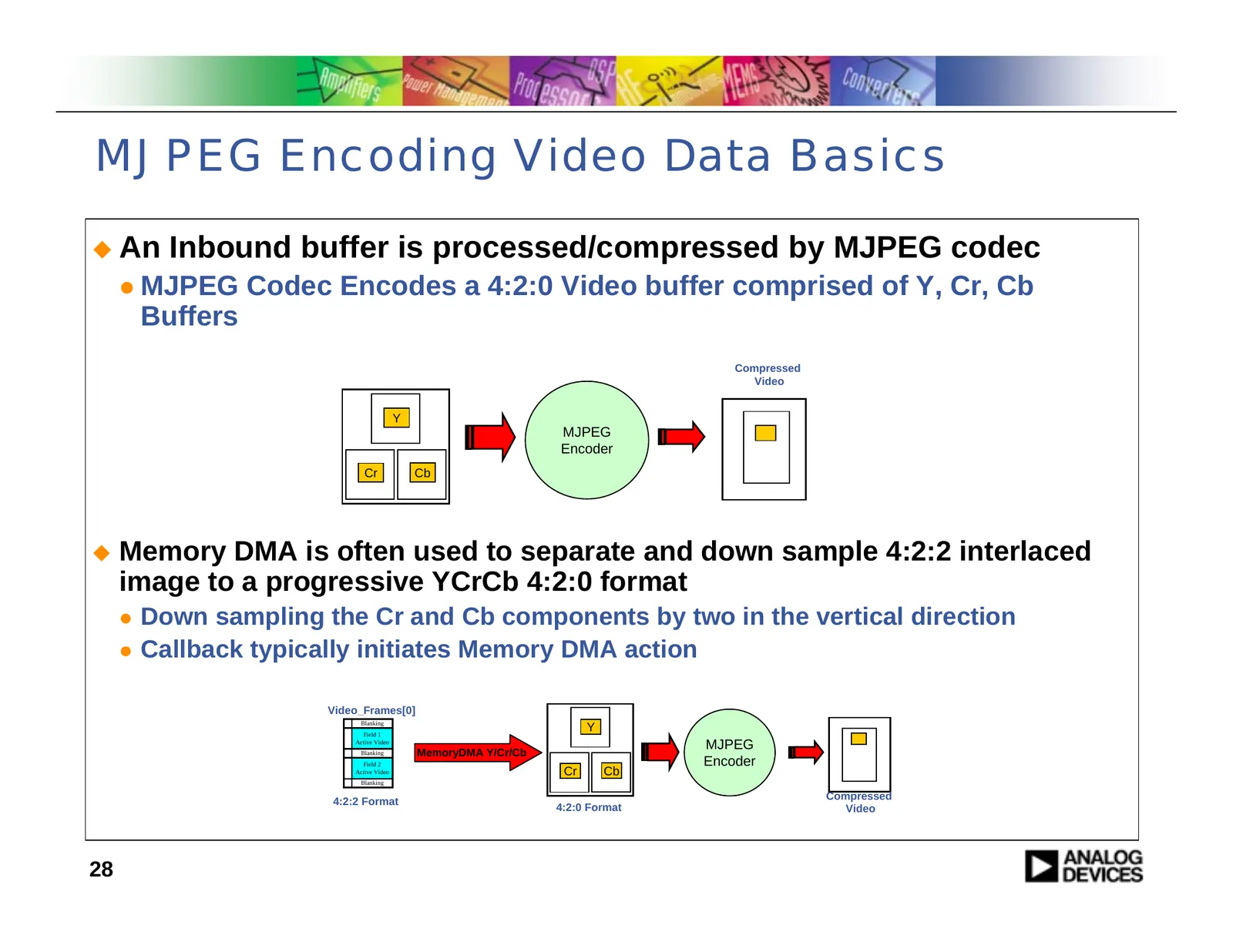
Slide 28: MJPEG Encoding Video Data Basics
MJPEG Encoding Video Data Basics ! An Inbound buffer is processed/compressed by MJPEG codec " MJPEG Codec Encodes a 4:2:0 Video buffer comprised of Y, Cr, Cb Buffers Compressed Video Y MJPEG Encoder Cr Cb ! Memory DMA is often used to separate and down sample 4:2:2 interlaced image to a progressive
Slide 29: Initializing MJPEG Codec
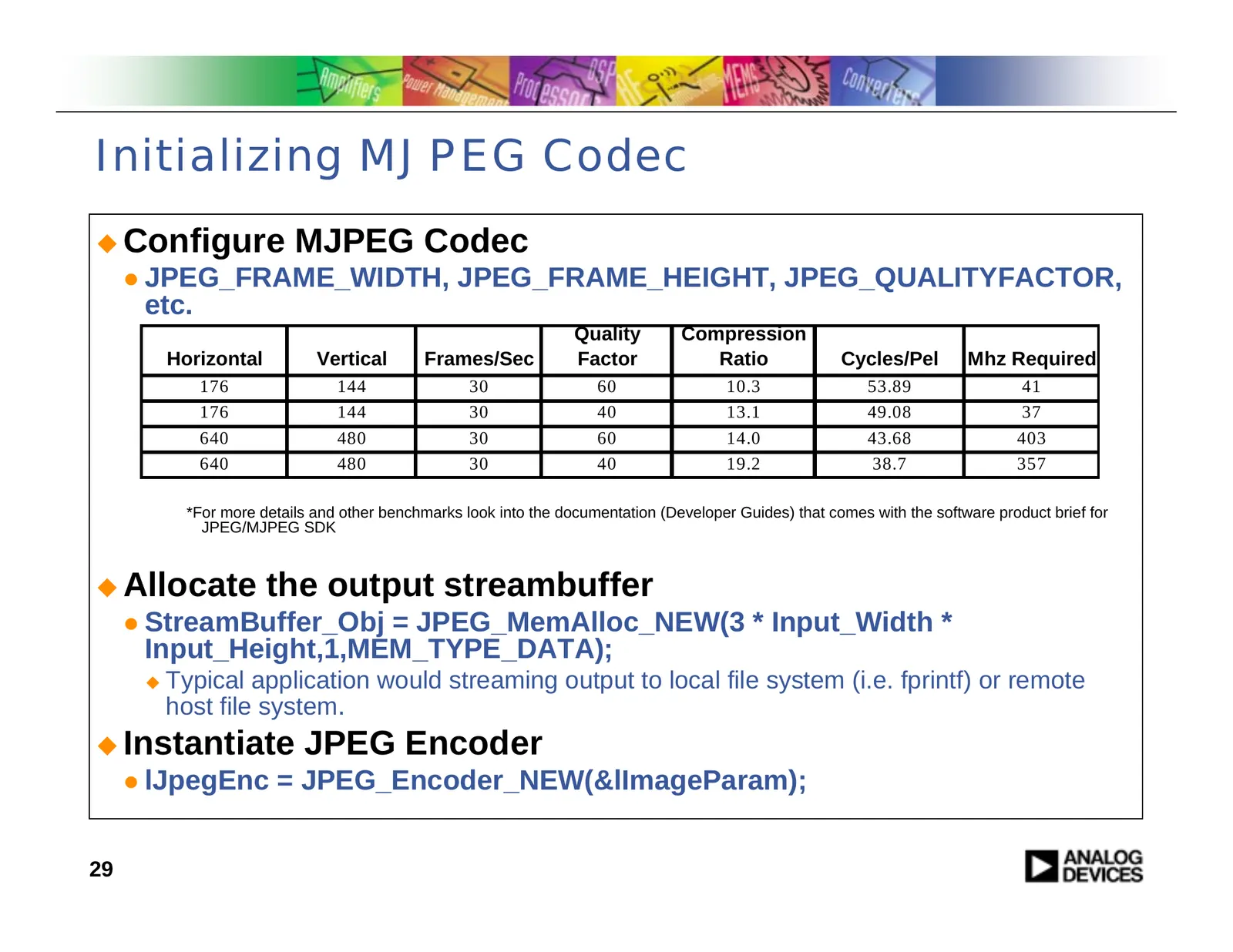
Initializing MJPEG Codec ! Configure MJPEG Codec " JPEG_FRAME_WIDTH, JPEG_FRAME_HEIGHT, JPEG_QUALITYFACTOR, etc. Quality Compression Horizontal Vertical Frames/Sec Factor Ratio Cycles/Pel Mhz Required 176 144 30 60 10.3 53.89 41 176 144 30 40 13.1 49.08 37 640 480 30 60 14.0 43.68 403 640 480 30 40
Slide 30: Encode Video
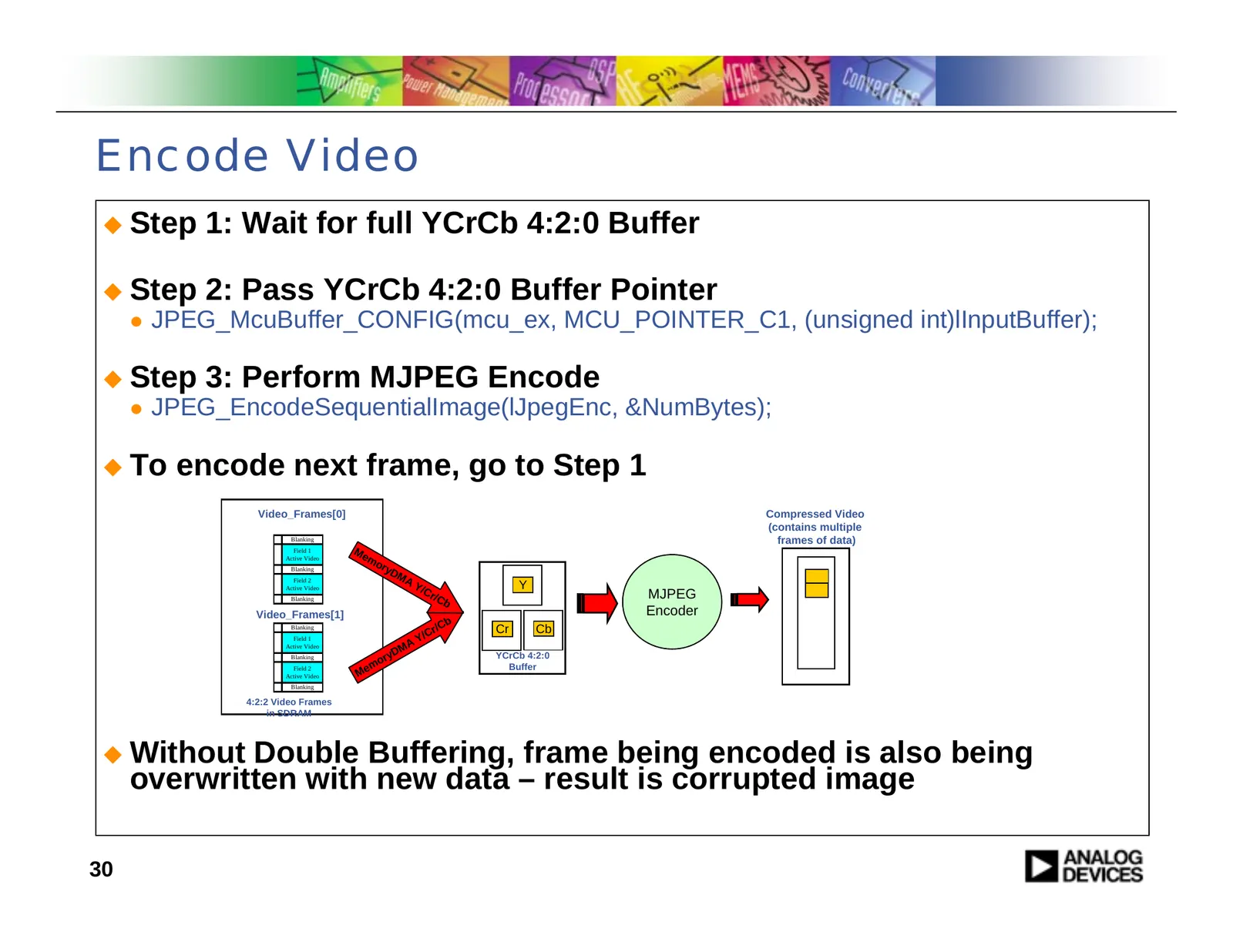
Encode Video ! Step 1: Wait for full YCrCb 4:2:0 Buffer ! Step 2: Pass YCrCb 4:2:0 Buffer Pointer " JPEG_McuBuffer_CONFIG(mcu_ex, MCU_POINTER_C1, (unsigned int)lInputBuffer); ! Step 3: Perform MJPEG Encode " JPEG_EncodeSequentialImage(lJpegEnc, &NumBytes); ! To encode next frame, go to Step 1 Video_
Slide 31: Encode YCrCb 4:2:0 Frame with Double Buffering
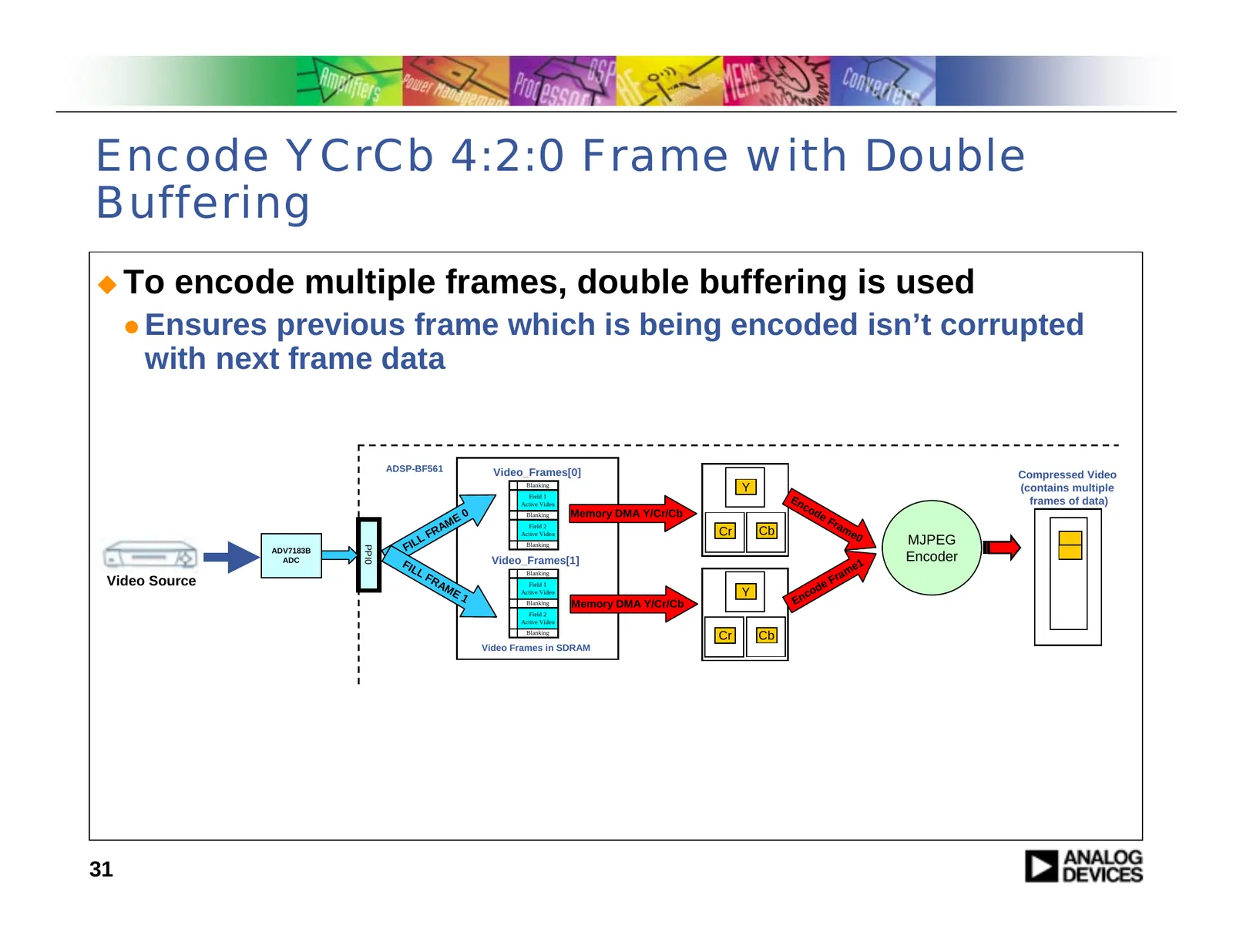
Encode YCrCb 4:2:0 Frame with Double Buffering ! To encode multiple frames, double buffering is used " Ensures previous frame which is being encoded isn’t corrupted with next frame data ADSP-BF561 Video_Frames[0] Compressed Video Blanking Y (contains multiple Field 1 En frames of data) Active Video
Slide 32: Outline for USB Sub-module
Outline for USB Sub-module ! Blackfin USB-LAN EZ-Extender ! Simple Blackfin-Host Data Transfers over USB 2.0 32
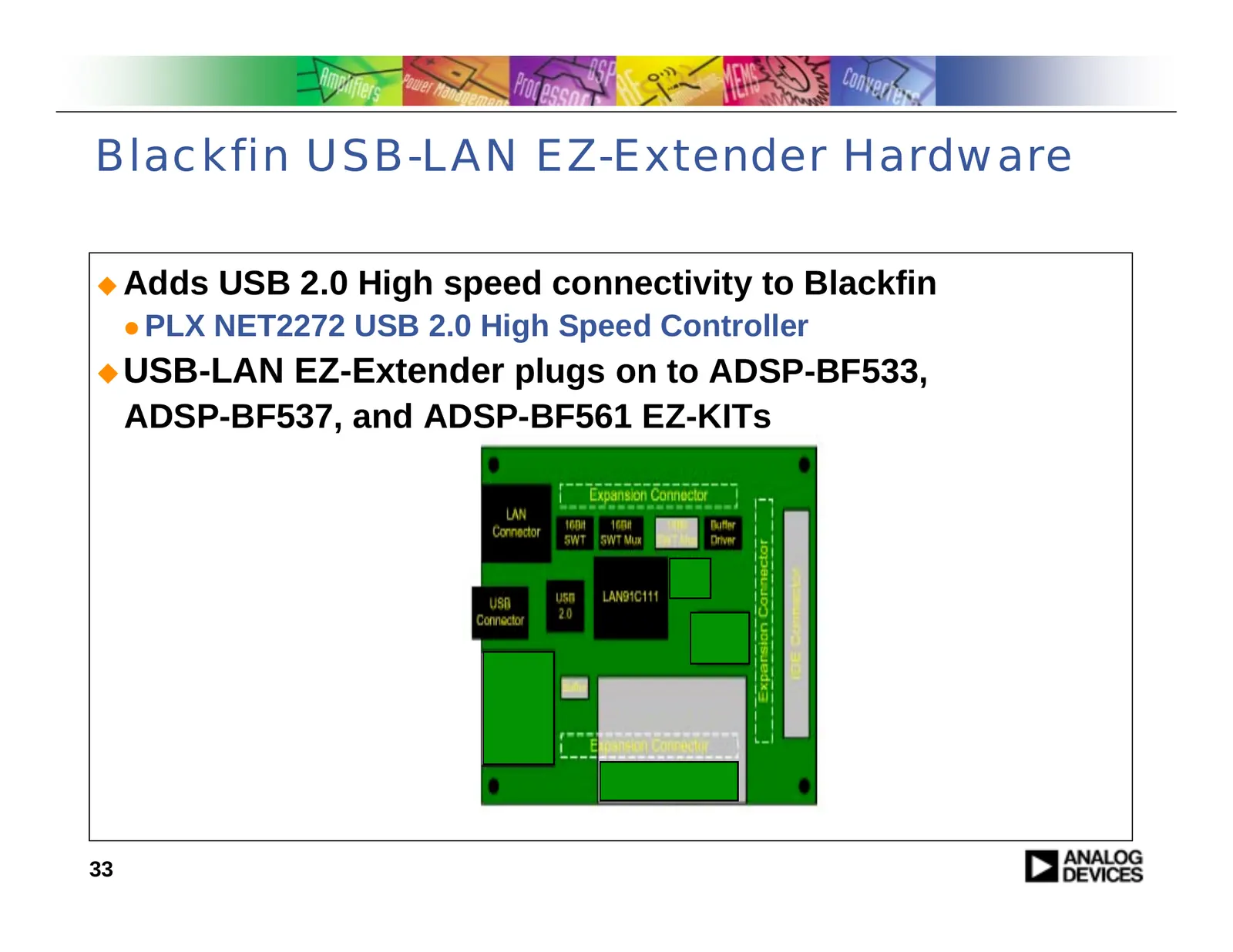
Slide 33: Blackfin USB-LAN EZ-Extender Hardware
Blackfin USB-LAN EZ-Extender Hardware ! Adds USB 2.0 High speed connectivity to Blackfin " PLX NET2272 USB 2.0 High Speed Controller ! USB-LAN EZ-Extender plugs on to ADSP-BF533, ADSP-BF537, and ADSP-BF561 EZ-KITs 33
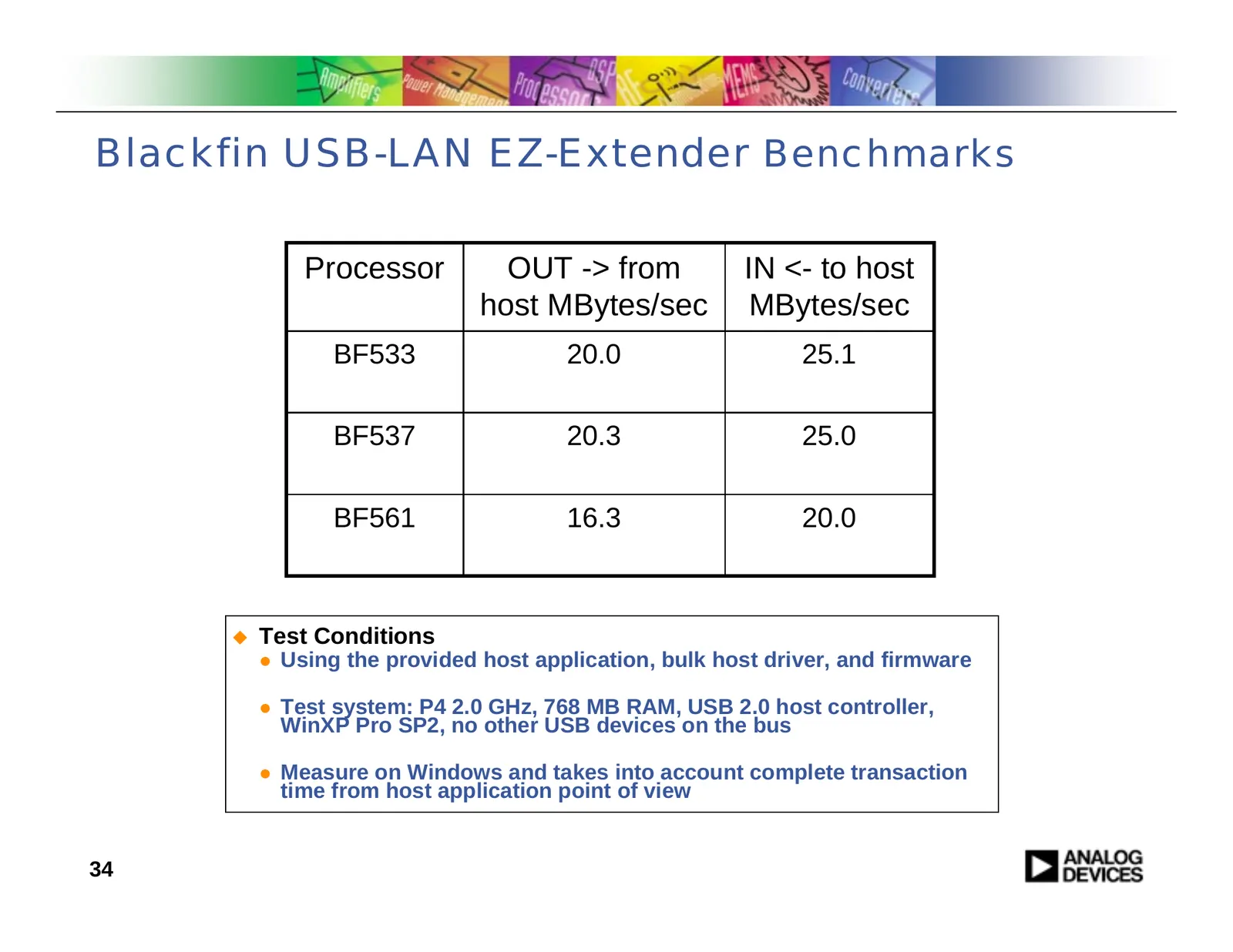
Slide 34: Blackfin USB-LAN EZ-Extender Benchmarks
Blackfin USB-LAN EZ-Extender Benchmarks Processor OUT -> from IN <- to host host MBytes/sec MBytes/sec BF533 20.0 25.1 BF537 20.3 25.0 BF561 16.3 20.0 ! Test Conditions " Using the provided host application, bulk host driver, and firmware " Test system: P4 2.0 GHz, 768 MB RAM, USB 2.0 host controlle
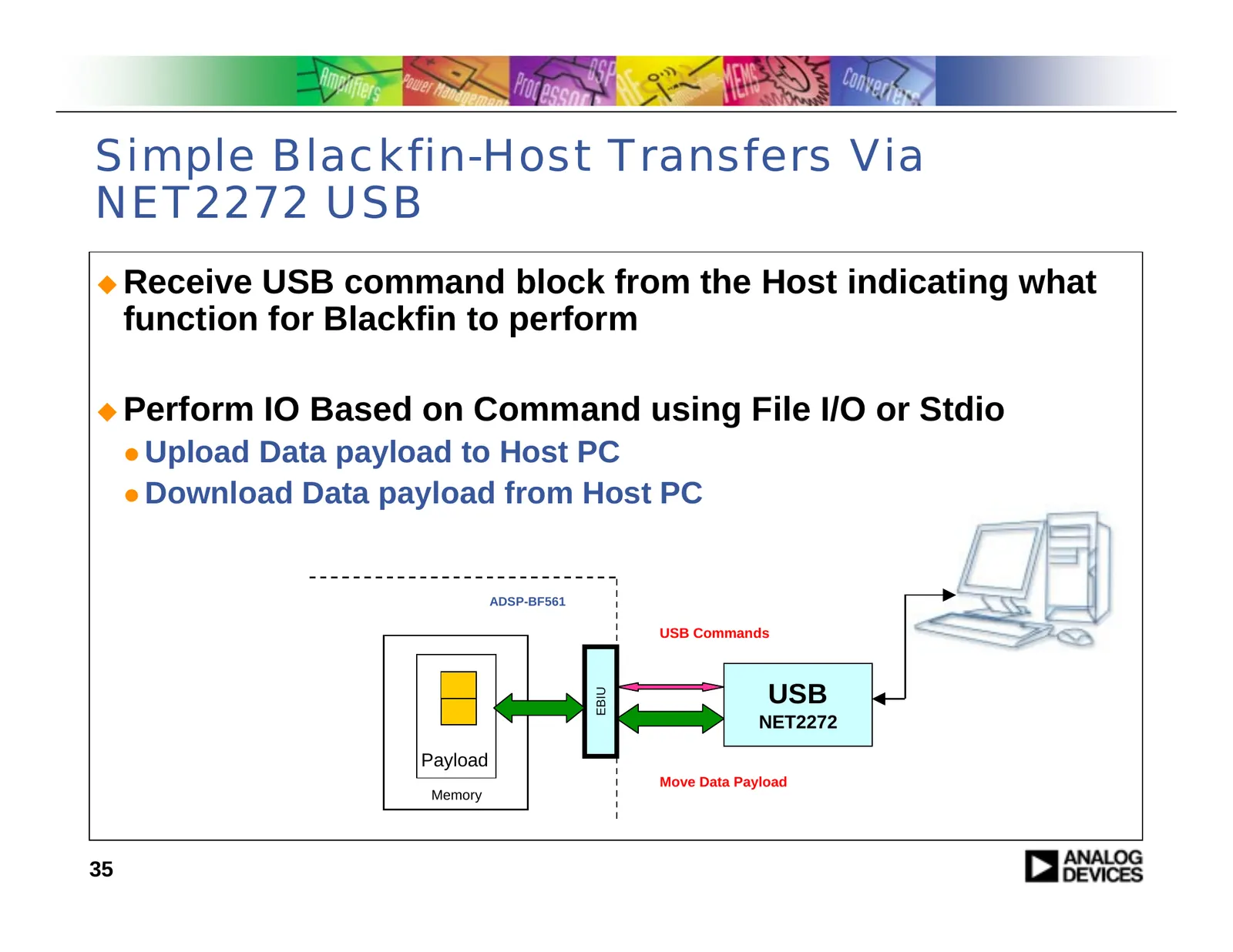
Slide 35: Simple Blackfin-Host Transfers Via NET2272 USB
Simple Blackfin-Host Transfers Via NET2272 USB ! Receive USB command block from the Host indicating what function for Blackfin to perform ! Perform IO Based on Command using File I/O or Stdio " Upload Data payload to Host PC " Download Data payload from Host PC ADSP-BF561 USB Commands USB EBIU NET22
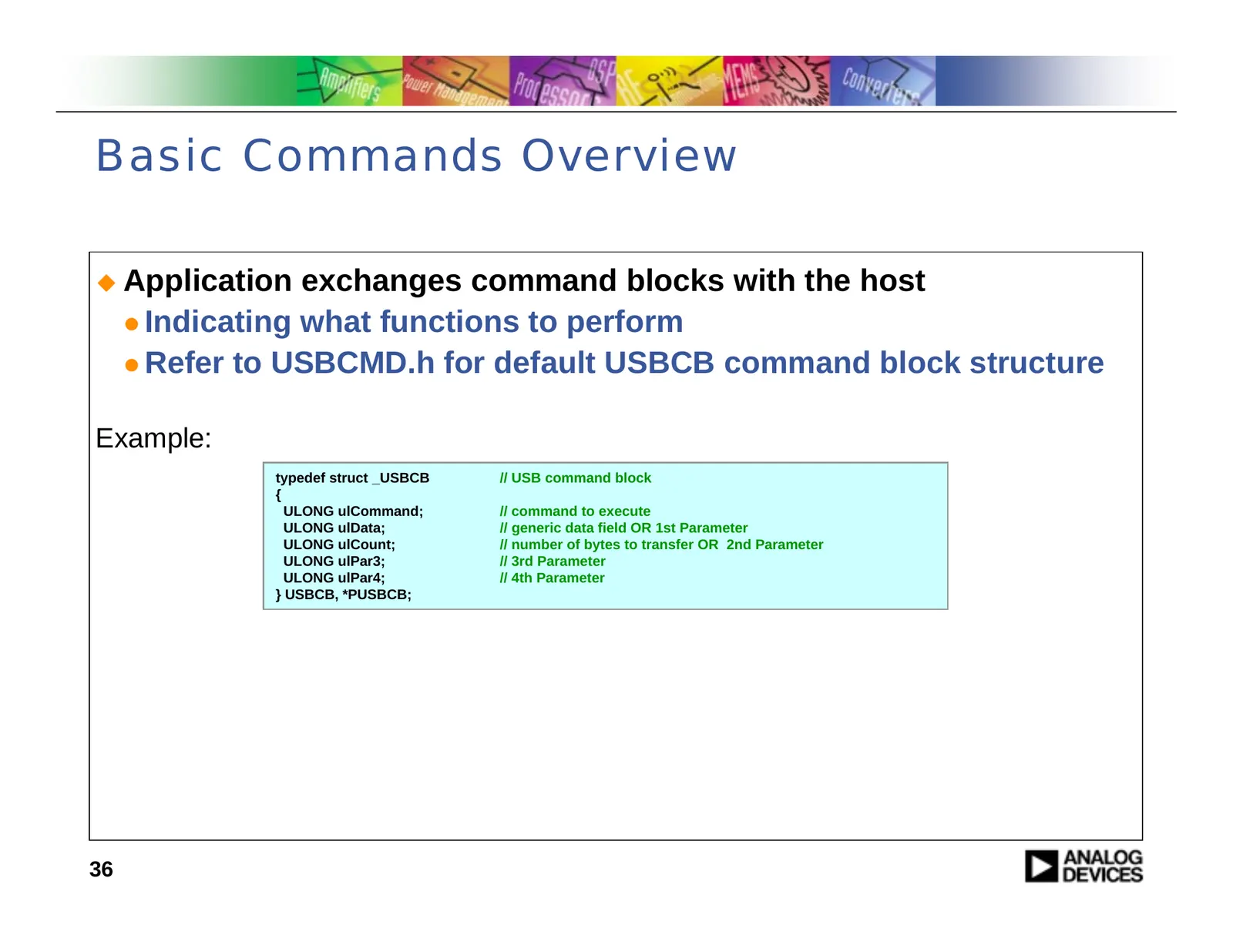
Slide 36: Basic Commands Overview
Basic Commands Overview ! Application exchanges command blocks with the host " Indicating what functions to perform " Refer to USBCMD.h for default USBCB command block structure Example: typedef struct _USBCB // USB command block { ULONG ulCommand; // command to execute ULONG ulData; // generic data
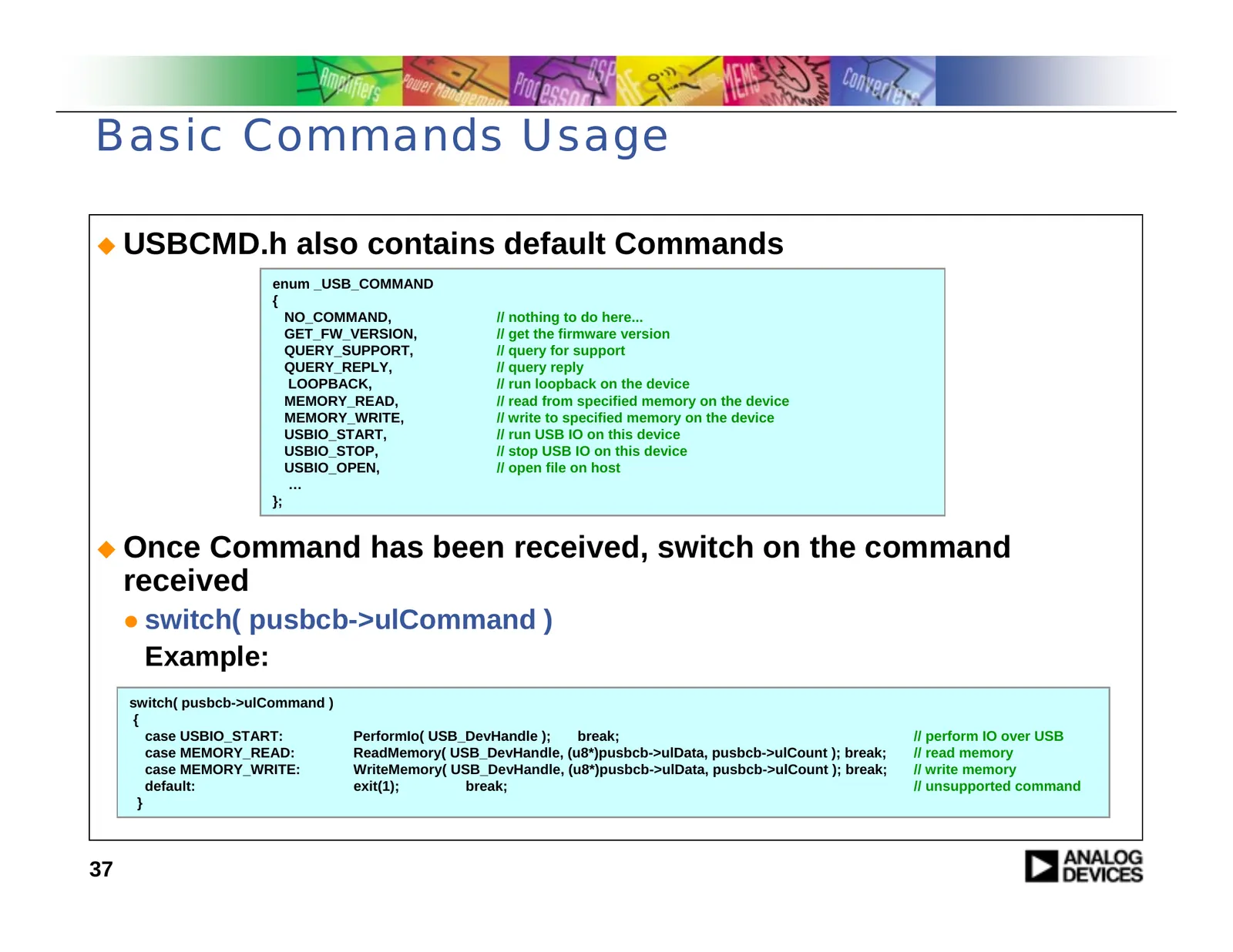
Slide 37: Basic Commands Usage
Basic Commands Usage ! USBCMD.h also contains default Commands enum _USB_COMMAND { NO_COMMAND, // nothing to do here... GET_FW_VERSION, // get the firmware version QUERY_SUPPORT, // query for support QUERY_REPLY, // query reply LOOPBACK, // run loopback on the device MEMORY_READ, // read from specif
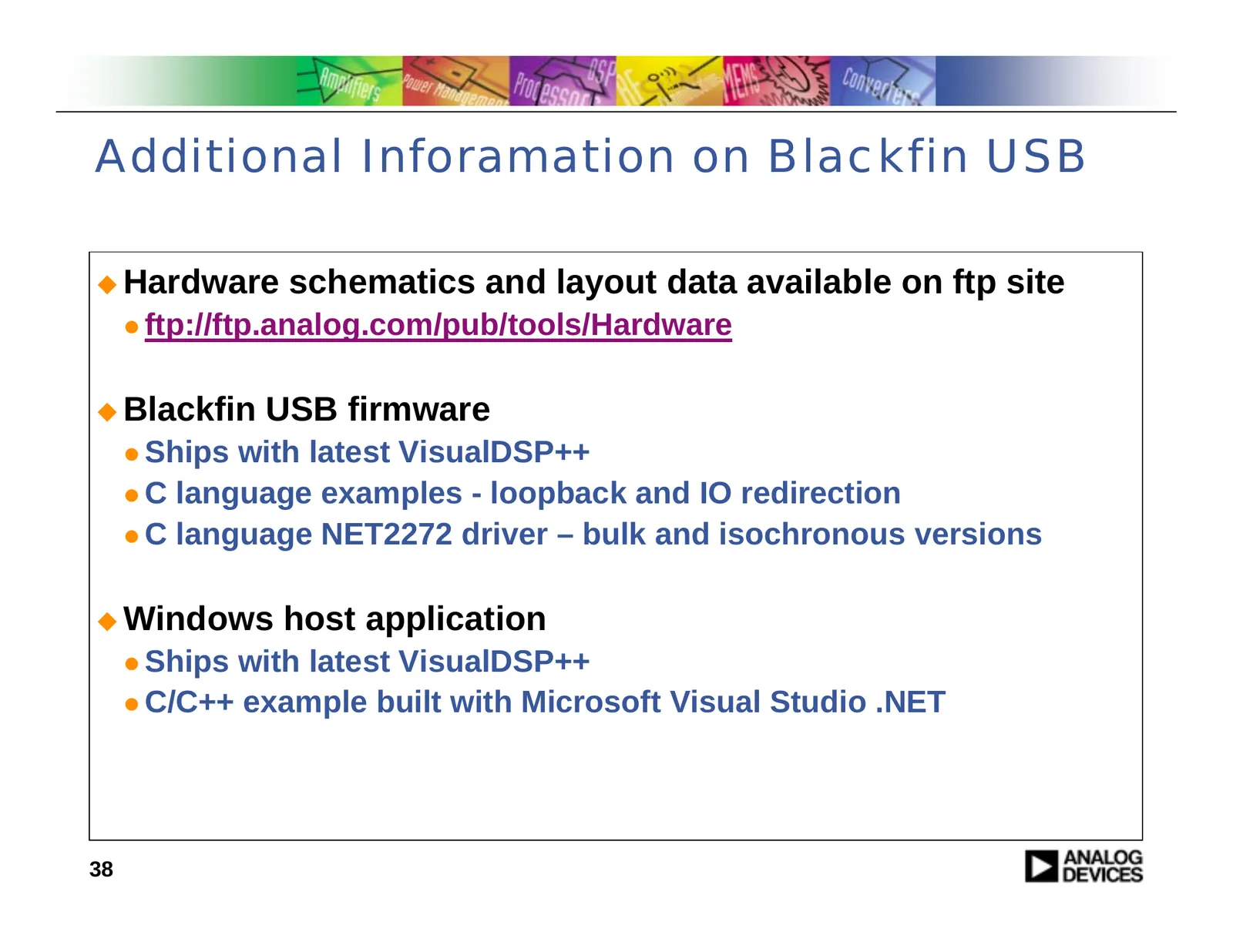
Slide 38: Additional Information on Blackfin USB
Additional Inforamation on Blackfin USB ! Hardware schematics and layout data available on ftp site " ftp://ftp.analog.com/pub/tools/Hardware ! Blackfin USB firmware " Ships with latest VisualDSP++ " C language examples - loopback and IO redirection " C language NET2272 driver – bulk and isochronous
Slide 39: Rapid Development of a MJPEG Video Encoder
Rapid Development of a MJPEG Video Encoder 39
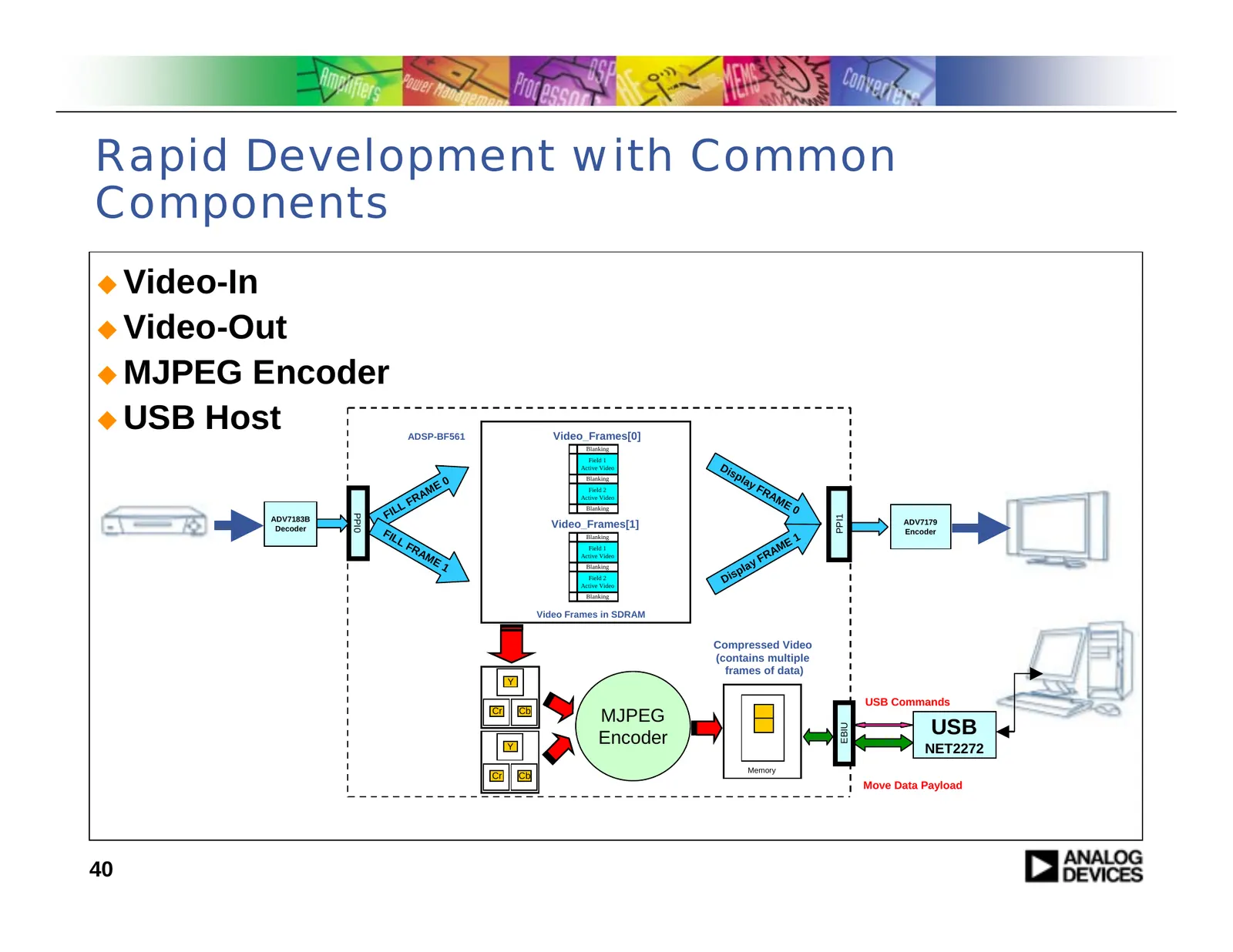
Slide 40: Rapid Development with Common Components
Rapid Development with Common Components ! Video-In ! Video-Out ! MJPEG Encoder ! USB Host ADSP-BF561 Video_Frames[0] Blanking Field 1 Active Video Di sp 0 Blanking lay ME Field 2 FR AM FRA Active Video E L Blanking 0 FIL PPI0 PPI1 ADV7183B ADV7179 Decoder Video_Frames[1] FIL Encoder LF Blanking 1 R
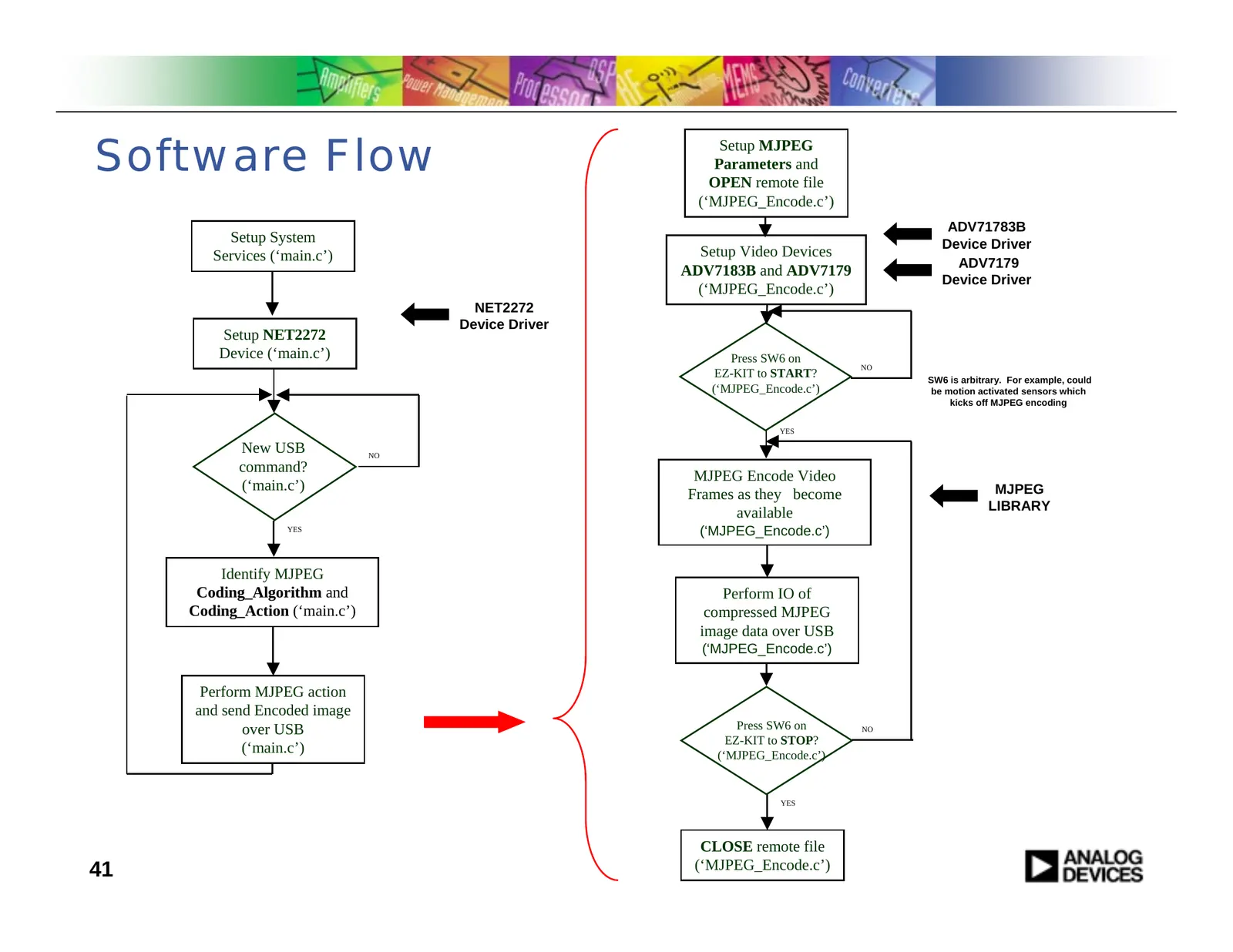
Slide 41: Software Flow
Software Flow Setup MJPEG Parameters and OPEN remote file (‘MJPEG_Encode.c’) ADV71783B Setup System Device Driver Services (‘main.c’) Setup Video Devices ADV7179 ADV7183B and ADV7179 Device Driver (‘MJPEG_Encode.c’) NET2272 Device Driver Setup NET2272 Device (‘main.c’) Press SW6 on NO EZ-KIT to STAR
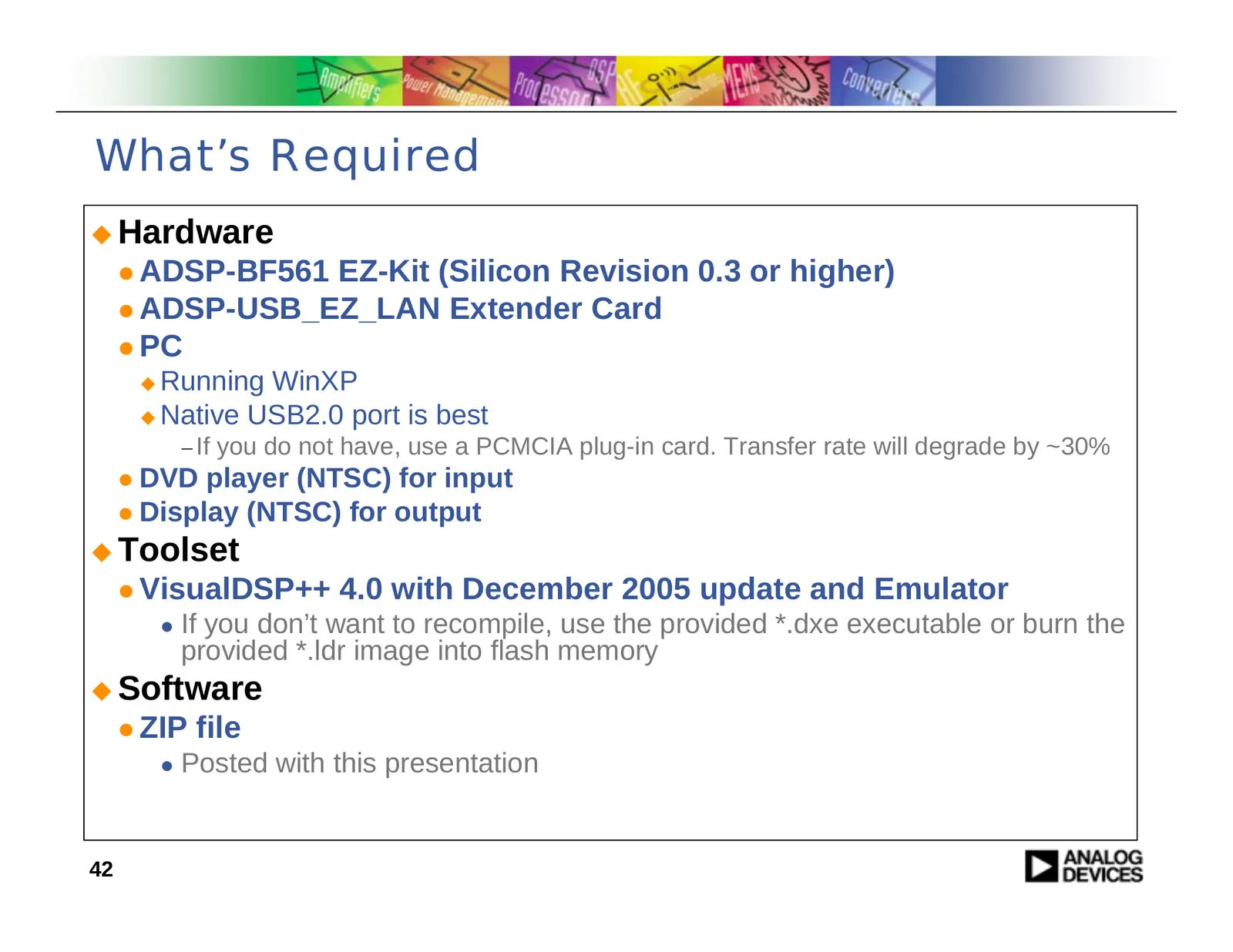
Slide 42: What’s Required
What’s Required ! Hardware " ADSP-BF561 EZ-Kit (Silicon Revision 0.3 or higher) " ADSP-USB_EZ_LAN Extender Card " PC ! Running WinXP ! Native USB2.0 port is best − If you do not have, use a PCMCIA plug-in card. Transfer rate will degrade by ~30% " DVD player (NTSC) for input " Display (NTSC) for out
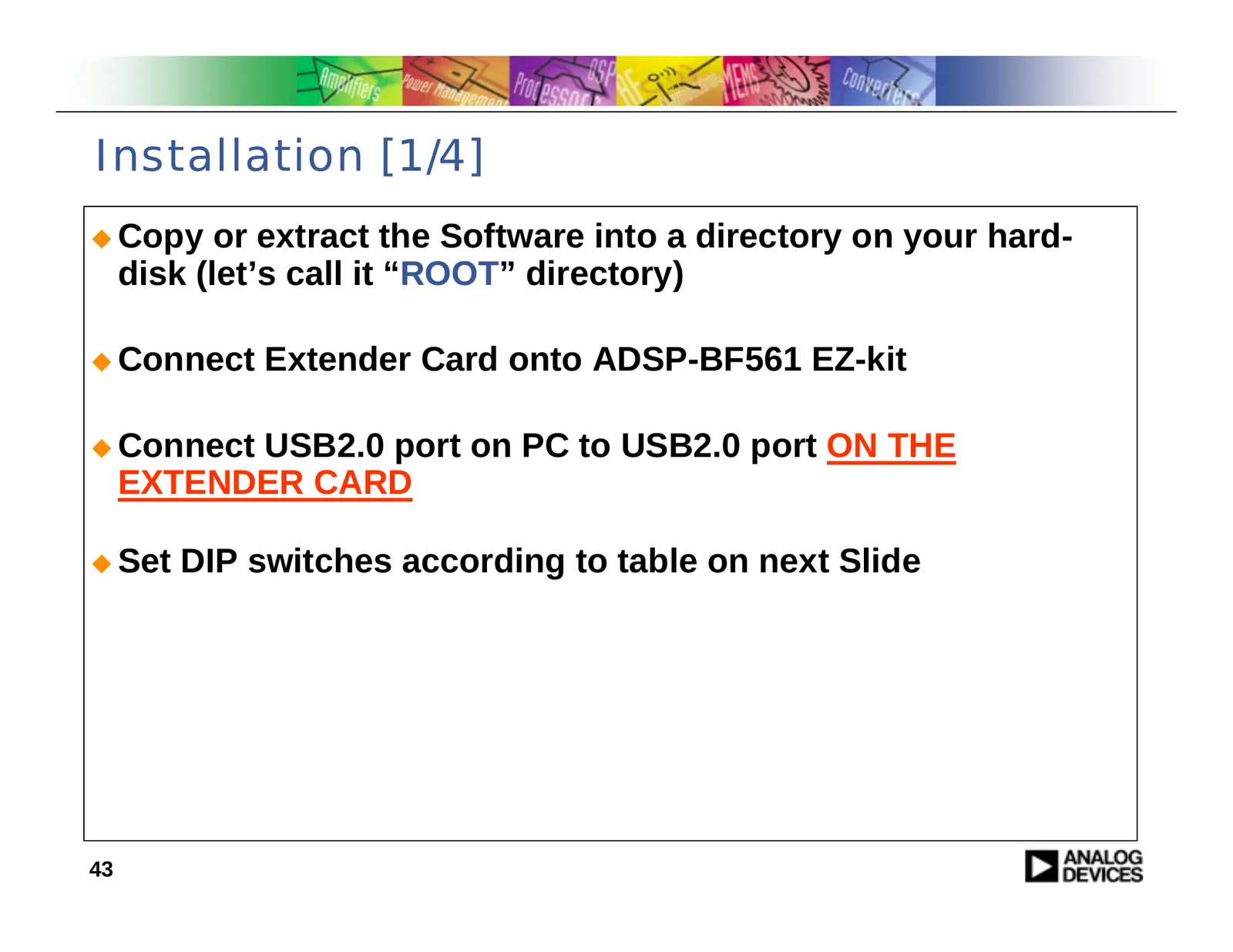
Slide 43: Installation [1/4]
Installation [1/4] ! Copy or extract the Software into a directory on your hard- disk (let’s call it “ROOT” directory) ! Connect Extender Card onto ADSP-BF561 EZ-kit ! Connect USB2.0 port on PC to USB2.0 port ON THE EXTENDER CARD ! Set DIP switches according to table on next Slide 43
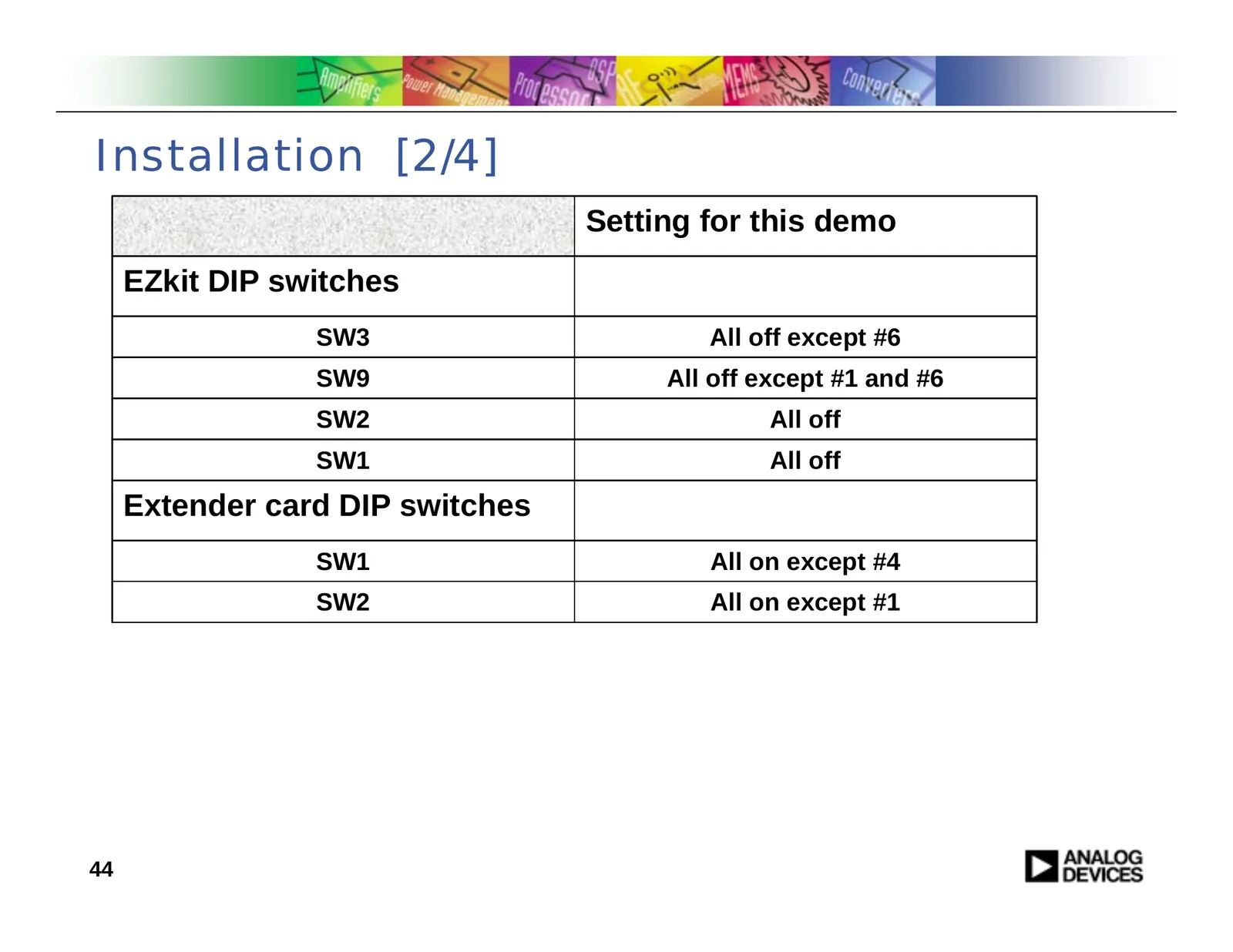
Slide 44: Installation [2/4]
Installation [2/4] Setting for this demo EZkit DIP switches SW3 All off except #6 SW9 All off except #1 and #6 SW2 All off SW1 All off Extender card DIP switches SW1 All on except #4 SW2 All on except #1 44
Slide 45: Hardware System Overview (MJPEG Encoder)
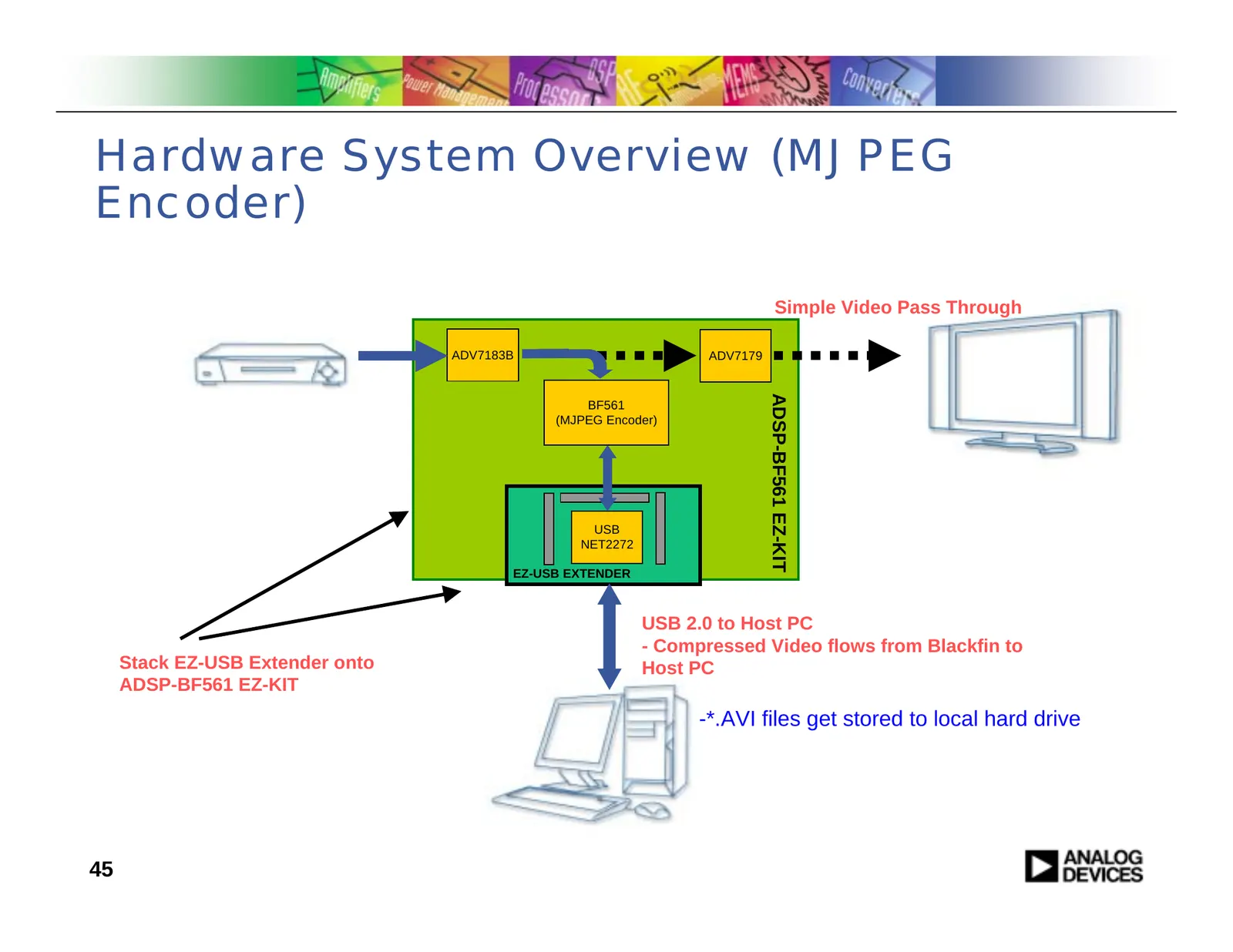
Hardware System Overview (MJPEG Encoder) Simple Video Pass Through ADV7183B ADV7179 ADSP-BF561 EZ-KIT BF561 (MJPEG Encoder) USB NET2272 EZ-USB EXTENDER USB 2.0 to Host PC - Compressed Video flows from Blackfin to Stack EZ-USB Extender onto Host PC ADSP-BF561 EZ-KIT -*.AVI files get stored to local h
Slide 46: Installation [3/4]
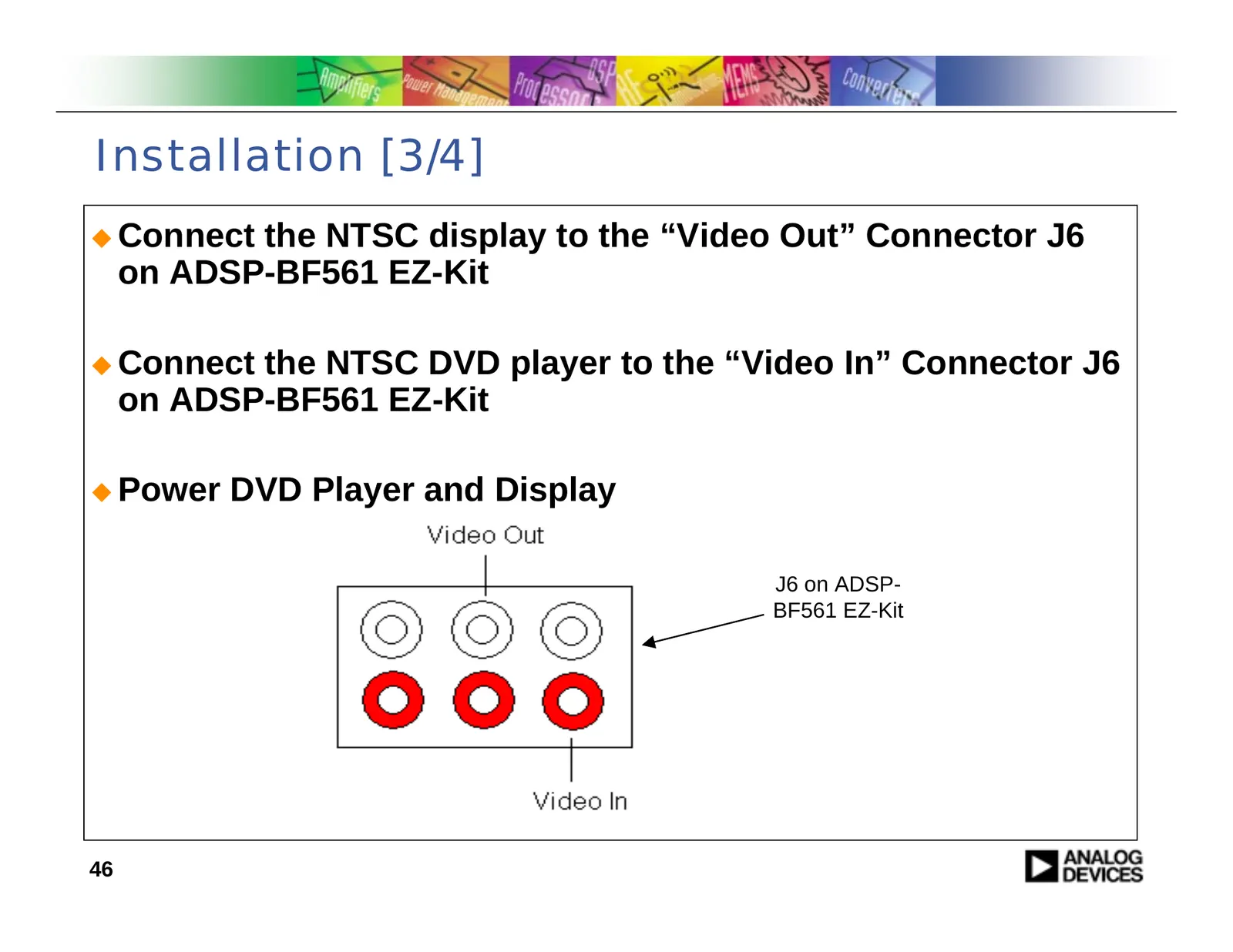
Installation [3/4] ! Connect the NTSC display to the “Video Out” Connector J6 on ADSP-BF561 EZ-Kit ! Connect the NTSC DVD player to the “Video In” Connector J6 on ADSP-BF561 EZ-Kit ! Power DVD Player and Display J6 on ADSP- BF561 EZ-Kit 46
Slide 47: Installation [4/4]
Installation [4/4] ! Power the EZ-Kit ! StartVisualDSP++ ! Load the Image File into flash memory " Use VisualDSP’s “flash programming tool” " Image file is “ROOT\codec_blkfn\jmjpeg_app\BF561\bin ! Exit VisualDSP++ and reset the EZ-kit ! Windows should now detect a new USB Device " Follow the prompts
Slide 48: USAGE [1/3] – General
USAGE [1/3] – General ! Open a DOS prompt Terminal on your PC ! Generally under Start->All Programs->Accessories ! Change Directory to “ROOT\codec_host\hostapp” directory ! With DOS’s “cd” command (if necessary, switch to the hard-disk drive by typing “C:”) ! The “hostapp.exe” application is the mai
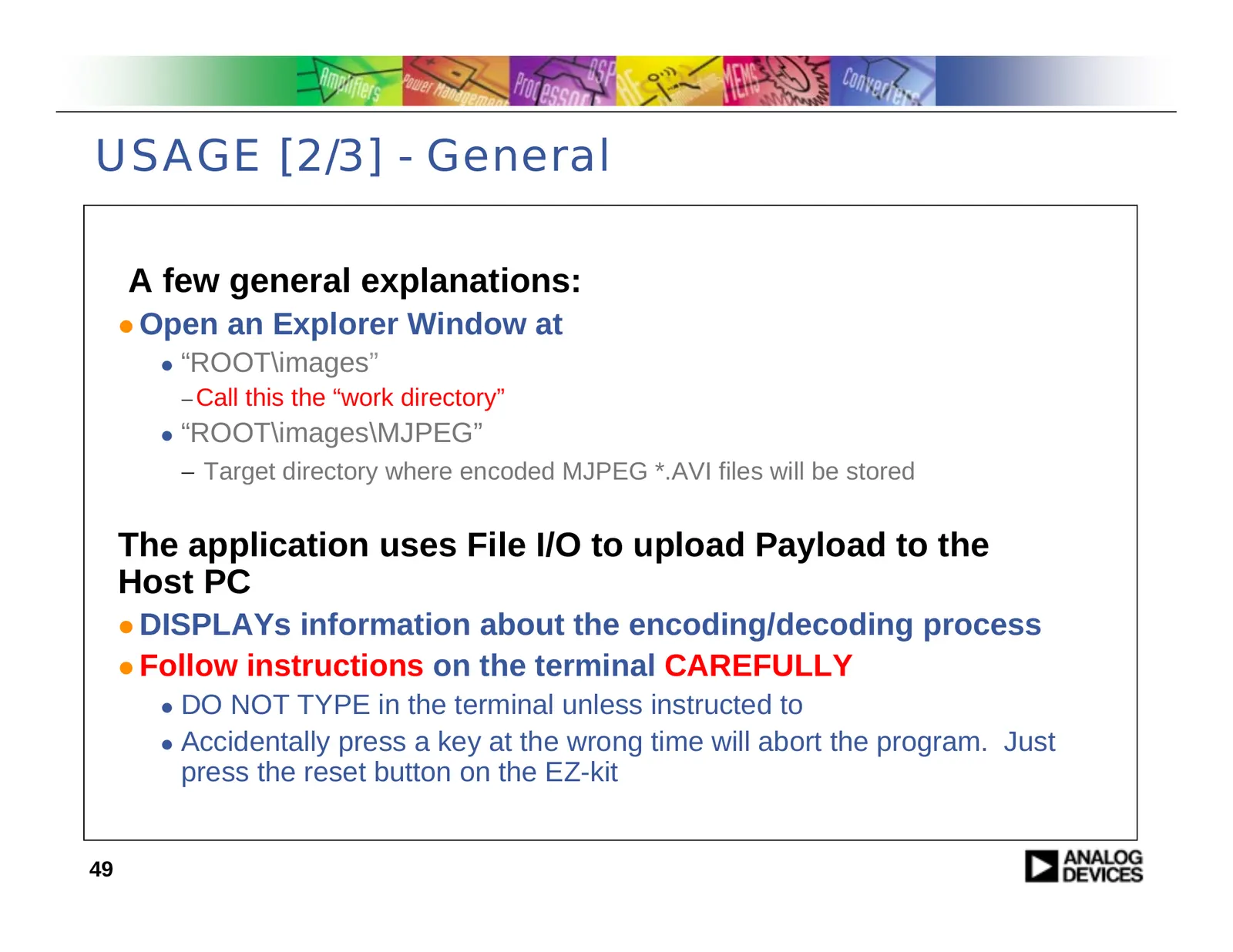
Slide 49: USAGE [2/3] - General
USAGE [2/3] - General A few general explanations: " Open an Explorer Window at " “ROOT\images” − Call this the “work directory” " “ROOT\images\MJPEG” − Target directory where encoded MJPEG *.AVI files will be stored The application uses File I/O to upload Payload to the Host PC " DISPLAYs informatio
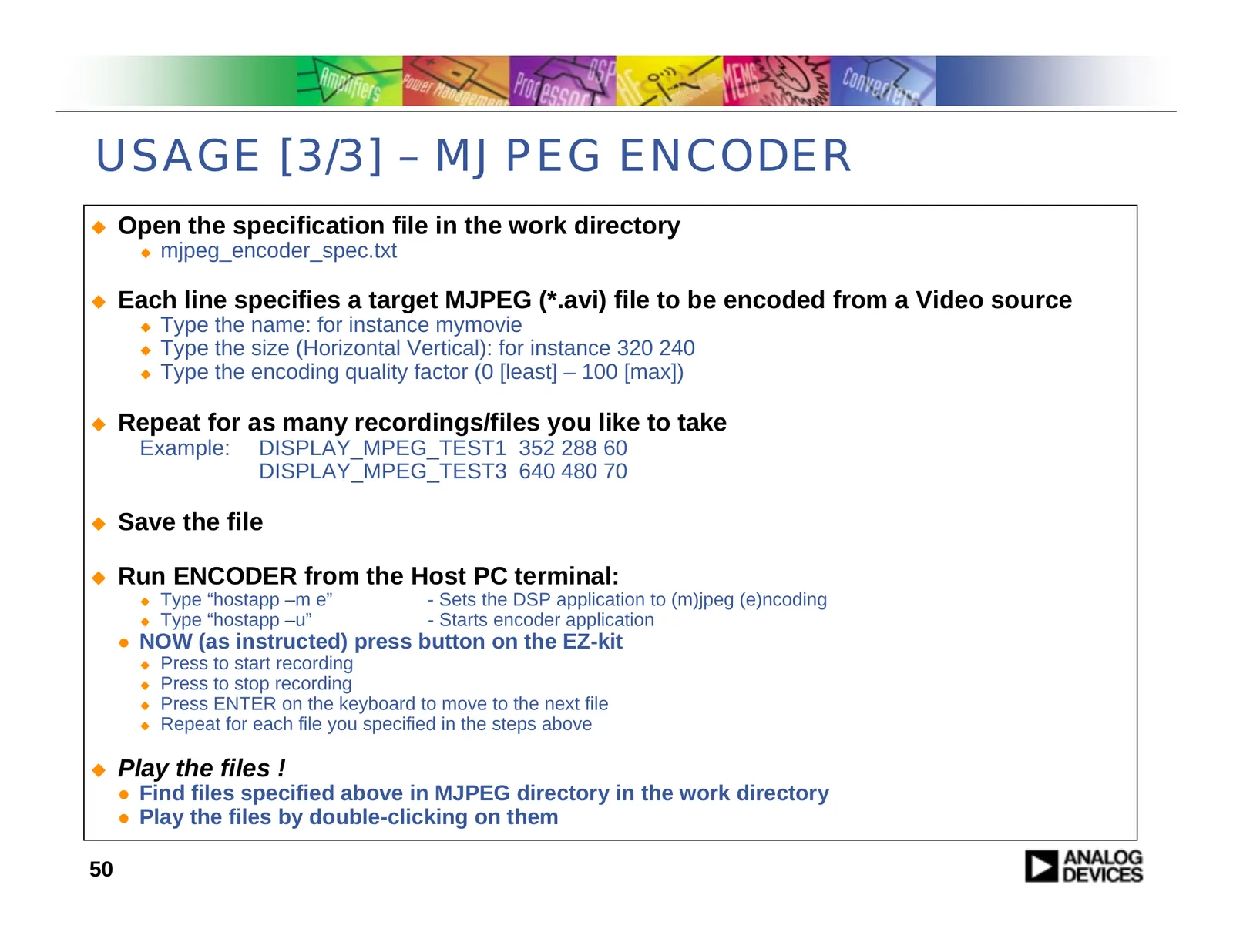
Slide 50: USAGE [3/3] – MJPEG ENCODER
USAGE [3/3] – MJPEG ENCODER ! Open the specification file in the work directory ! mjpeg_encoder_spec.txt ! Each line specifies a target MJPEG (*.avi) file to be encoded from a Video source ! Type the name: for instance mymovie ! Type the size (Horizontal Vertical): for instance 320 240 ! Type the en
Slide 51: Additional Information
Additional Information ! Blackfin USB firmware " Ships with latest VisualDSP++ " C language examples - loopback and IO redirection " C language NET2272 driver – bulk and isochronous versions ! Windows host application " Ships with latest VisualDSP++ " C/C++ example built with Microsoft Visual Studio
Source: Internet Archive copy of analog.com
More decks from Analog Devices, Inc.
 Proxy Contest (February 2026)6 slides · Feb 9, 2026
 Investor Presentation (September 2025)11 slides · Sep 19, 2025
 Investor Presentation (September 2024)14 slides · Sep 27, 2024
 Technical Presentation (May 2024)97 slides · May 30, 2024
 Shareholder Meeting (February 2024)18 slides · Feb 29, 2024
 Investor Presentation (October 2023)12 slides · October 2023