Mastek Limited · NSE:MASTEK
Mastek — Technical Presentation (October 2022)
65 slides from Mastek's technical presentation, October 2022
Slide 1: Cloud Enhancement Services 22D Workforce Management & Payroll Live Webinar
Cloud Enhancement Services 22D - WORKFORCE Live Webinar MANAGEMENT & PAYROLL Empowering you for the next update Host: Rahul Ghike Lead – Service Line Marketing Speaker: Ankur Agrawal Solution Architect
Slide 2: Disclaimer
These advisory webinars are organized to equip you with the latest updates. The content of this session is based on the interpretation of the material and documentation that Oracle has released and is a general guideline/recommendation only. DISCLAIMER
Slide 3: Agenda
AGENDA Our Approach to Oracle Update Our Analysis of Latest Release - New Features - Known Issues (If any) Closing - Q&A Presentation Title | Author | Date Company Confidential © M astek 2022. All rights reserved | 3
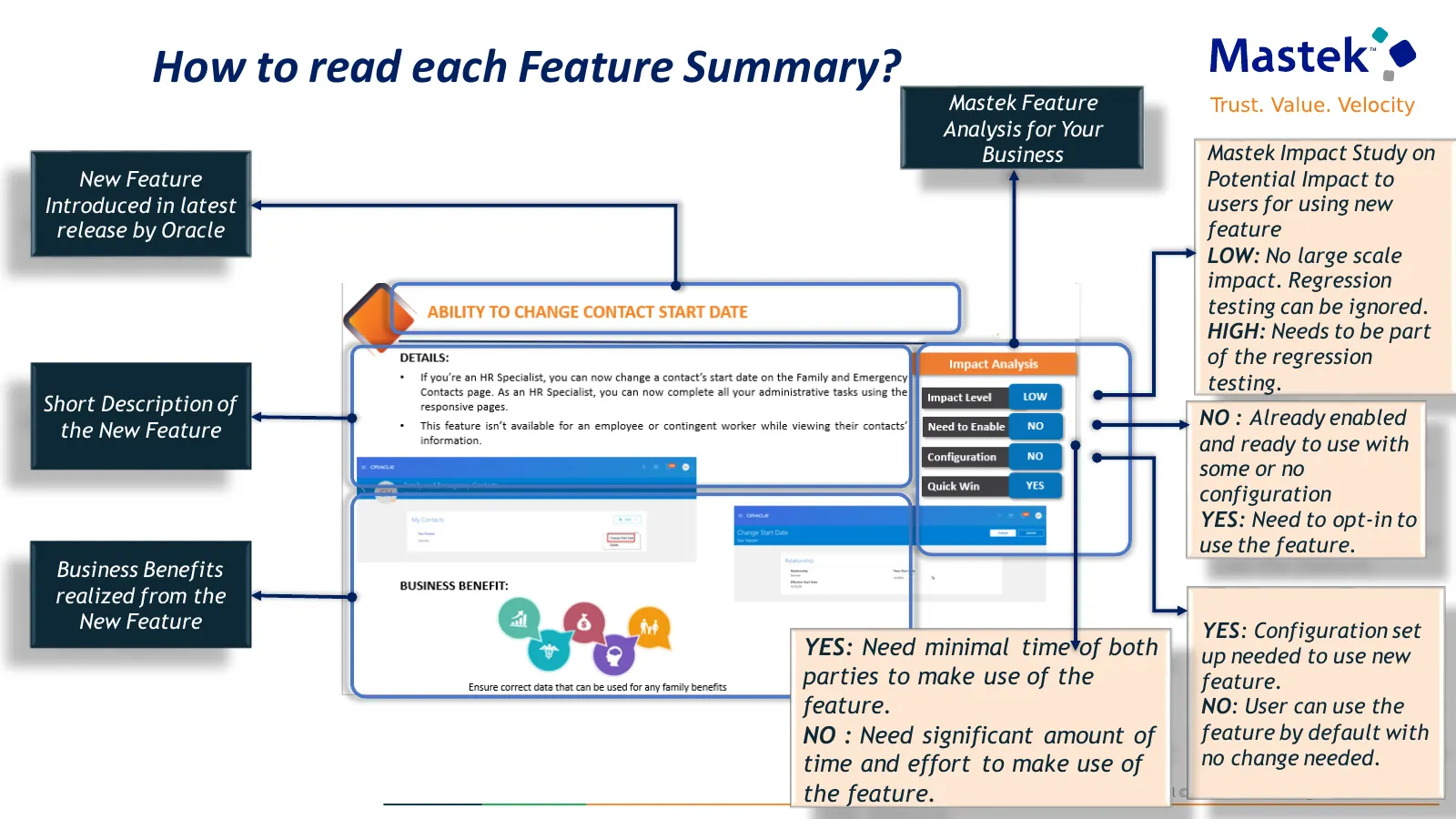
Slide 4: How to read each Feature Summary?
How to read each Feature Summary? Mastek Feature Analysis for Your Business Mastek Impact Study on New Feature Potential Impact to Introduced in latest users for using new release by Oracle feature LOW: No large scale impact. Regression testing can be ignored. HIGH: Needs to be part of the regressio

Slide 5: Our Analysis of Latest Release: New Features
OUR ANALYSIS OF LATEST RELEASE NEW FEATURES
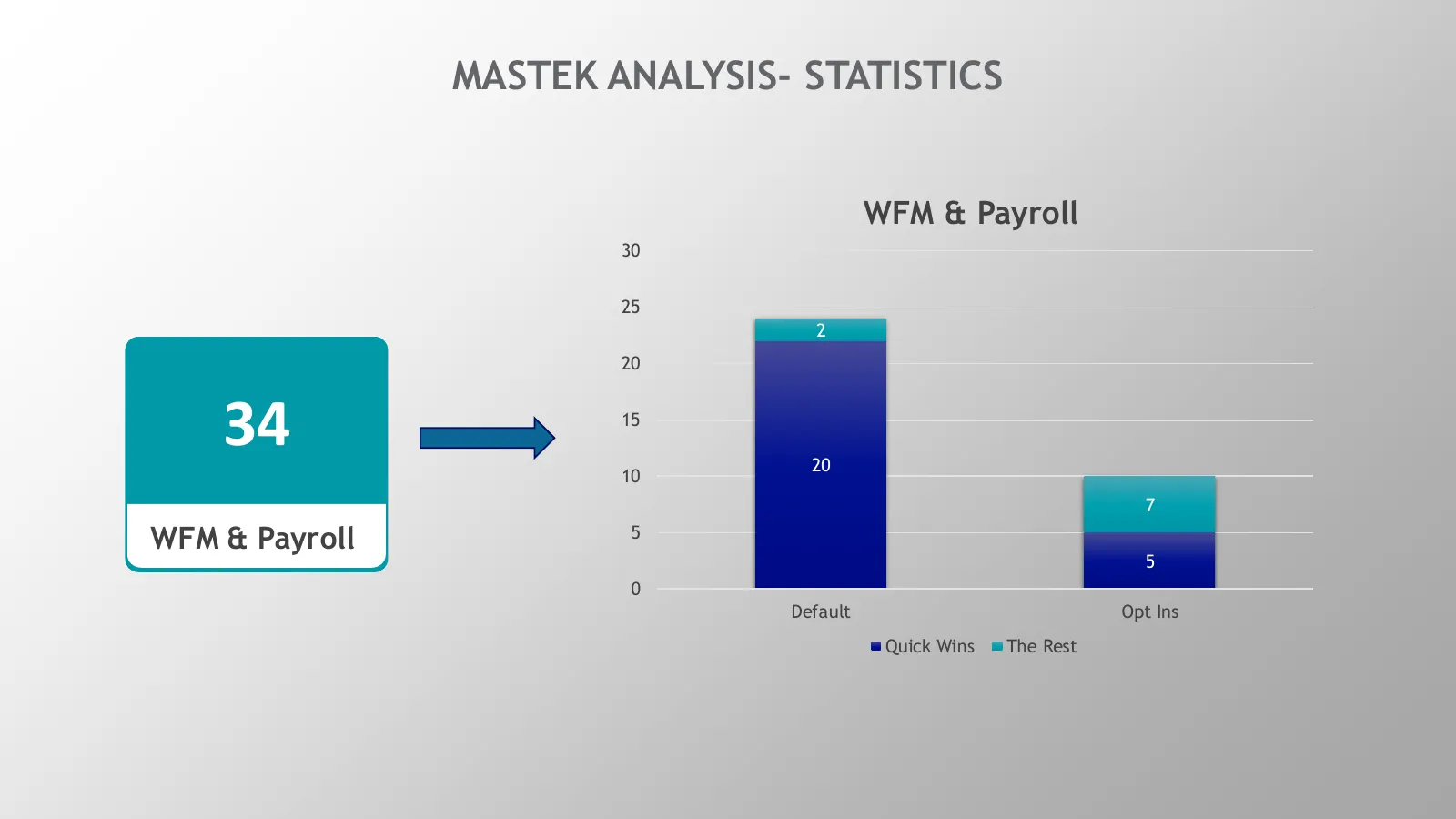
Slide 6: Mastek Analysis - Statistics
MASTEK ANALYSIS- STATISTICS WFM & Payroll 30 25 2 20 34 15 20 10 7 WFM & Payroll 5 5 0 Default Opt Ins Quick Wins The Rest
Slide 7: Mastek Analysis
MASTEK ANALYSIS Presentation Title | Author | Date Company Confidential © M astek 2022. All rights reserved | 7

Slide 8: New Features: Quick Wins – Default with No Configuration
NEW FEATURES QUICK WINS – DEFAULT WITH NO CONFIGURATION
Slide 9: Carryover Balance Consumption and Multiple Year Carryover for Accrual Plans
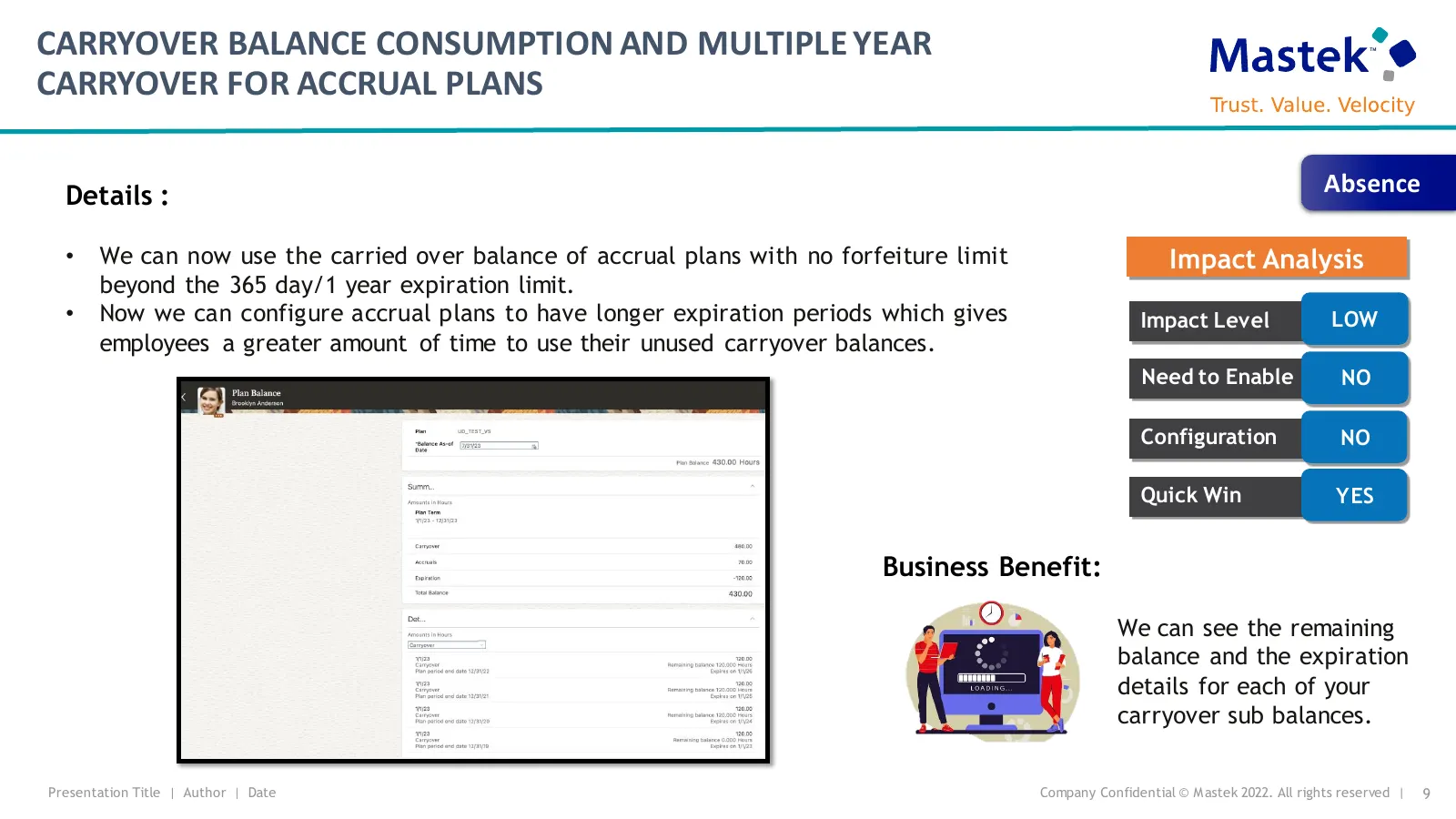
CARRYOVER BALANCE CONSUMPTION AND MULTIPLE YEAR CARRYOVER FOR ACCRUAL PLANS Details : Absence • We can now use the carried over balance of accrual plans with no forfeiture limit Impact Analysis beyond the 365 day/1 year expiration limit. • Now we can configure accrual plans to have longer expiration
Slide 10: Increased Character Limit for Short Code in Calendar Events
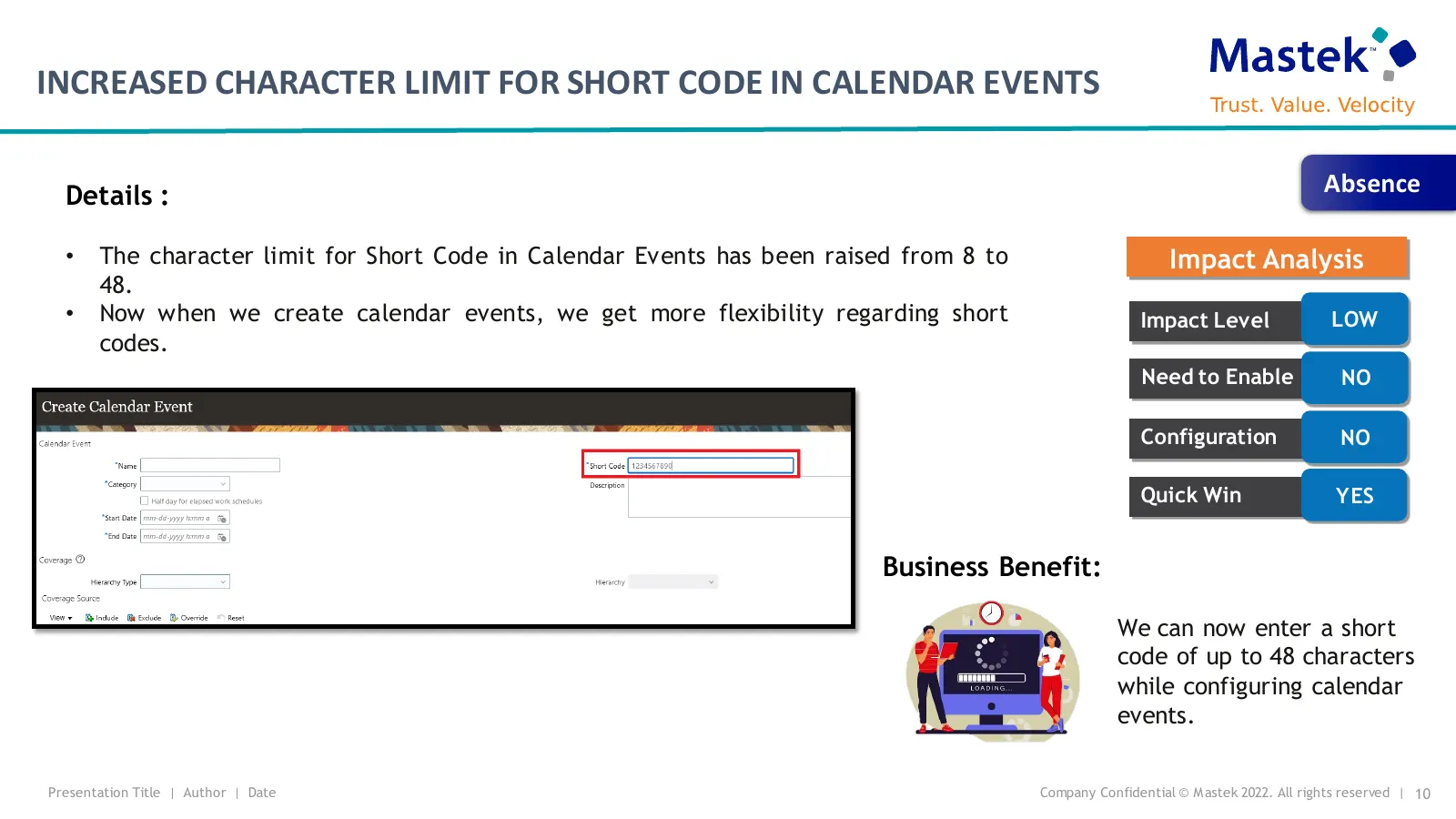
INCREASED CHARACTER LIMIT FOR SHORT CODE IN CALENDAR EVENTS Details : Absence • The character limit for Short Code in Calendar Events has been raised from 8 to Impact Analysis 48. • Now when we create calendar events, we get more flexibility regarding short Impact Level LOW codes. Need to Enable NO
Slide 11: Standardization of Button Logic in Responsive Time Cards
STANDARDIZATION OF BUTTON LOGIC IN RESPONSIVE TIME CARDS Details : Time & Labor • Time card Actions buttons now show all actions the person can do, both available Impact Analysis or unavailable based on their time entry profile, their security setup, and the time card status. Impact Level LOW • The
Slide 12: Integration with the Delete Assignment Process in Global Human Resources
INTEGRATION WITH THE DELETE ASSIGNMENT PROCESS IN GLOBAL HUMAN RESOURCES Details : Time & Labor • Oracle Fusion Global Human Resources prevents a delete assignment process from Impact Analysis completing with success if the assignment has time cards. • The process calls a time and labor API that ide
Slide 13: Enhanced Oracle Time and Payroll Reconciliation Extract
ENHANCED ORACLE TIME AND PAYROLL RECONCILIATION EXTRACT Details : Time & Labor • Time and Payroll Info for Reconciliation extract has been enhanced with the new Impact Analysis Include reconciled rows parameter. • We can use this parameter to exclude or include information with no differences Impact
Slide 14: Generate Time Cards Enhancement
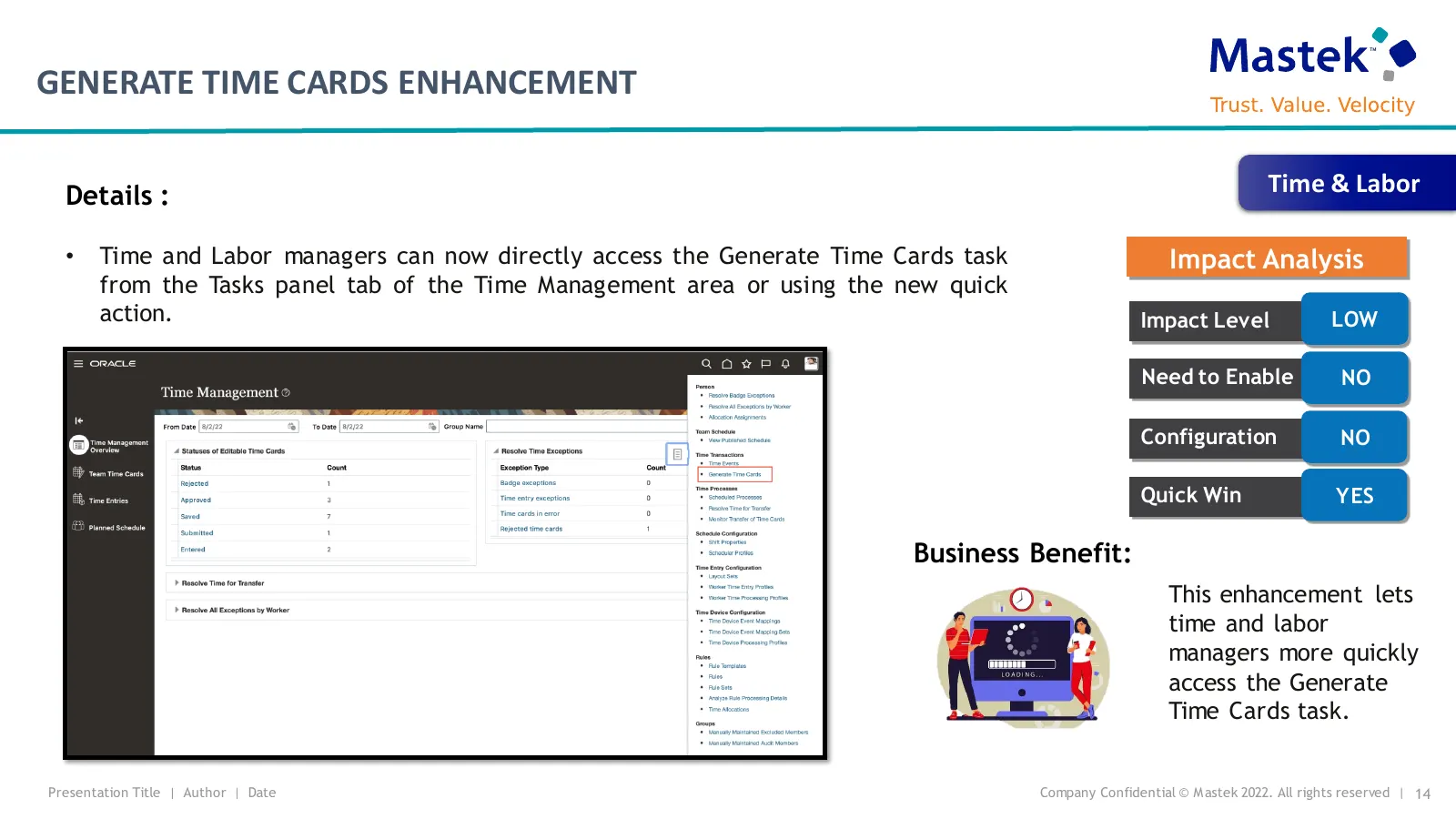
GENERATE TIME CARDS ENHANCEMENT Details : Time & Labor • Time and Labor managers can now directly access the Generate Time Cards task Impact Analysis from the Tasks panel tab of the Time Management area or using the new quick action. Impact Level LOW Need to Enable NO Configuration NO Quick Win YES
Slide 15: Payroll Tasks in Person Spotlight
PAYROLL TASKS IN PERSON SPOTLIGHT Details : Global Payroll • Professional payroll users can see their workers' information in the Person Impact Analysis Spotlight Page, and take certain actions depending on the security configuration of their role. Impact Level LOW • Actions they can do are- - Adjus
Slide 16: Add New Input Values to Unused Elements
ADD NEW INPUT VALUES TO UNUSED ELEMENTS Details : Global Payroll • Previously, if a payroll process was executed after creation of an element, adding Impact Analysis a new input value was not allowed even if the element was not used. • But now we can add a new input value to an element if the entry
Slide 17: Automatically Add Balance Run Dimensions
AUTOMATICALLY ADD BALANCE RUN DIMENSIONS Details : Global Payroll • The associated run dimensions are now added automatically when you use the Impact Analysis Balance Definition page and add or update a group level balance. • This feature is automatically triggered for all balance groups and assignm
Slide 18: Calculation Entries Display Reserved Input Values
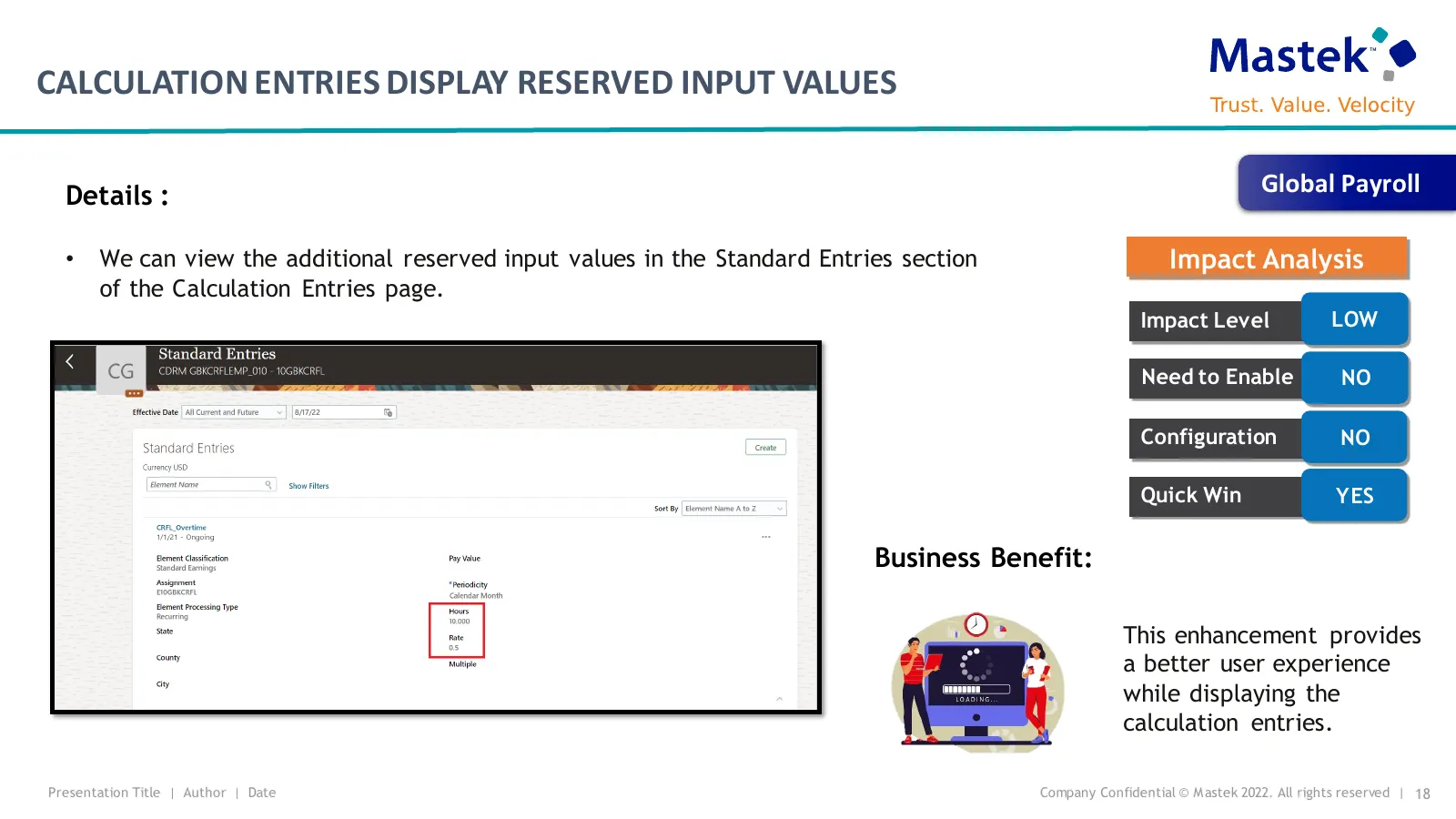
CALCULATION ENTRIES DISPLAY RESERVED INPUT VALUES Details : Global Payroll • We can view the additional reserved input values in the Standard Entries section Impact Analysis of the Calculation Entries page. Impact Level LOW Need to Enable NO Configuration NO Quick Win YES Business Benefit: This enha
Slide 19: New Process Event Action Flow for Manual Event Actions
NEW PROCESS EVENT ACTION FLOW FOR MANUAL EVENT ACTIONS Details : Global Payroll • Now event groups and event actions can be used to control the employees Impact Analysis that are included in processes such as to generate HCM Rates and time card reprocessing. Impact Level LOW • In case event action i
Slide 20: Flow Messages in CSV Format
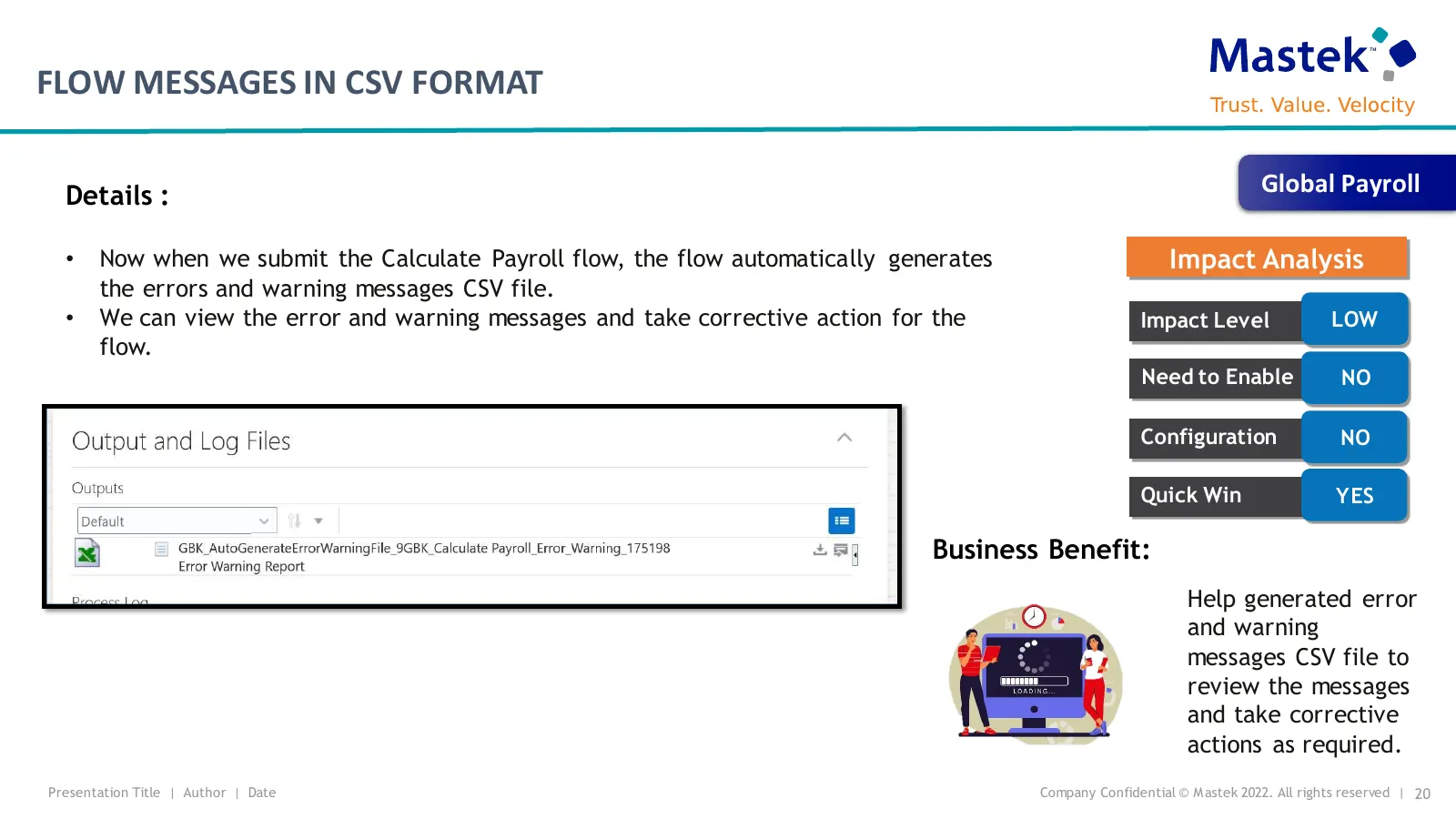
FLOW MESSAGES IN CSV FORMAT Details : Global Payroll • Now when we submit the Calculate Payroll flow, the flow automatically generates Impact Analysis the errors and warning messages CSV file. • We can view the error and warning messages and take corrective action for the Impact Level LOW flow. Need
Slide 21: Logging and Monitoring for the Payroll Background Process
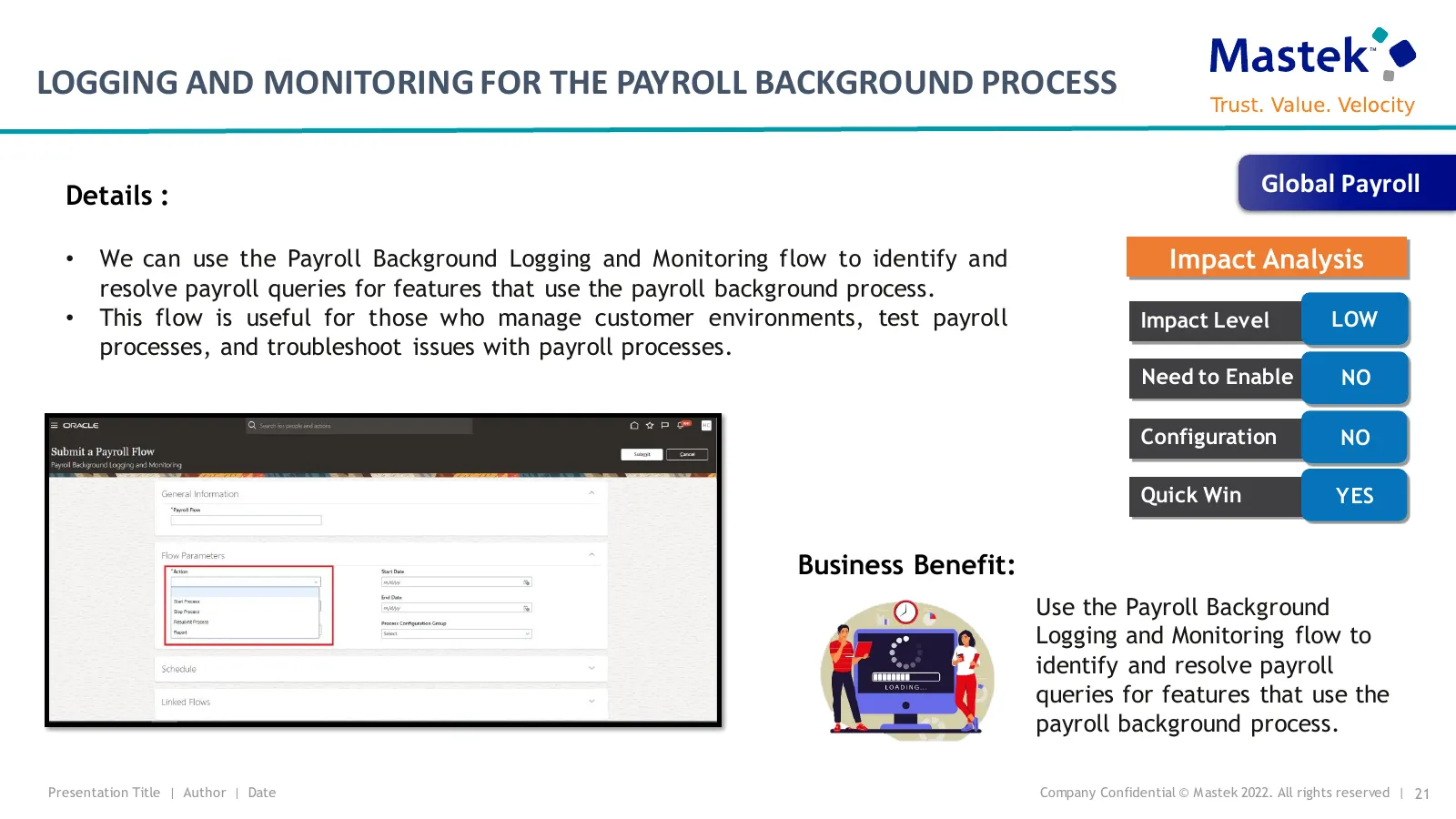
LOGGING AND MONITORING FOR THE PAYROLL BACKGROUND PROCESS Details : Global Payroll • We can use the Payroll Background Logging and Monitoring flow to identify and Impact Analysis resolve payroll queries for features that use the payroll background process. • This flow is useful for those who manage
Slide 22: View Payroll Costing Results for a Subledger Journal Entry
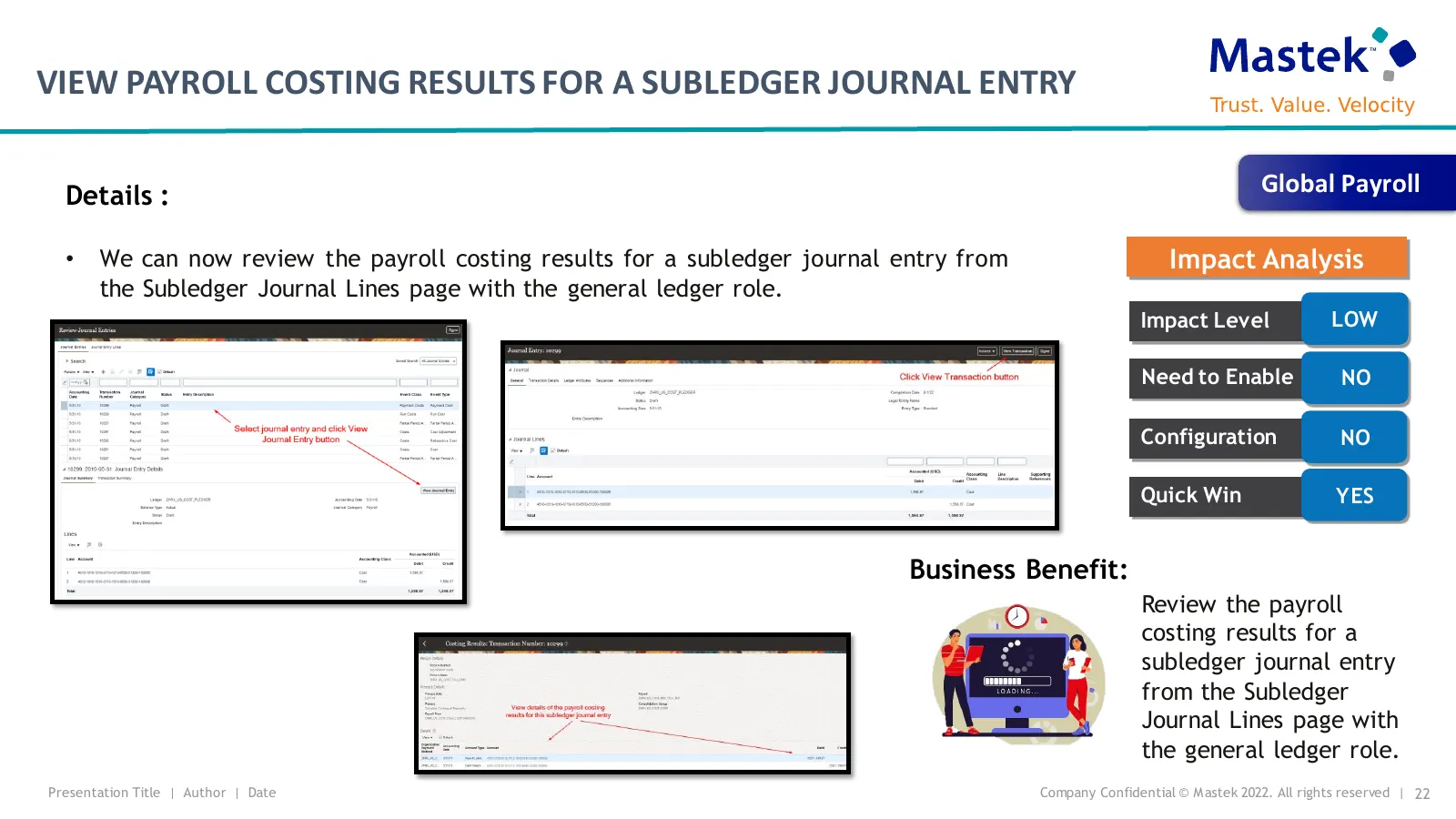
VIEW PAYROLL COSTING RESULTS FOR A SUBLEDGER JOURNAL ENTRY Details : Global Payroll • We can now review the payroll costing results for a subledger journal entry from Impact Analysis the Subledger Journal Lines page with the general ledger role. Impact Level LOW Need to Enable NO Configuration NO Qu
Slide 23: Intermediary Bank Account Details in Payments XML
INTERMEDIARY BANK ACCOUNT DETAILS IN PAYMENTS XML Details : Global Payroll • We can now include intermediary bank account details, now stored in the Impact Analysis Payments XML, in the EFT file when it's required to facilitate an inter-country payment. Impact Level LOW • Use the Financials SOAP ser
Slide 24: Global Transfer for Student Loan and Postgraduate Loan Components with Future-Dated Updates
GLOBAL TRANSFER FOR STUDENT LOAN AND POSTGRADUATE LOAN COMPONENTS WITH FUTURE-DATED UPDATES UK Payroll Details : • We can now copy future-dated updates for the Court Order and Student Loans Impact Analysis calculation cards during the global transfer process. • The application creates Student Loan o
Slide 25: Start-of-Year Flow Enhancement for Exempt Details Update Options
START-OF-YEAR FLOW ENHANCEMENT FOR EXEMPT DETAILS UPDATE OPTIONS US Payroll Details : • The Start-of-Year flow has been enhanced with the inclusion of additional options Impact Analysis when running the Exempt details update data type. • These new options allow more flexibility when resetting exempt
Slide 26: Start-of-Year Flow Enhancement for Limit Update
START-OF-YEAR FLOW ENHANCEMENT FOR 457 LIMIT UPDATE US Payroll Details : • The Start-of-Year flow has been enhanced when running the 457 limit update data Impact Analysis type. • The flow now end-dates the Accumulated Under-Utilized Contributions for Special Impact Level LOW 457 (b) Catch-Up calcula
Slide 27: Perform Multiple Tax Balance Adjustments for Third-Party Payments Using HCM Data Loader
PERFORM MULTIPLE TAX BALANCE ADJUSTMENTS FOR THIRD-PARTY PAYMENTS USING HCM DATA LOADER US Payroll Details : • Performing tax balance adjustments for third-party payments for multiple Impact Analysis employees got easier. • We can now use HCM data loader (HDL) to perform these balance adjustments in
Slide 28: Periodic Payroll Archive Enhancement to Capture Employer Phone Number
PERIODIC PAYROLL ARCHIVE ENHANCEMENT TO CAPTURE EMPLOYER PHONE NUMBER US Payroll Details : • The Periodic Payroll Archive process have been augmented to capture employer Impact Analysis phone number defined at the legal reporting unit level. • This enables us to include it on employee payslips. Impa

Slide 29: New Features: Quick Wins – Default with Yes Configuration
NEW FEATURES QUICK WINS – DEFAULT WITH YES CONFIGURATION
Slide 30: Optimize Performance of Multi-Threaded Processes
OPTIMIZE PERFORMANCE OF MULTI-THREADED PROCESSES Details : Global Payroll • This automatic multi-thread feature identifies and assigns the number of threads Impact Analysis and the chunk size to optimize the process. • It supports all multi-threaded payroll processes and predefined HCM Extracts. Imp
Slide 31: Cancel Action
CANCEL ACTION Details : Global Payroll • With this enhancement we can use the Cancel action in the Checklist and Results Impact Analysis Summary UIs to cancel all ESS threads of a flow task that are in In Progress status. • We can use this Cancel action in the Checklist and Results Summary UIs to ca
Slide 32: New Features: Quick Wins – Opt Ins
NEW FEATURES QUICK WINS – OPT INS
Slide 33: New Payroll Duty Roles
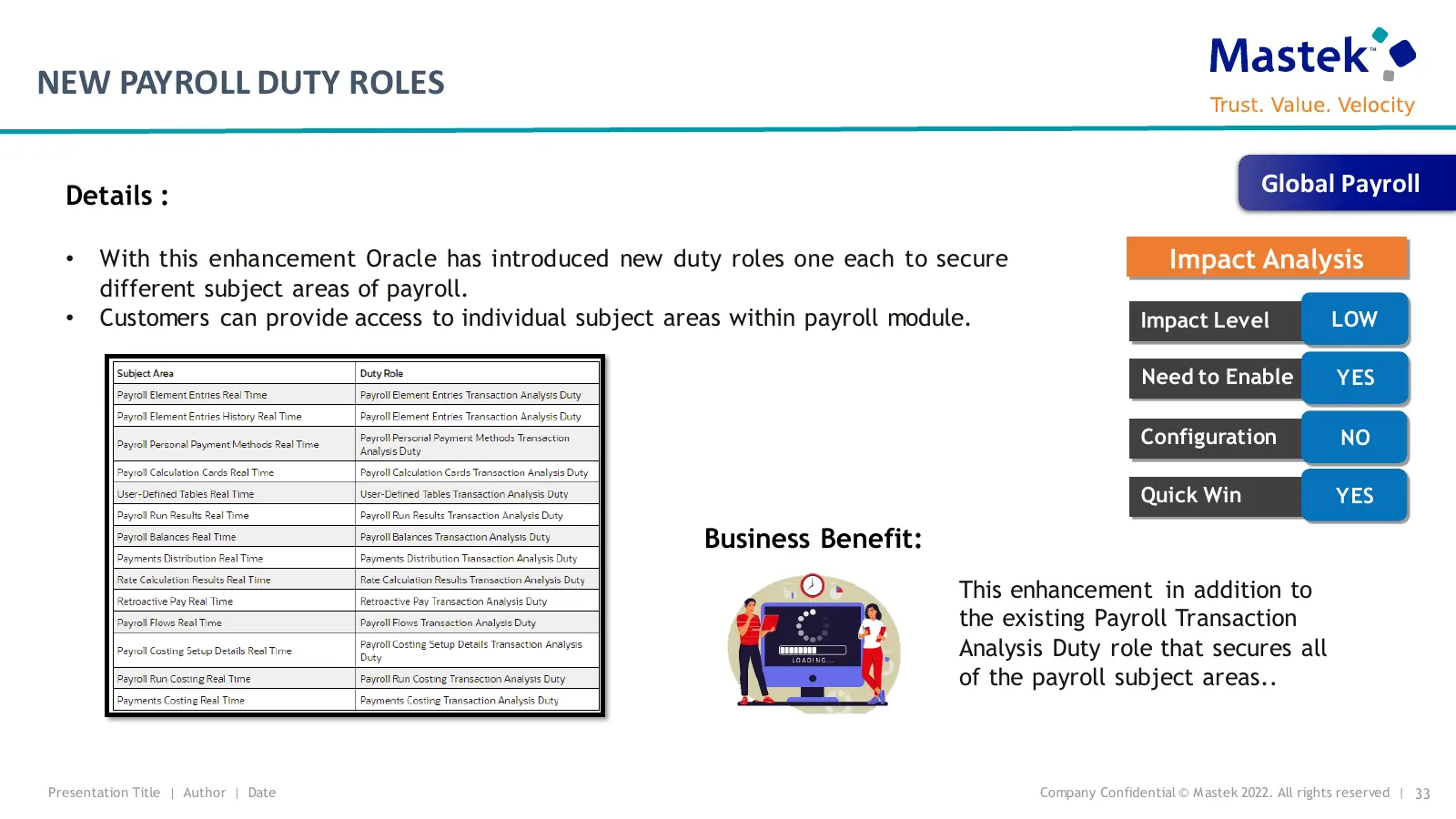
NEW PAYROLL DUTY ROLES Details : Global Payroll • With this enhancement Oracle has introduced new duty roles one each to secure Impact Analysis different subject areas of payroll. • Customers can provide access to individual subject areas within payroll module. Impact Level LOW Need to Enable YES Co
Slide 34: Support for Time Updates in Payroll: Upgrade Time Elements
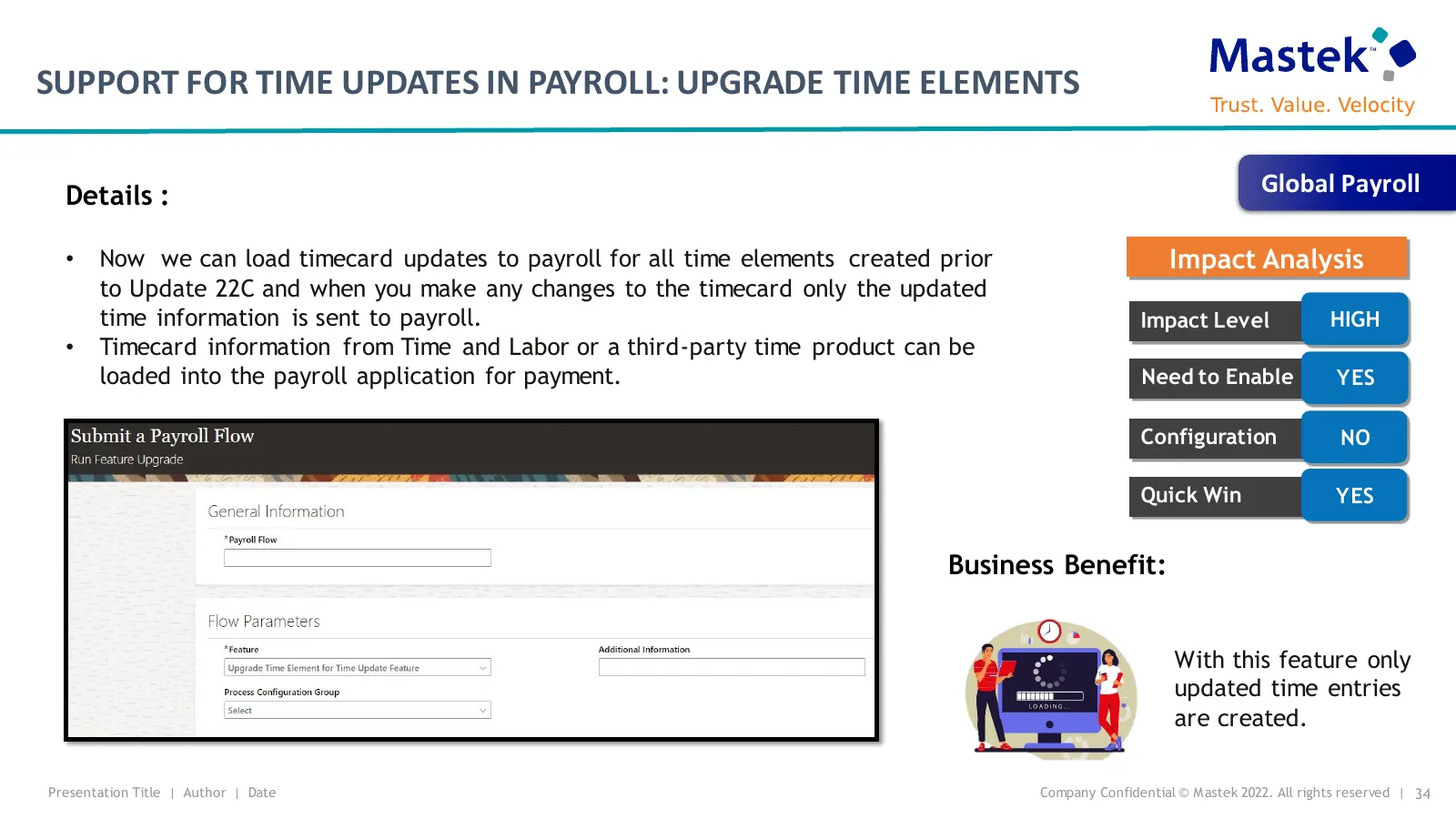
SUPPORT FOR TIME UPDATES IN PAYROLL: UPGRADE TIME ELEMENTS Details : Global Payroll • Now we can load timecard updates to payroll for all time elements created prior Impact Analysis to Update 22C and when you make any changes to the timecard only the updated time information is sent to payroll. Impa
Slide 35: View Run Results with Element Entry Result Identifier
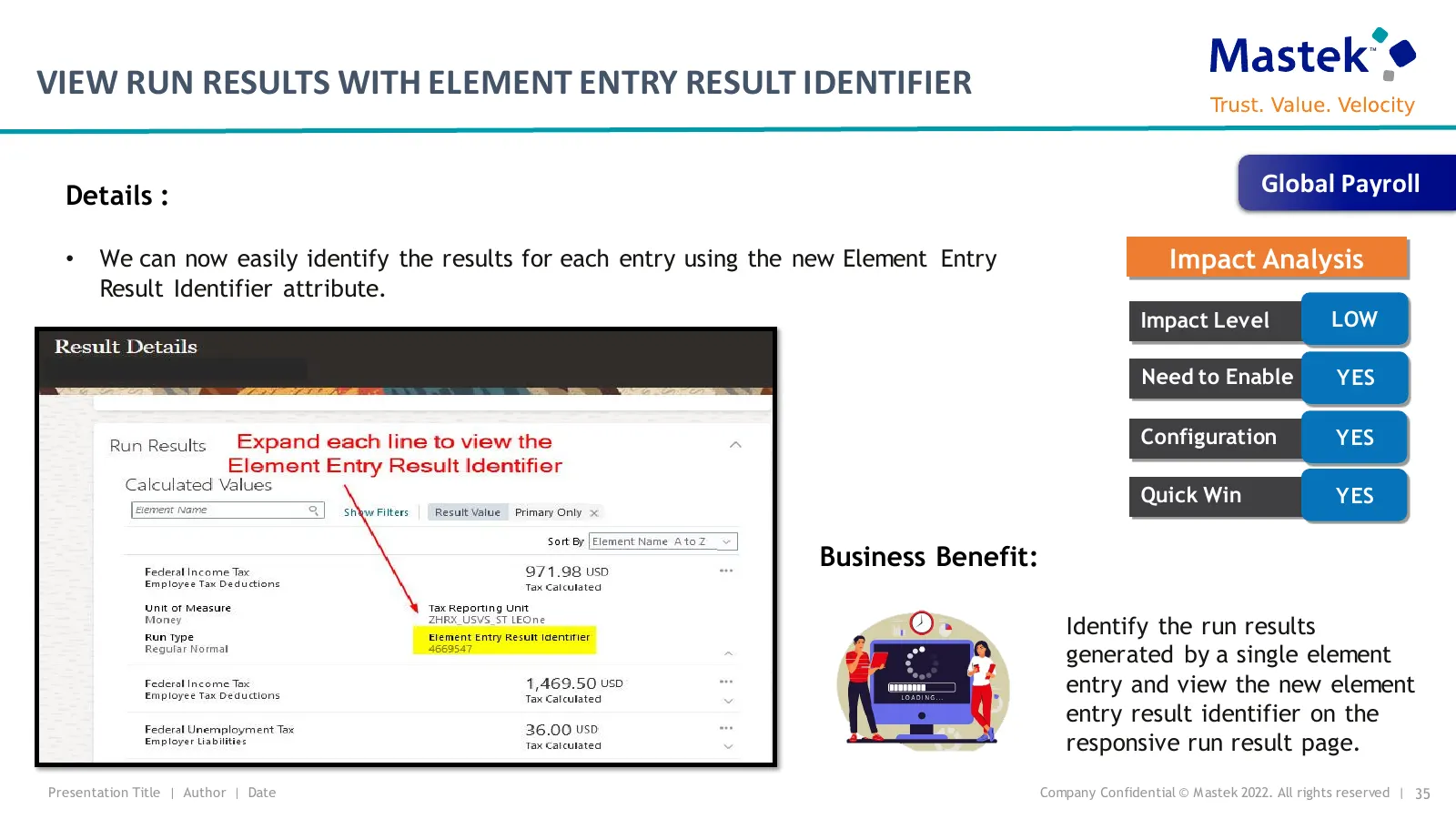
VIEW RUN RESULTS WITH ELEMENT ENTRY RESULT IDENTIFIER Details : Global Payroll • We can now easily identify the results for each entry using the new Element Entry Impact Analysis Result Identifier attribute. Impact Level LOW Need to Enable YES Configuration YES Quick Win YES Business Benefit: Identi
Slide 36: Preview Payslips and Year-End Documents
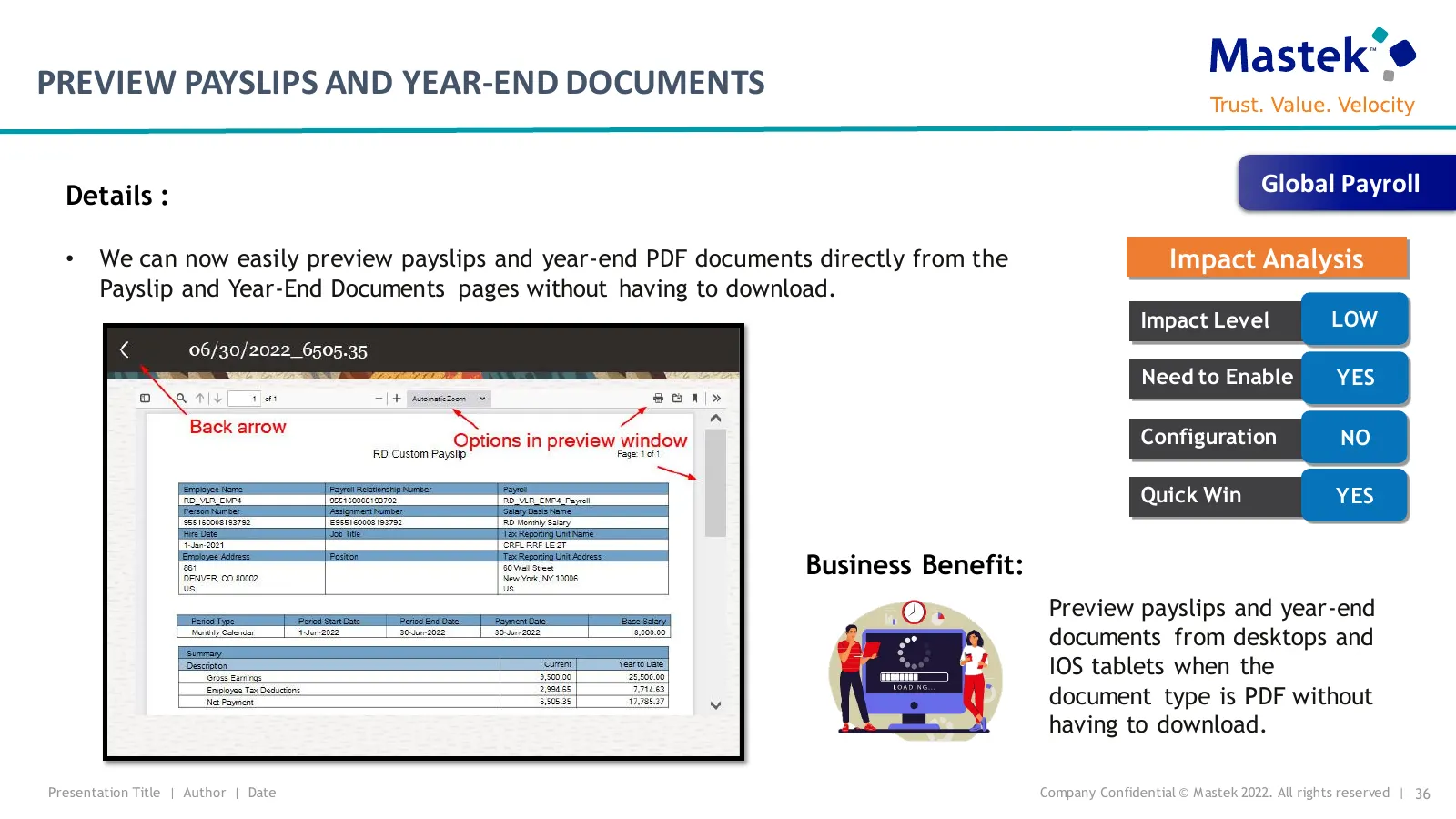
PREVIEW PAYSLIPS AND YEAR-END DOCUMENTS Details : Global Payroll • We can now easily preview payslips and year-end PDF documents directly from the Impact Analysis Payslip and Year-End Documents pages without having to download. Impact Level LOW Need to Enable YES Configuration NO Quick Win YES Busin
Slide 37: Payroll Core Support for Defaulting Tax Reporting Unit
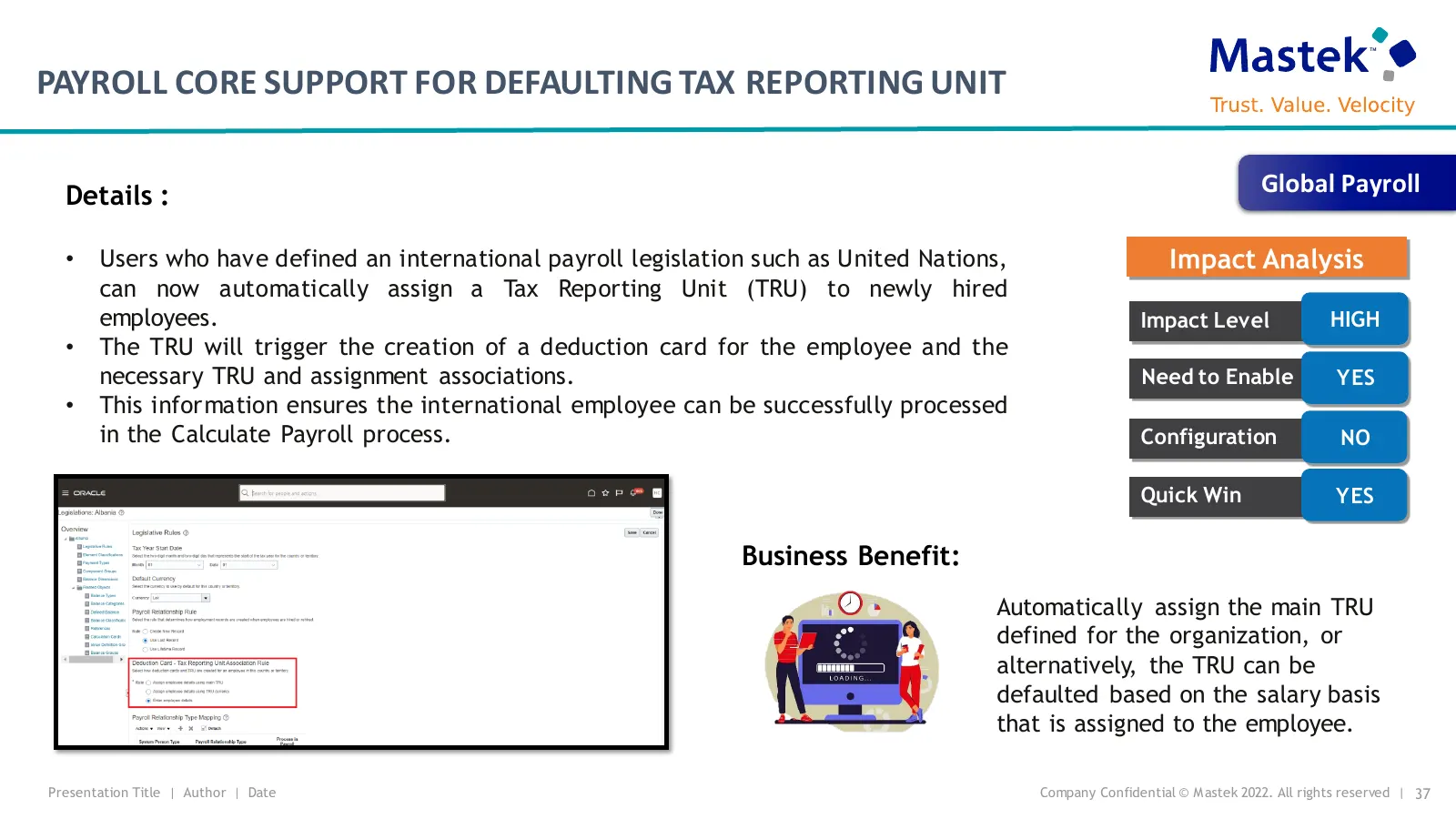
PAYROLL CORE SUPPORT FOR DEFAULTING TAX REPORTING UNIT Details : Global Payroll • Users who have defined an international payroll legislation such as United Nations, Impact Analysis can now automatically assign a Tax Reporting Unit (TRU) to newly hired employees. Impact Level HIGH • The TRU will tri

Slide 38: New Features: The Rest
Mastek*@ Trust. Value. Velocity NEW FEATURES THE REST
Slide 39: Autocomplete Rules for Childbirth and Placement Dates Business Object in Absence Management
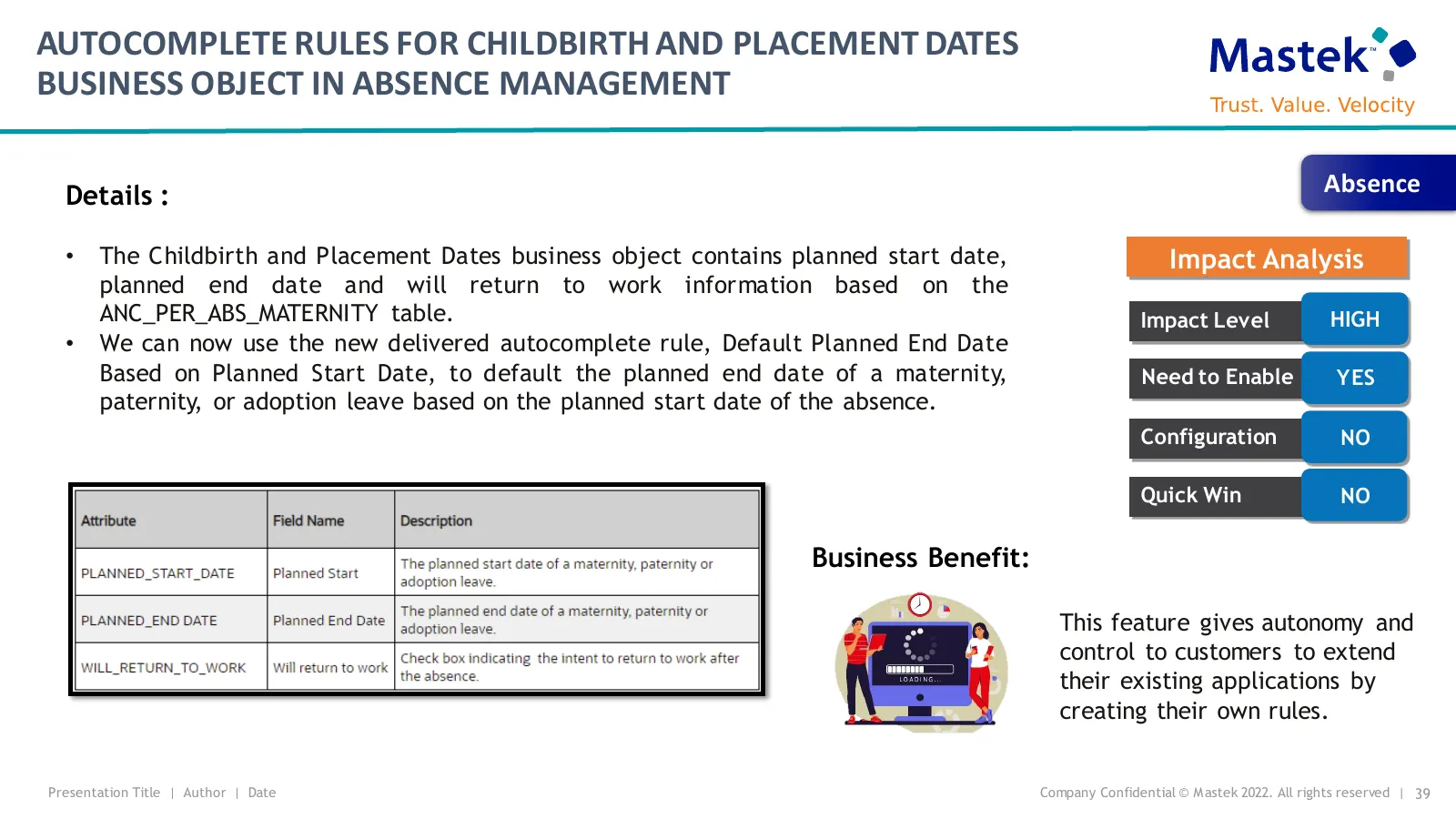
AUTOCOMPLETE RULES FOR CHILDBIRTH AND PLACEMENT DATES BUSINESS OBJECT IN ABSENCE MANAGEMENT Details : Absence • The Childbirth and Placement Dates business object contains planned start date, Impact Analysis planned end date and will return to work information based on the ANC_PER_ABS_MATERNITY tabl
Slide 40: Audit Enabled for Accrual Tables
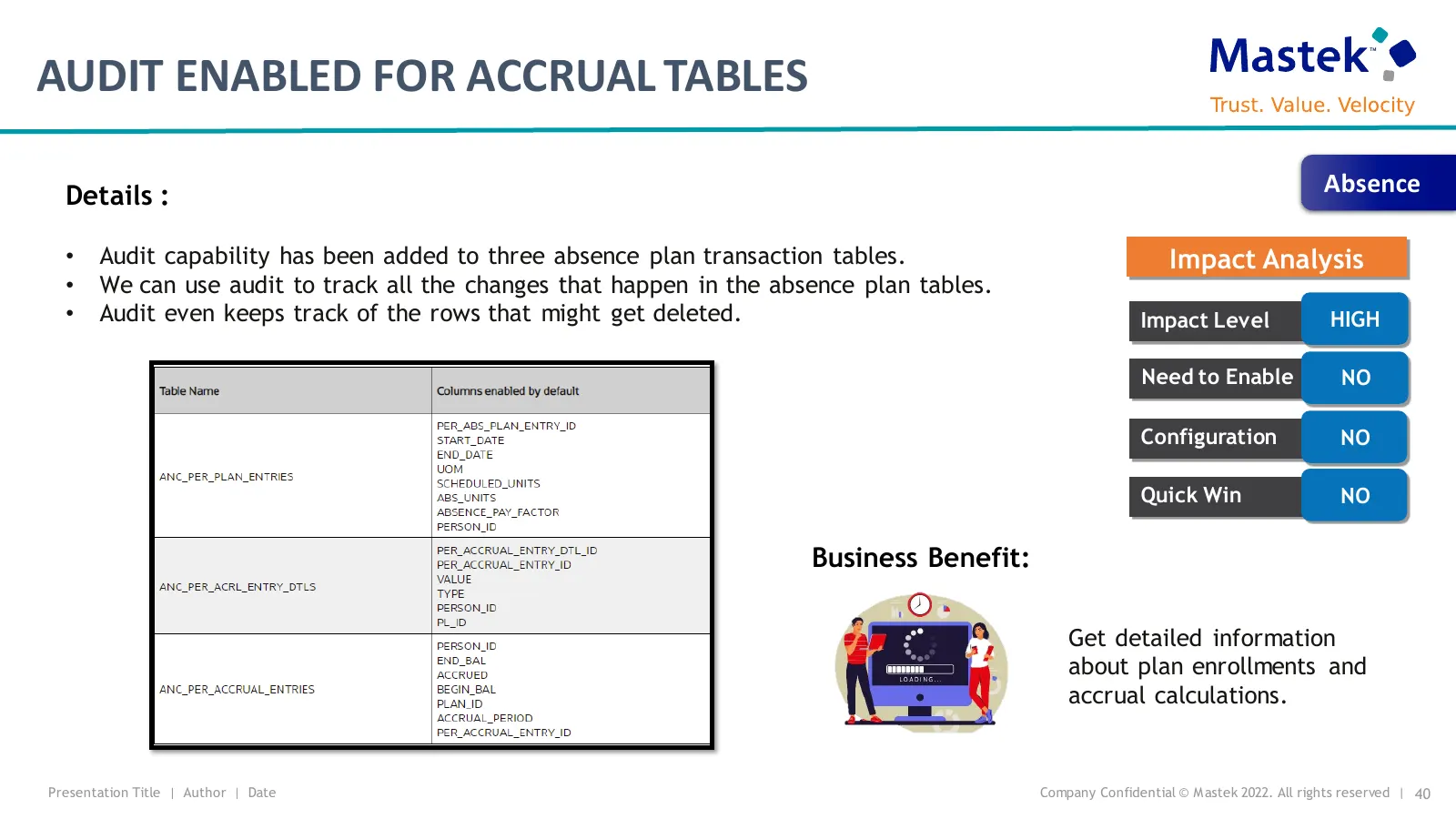
AUDIT ENABLED FOR ACCRUAL TABLES Details : Absence • Audit capability has been added to three absence plan transaction tables. Impact Analysis • We can use audit to track all the changes that happen in the absence plan tables. • Audit even keeps track of the rows that might get deleted. Impact Level
Slide 41: Team Schedule Self-Service Pages Enhancements
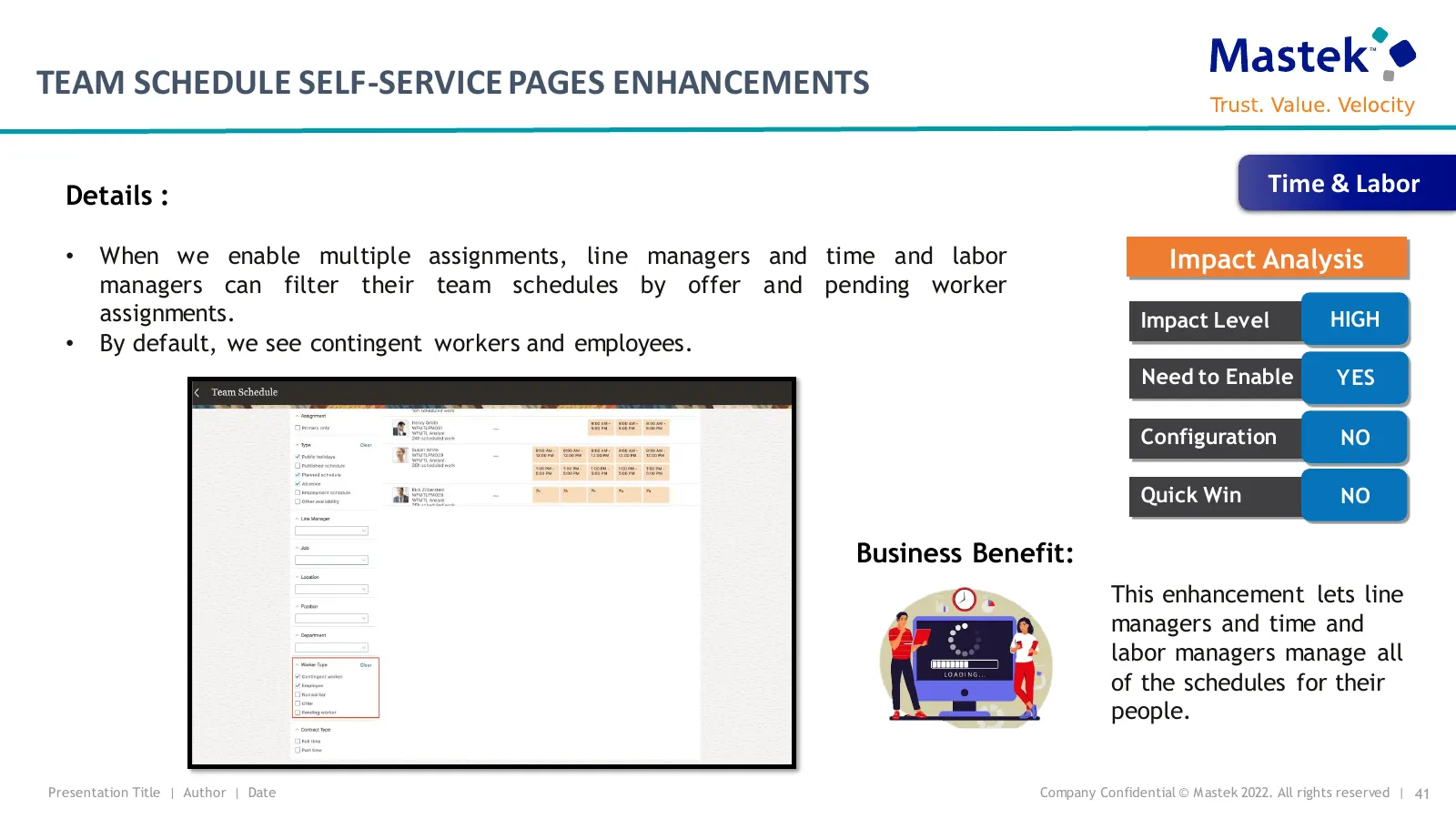
TEAM SCHEDULE SELF-SERVICE PAGES ENHANCEMENTS Details : Time & Labor • When we enable multiple assignments, line managers and time and labor Impact Analysis managers can filter their team schedules by offer and pending worker assignments. Impact Level HIGH • By default, we see contingent workers and
Slide 42: Autocomplete Rules for Final Close Date in the Termination Flow
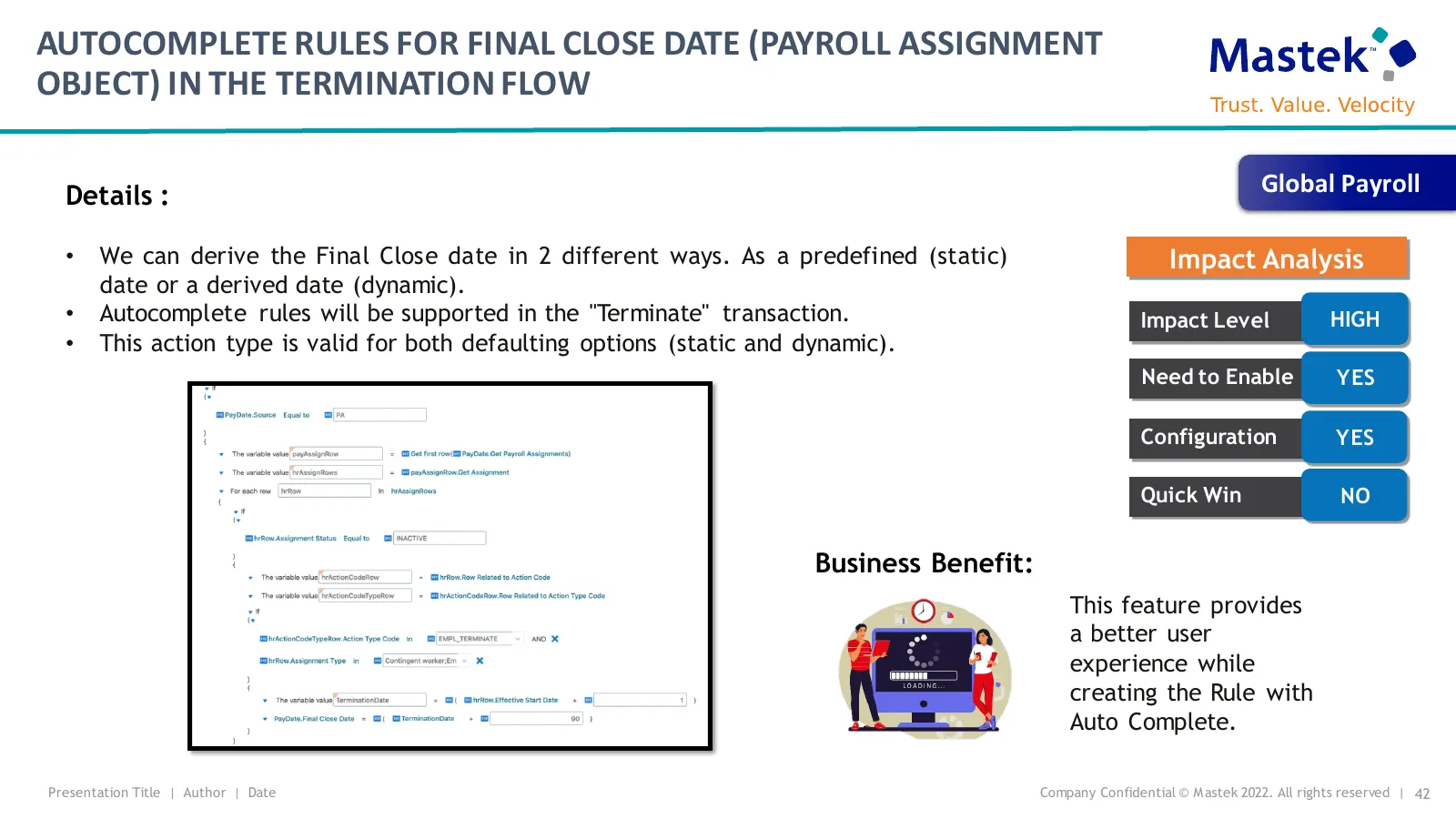
AUTOCOMPLETE RULES FOR FINAL CLOSE DATE (PAYROLL ASSIGNMENT OBJECT) IN THE TERMINATION FLOW Details : Global Payroll • We can derive the Final Close date in 2 different ways. As a predefined (static) Impact Analysis date or a derived date (dynamic). • Autocomplete rules will be supported in the "Ter
Slide 43: Autocomplete Rules for Tax Reference Unit in HR Flows
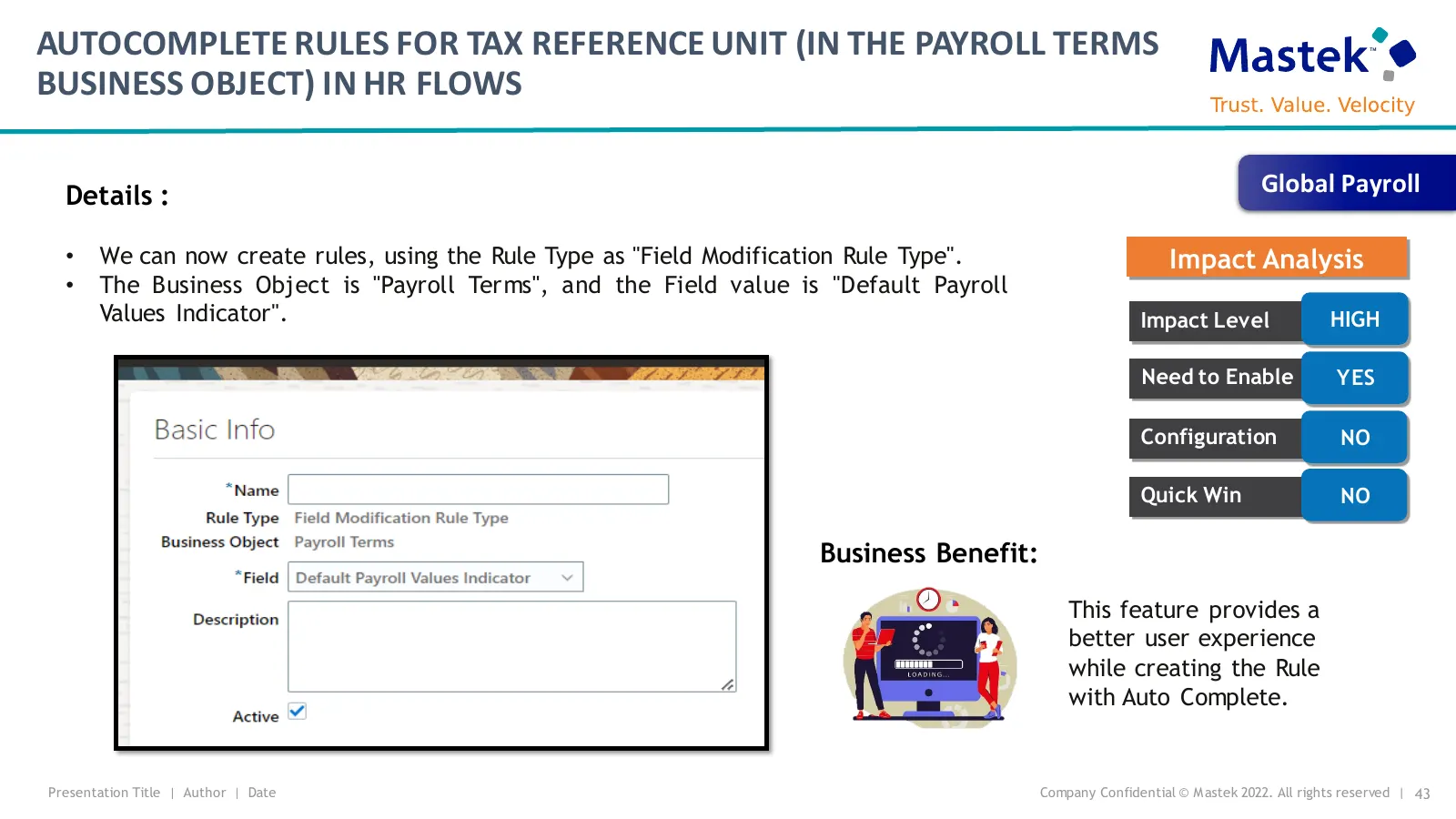
AUTOCOMPLETE RULES FOR TAX REFERENCE UNIT (IN THE PAYROLL TERMS BUSINESS OBJECT) IN HR FLOWS Details : Global Payroll • We can now create rules, using the Rule Type as "Field Modification Rule Type". Impact Analysis • The Business Object is "Payroll Terms", and the Field value is "Default Payroll Va
Slide 44: Copy Future Dated Changes During Global Transfer
COPY FUTURE DATED CHANGES DURING GLOBAL TRANSFER Details : Global Payroll • We can now copy the future-dated changes and preserve end dates on calculation Impact Analysis cards and person costing overrides during a Global Transfer. • There are two types of future changes: Impact Level HIGH - Future
Slide 45: Event Support for HCM Rates
EVENT SUPPORT FOR HCM RATES Details : Global Payroll • With this enhancement, we can use the new event actions solution to control Impact Analysis which employees should have rates calculated. • This feature limits the number of employees that have rates recalculated and Impact Level HIGH thereby im

Slide 46: New Features: OTBI Enhancements
NEW FEATURES OTBI ENHANCEMENTS
Slide 47: New Subject Area - Workforce Management Absence Entitlement Case Real Time
NEW SUBJECT AREA - WORKFORCE MANAGEMENT ABSENCE ENTITLEMENT CASE REAL TIME Details : Absence • The Workforce Management - Absence Entitlement Case Real Time subject area Impact Analysis provides real-time information on a worker's absence case information for UK statutory plans. Impact Level LOW • T

Slide 48: Known Issues
Mastek*@ Trust. Value. Velocity KNOWN ISSUES
Slide 49: Absences OTBI Subject Areas Hide Certain Absences for Multi-Assignment Employees
ABSENCES OTBI SUBJECT AREAS HIDE CERTAIN ABSENCES FOR MULTI-ASSIGNMENT EMPLOYEES Details: Absence • All managers of an employee with multiple-assignments can view all person-level absences on the page and in OTBI reports, unless a person-level absence is entered using the advanced mode. • The advanc
Slide 50: HCM Calendars Can't Display Overlapping Resource Exceptions
HCM CALENDARS CAN’T DISPLAY OVERLAPPING RESOURCE EXCEPTIONS Details: Absence • When you assign multiple, overlapping resource exceptions to an employee at the same level, they will not show correctly on the HCM calendar pages. Workaround: • This issue won't be resolved, because there isn't a functio
Slide 51: Individuals Can View All of Their Responsive Time Cards
INDIVIDUALS CAN VIEW ALL OF THEIR RESPONSIVE TIME CARDS Details: Time & Labor • An individual can always view their time cards on responsive pages regardless of the Days Before and Days After settings in their time entry profile. • The settings of Days Before and Days After do affect what an individ
Slide 52: Task Iterations Status
TASK ITERATIONS STATUS Details: Global Payroll • Use the Task Iterations page to review flow instances of the "Submit Another Task" flow iterations. We are currently experiencing some issues whereby the statuses for task iteration in the new Task Iterations page are not accurate. • For example, afte
Slide 53: Automatic Element Entries Issue When Using Worker HCM Data Loader
AUTOMATIC ELEMENT ENTRIES ISSUE WHEN USING WORKER HCM DATA LOADER Details: Global Payroll • Automatic entries are not always created when an employee is hired using the Worker in HCM Data Loader. • This issue occurs if the worker record is loaded with multiple historic records. What happens is autom
Slide 54: Incorrect Warning Message Appears During Duplicate Bank Account Entry
INCORRECT WARNING MESSAGE APPEARS DURING DUPLICATE BANK ACCOUNT ENTRY Details: Global Payroll • In the payment method page, if a user tries to enter the same bank account for themselves, twice, the application gives the following warning message: A bank account with given details already exists and
Slide 55: Data Loader Tasks Results
DATA LOADER TASKS RESULTS Details: Global Payroll • HCM Data Loader (HDL) related tasks, such as the "Initiate Data Loader" process, are currently not returning all of the HDL process results data on the Process Results Details page. • You will see limited results data when you try to view the HDL p
Slide 56: Submit Related Flow with Errors or Corrections
SUBMIT RELATED FLOW WITH ERRORS OR CORRECTIONS Details: Global Payroll • When a flow status is in error (Critical Errors, Stopped) or with corrections (Full Roll Back, Mark for Retry, Skipped), a user should not be able to Submit a Related Flow. • However, as it stands, this action is available whic
Slide 57: Not Able to Create Events Using CostAllocationDEO
NOT ABLE TO CREATE EVENTS USING COSTALLOCATIONDEO Details: Global Payroll • The CostAllocationDEO is not available to create events to prorate and retrospective process the costing results based on the costing setup changes. • Users won't be able to create events to prorate and retrospective process
Slide 58: Payroll Global Transfer Business Objects Usability in Autocomplete
PAYROLL GLOBAL TRANSFER BUSINESS OBJECTS USABILITY IN AUTOCOMPLETE Details: Global Payroll • Payroll Global Transfer business object displays attributes that should be hidden. Workaround: • We recommend users not to use the business object until the fix to hide the attributes is delivered. Oracle Re
Slide 59: Responsive Professional Payslip Page SmartNav Issues
RESPONSIVE PROFESSIONAL PAYSLIP PAGE SMARTNAV ISSUES Details: Global Payroll • The responsive Smart Nav component does not contain payroll professional tasks, such as, Element Entries or Payment Methods, meaning you cannot easily move to one of these tasks in the context of the same person. Workarou
Slide 60: GL Users Are Unable to Drilldown to Costing Results
GL USERS ARE UNABLE TO DRILLDOWN TO COSTING RESULTS Details: Global Payroll • Users with the General Ledger Reporting Duty role can't access costing results from general ledger entries. In 21D, there was a new feature that users can verify the payroll costing results for a subledger journal entry fr

Slide 61: Replaced or Removed Features
REPLACED OR REMOVED FEATURES
Slide 62: Removal of Expediting Time for Payroll Reprocessing
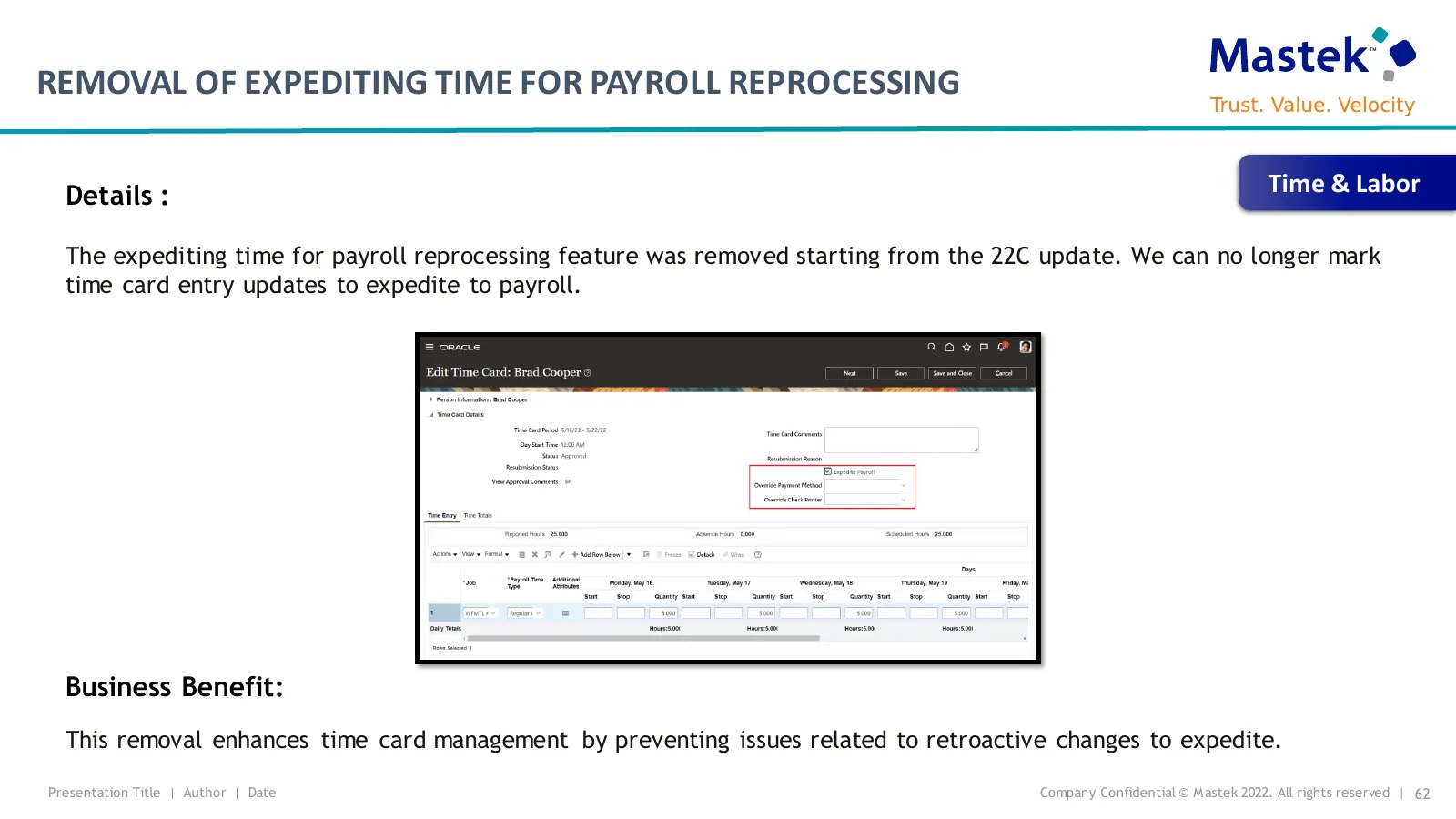
REMOVAL OF EXPEDITING TIME FOR PAYROLL REPROCESSING Details : Time & Labor The expediting time for payroll reprocessing feature was removed starting from the 22C update. We can no longer mark time card entry updates to expedite to payroll. Business Benefit: This removal enhances time card management

Slide 63: Closing Q&A
Closing Q&A Presentation Title | Author | Date Company Confidential © M astek 2022. All rights reserved | 63
Slide 64: Closing Note
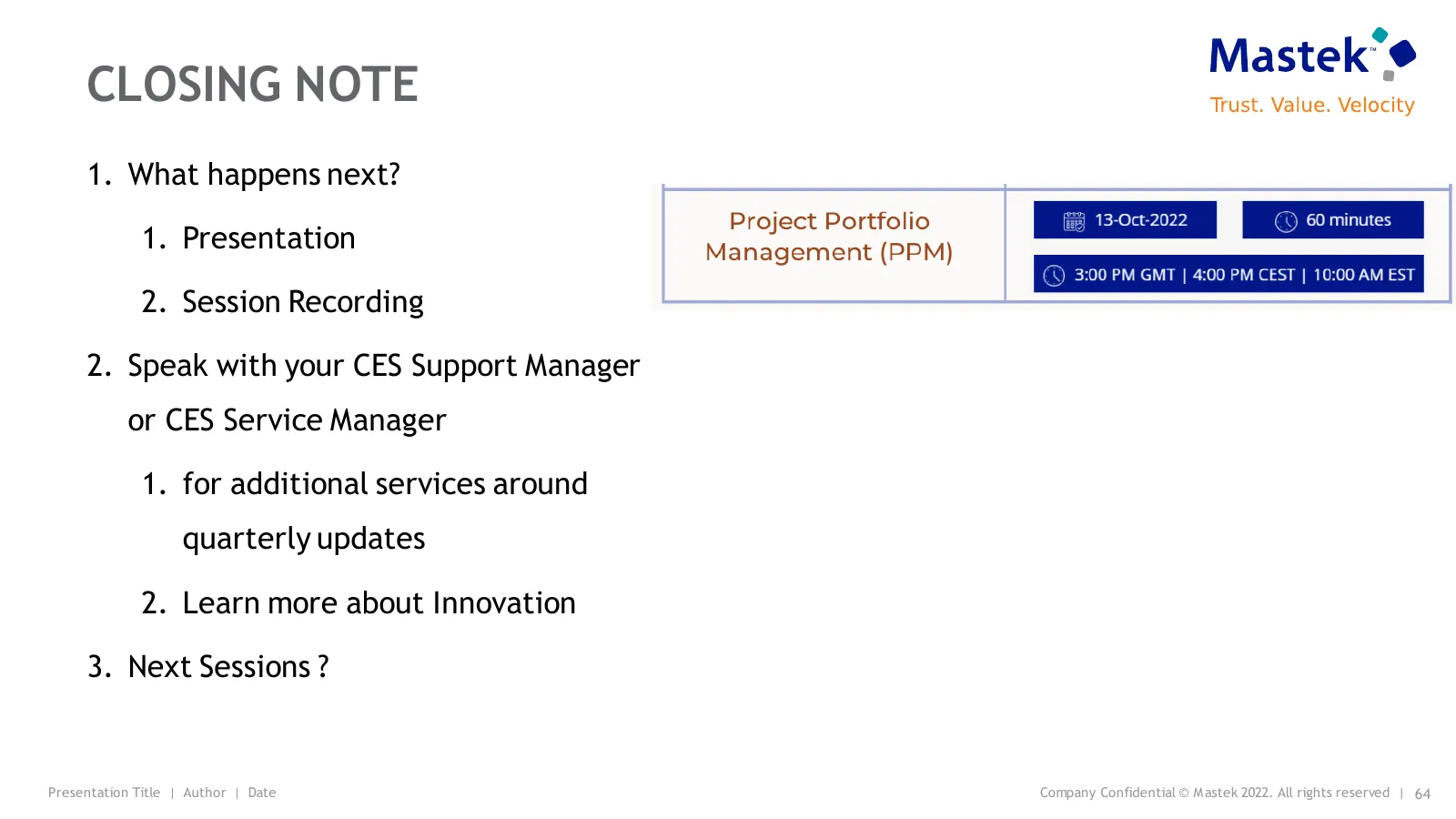
CLOSING NOTE 1. What happens next? 1. Presentation 2. Session Recording 2. Speak with your CES Support Manager or CES Service Manager 1. for additional services around quarterly updates 2. Learn more about Innovation 3. Next Sessions ? Presentation Title | Author | Date Company Confidential © M aste

Slide 65: Thank You
MASTEK is here to help you! THANK YOU This pr esentation contains infor mation that may be pr ivileged or confidential and is the pr oper ty of Mastek. Copyr ight © 2022 Mastek. All r ights r eserved.
Source: Internet Archive copy of mastek.com
More decks from Mastek Limited
 Q2 FY2027 Earnings Presentation18 slides · Oct 23, 2026
 Q2 FY2027 Earnings Presentation25 slides · Oct 23, 2026
 Q1 FY27 Earnings Presentation31 slides · Jul 21, 2026
 Q1 FY2027 Earnings Presentation23 slides · Jul 21, 2026
 Q4 FY26 Earnings Presentation37 slides · Apr 18, 2026
 Q4 FY26 Earnings Presentation28 slides · Apr 17, 2026